Adding Missing HUD Speed Limits via XML
Introduction
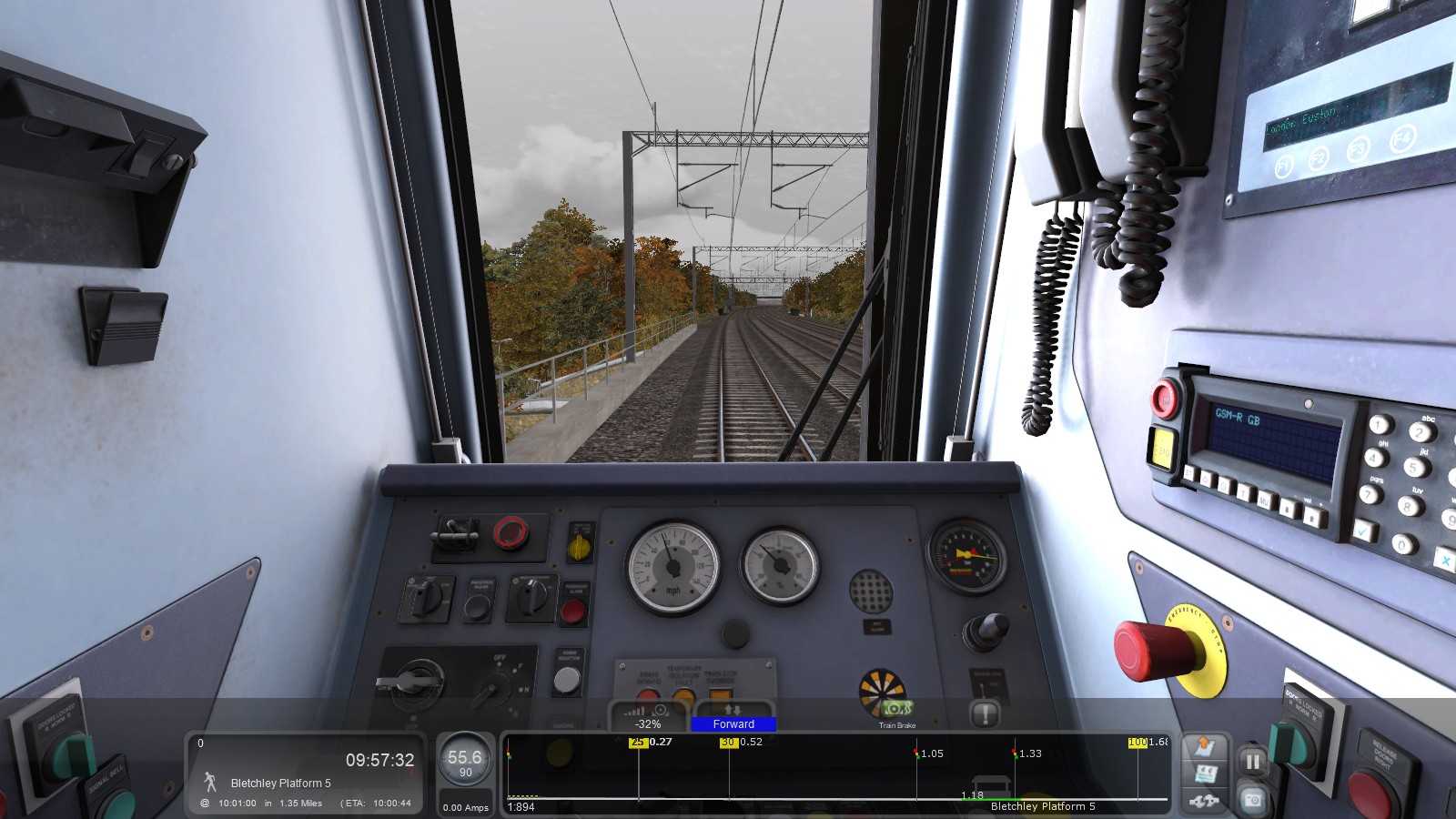
This is obviously deeply frustrating, particularly for newer players that don't have full experience of the track ahead of them. Reading around, I saw many complaints about these apparently-hidden speed limit changes, but no advice on how to fix them (beyond "git gud", obviously!). Fortunately, I was able to solve this problem via a relatively simple fix, detailed in the rest of this Guide.
Finding and Editing the RouteProperties XML File
- Using 7-Zip (or a similar utility), find the RailWorks directory under your overall Steam directory, then find the relevant route sub-directory under RailWorks → Content → Routes. These will all have machine-readable names, and will contain a MainContent.ap (Asset Pack) file for the route, plus any Workshop/third-party scenarios/content which you have installed for that route.
- Open (but don't extract) the .ap file in 7-Zip, and look for the RouteProperties.xml file. You can open this to double-check that you're in the correct route directory.
- Save a copy of this XML file somewhere safe as a backup, then open it in a suitable editor (e.g. Notepad++, Spyder, etc.) and save a third copy under a new name to disable its edit protection. This will become our “fixed” file.
- In the fixed file, look for the HasSpeedsigns variable towards the end of the file. If this variable is 1, set it to 0, as shown in the screenshot below. Save the change.
- Go back to the route directory and save a copy of the fixed .xml file alongside the .ap file. This new file version will then override the version contained in the .ap file, without having to manually replace it and repack the .ap file. This edit will also be stable if the .ap files are reset when verified through Steam.

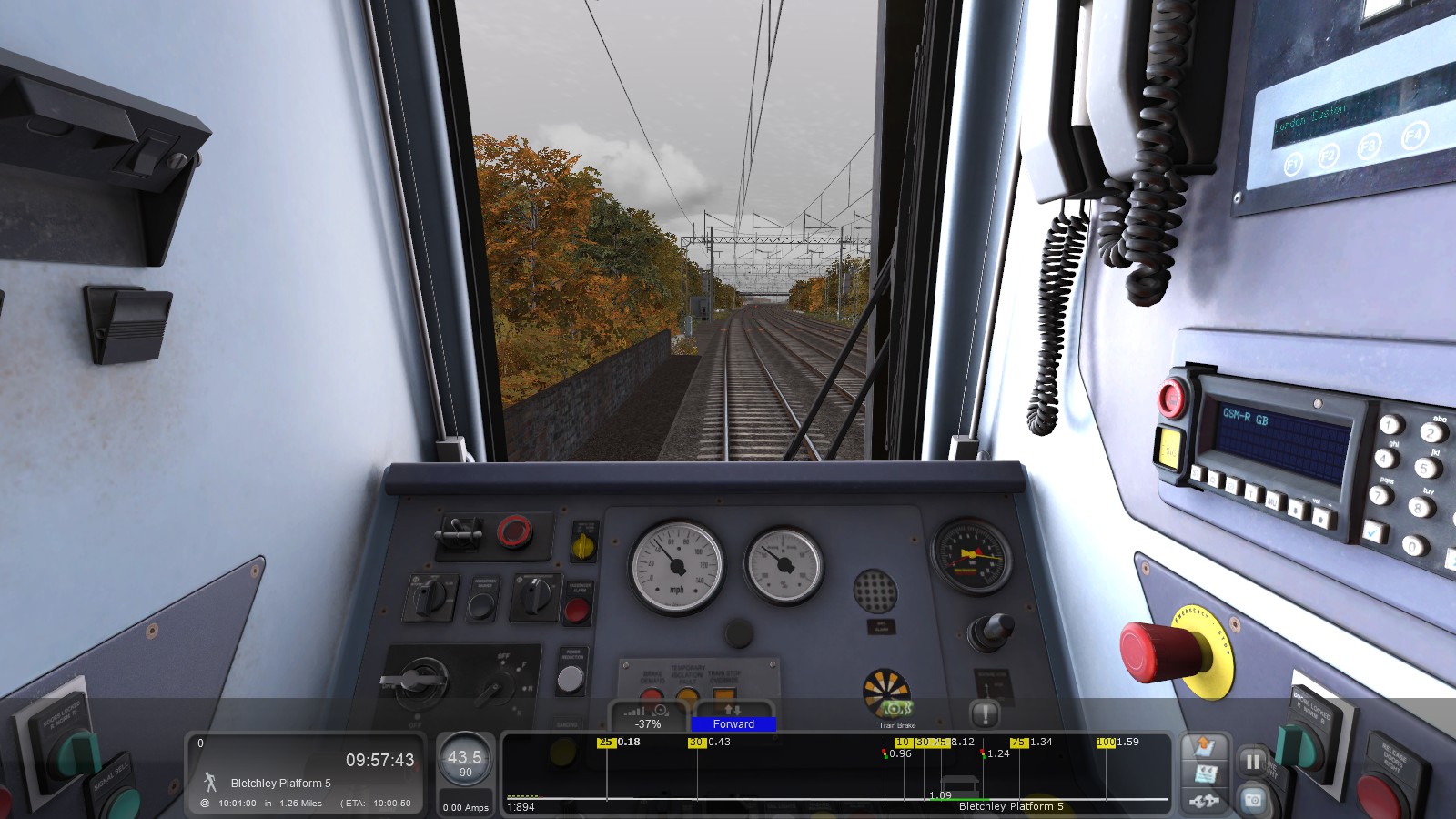
The screenshot above shows the same scenario being played with this fix in place. As you can see, both the 10mph limit for the engineering works and the 75mph limit past Bletchley station are now properly displayed.
Conclusion & Acknowledgements
This is only one possible fix for the issue outlined at the start of this guide. Because everyone's system and TS installation is different, I cannot guarantee this fix will work for you, nor can I provide personal tech support. But if you encounter phantom speed limits as I did, it's worth checking in on the RouteProperties file if you haven't already.
I am grateful to jalsina for originally posting the XML-based solution in this thread, and to æterna for detailing how to override .ap contents with new file versions, as described in this guide.
Thank you for reading this guide - now get out there and highball it!
-- SternguardJake
- Driving and Firing Steam Engines★ 5 (1.1k)33k views1.1k ♥14 minUpdated Jan 3, 2013
- [ENG] TS2015 - Controls Overview★ 5 (641)26k views837 ♥3 minUpdated Mar 10, 2015
- Route maps★ 5 (408)22k views575 ♥28 minUpdated Mar 21
- Fixing the Out of Memory Error★ 5 (206)13k views302 ♥12 minUpdated Jun 15
- Horn and Bell Use★ 5 (352)11k views345 ♥11 minUpdated Dec 26, 2025
- The Simple guide to - Scenario Creation★ 5 (278)10k views541 ♥15 minUpdated Nov 25, 2015



- Upgrading to PremiumTeam Fortress 2★ 5 (20k)1441k views11k ♥6 minUpdated May 11, 2022
- No More Room in Hell Official ManualNo More Room in Hell★ 5 (2.8k)569k views2.1k ♥29 minUpdated Apr 22, 2019
- NMRiH Community Hosting GuidesNo More Room in Hell★ 5 (526)351k views653 ♥1 minUpdated Aug 10, 2022
- ULTIMATE GUIDE FOR GAME DEV TYCOONGame Dev Tycoon★ 5 (5.8k)326k views10k ♥4 minUpdated 23 Jan, 2014
- How to 'Git Gud' Soon™MORDHAU★ 5 (2k)318k views3k ♥68 minUpdated Nov 16, 2024
- Лучшие кооперативные игры SteamPAYDAY 2★ 5 (1.5k)315k views2.1k ♥56 minRussianUpdated Apr 27, 2025






This guide was created by its original author on the Steam Community. Are you the author and want it removed? Request removal.