DIY GUI
Defining a GUIScript
key can be compared to any "InputKey" value, down corresponds to whether the key is pressed or released.
Creating and Destroying a GUI
GetGUIManager():CreateGUIScriptSingle("GUIDIY")
GetGUIManager():DestroyGUIScriptSingle("GUIDIY")
Create an instance of your GUI. Create and destroy as many as you want!
local script = GetGUIManager():CreateGUIScript("GUIDIY")
GetGUIManager():DestroyGUIScript(script)
text = GUIManager:CreateTextItem()
GUI.DestroyItem(item)
All GUI items must be destroyed using DestroyItem or they will "leak". If you lose your reference to the GUI item before destroying it you will end up with phantom GUI items on the screen. These can only be removed by rejoining a server. DestroyItem will also destroy any children of the item you're destroying.
Position, Size, and Scale
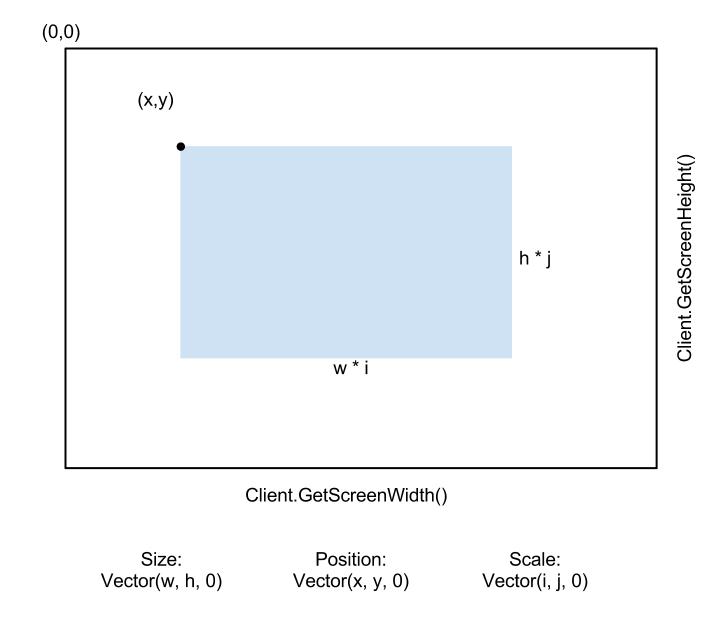
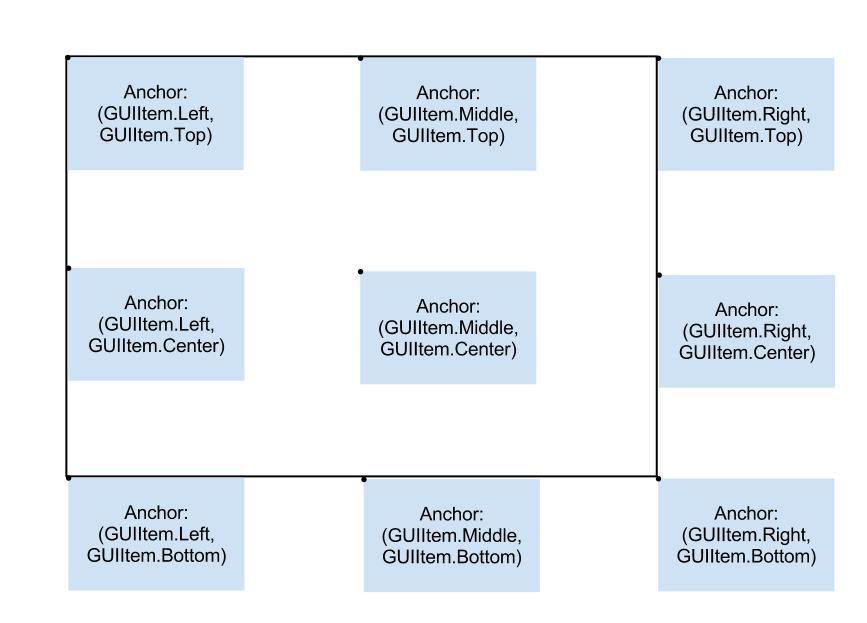
Anchor
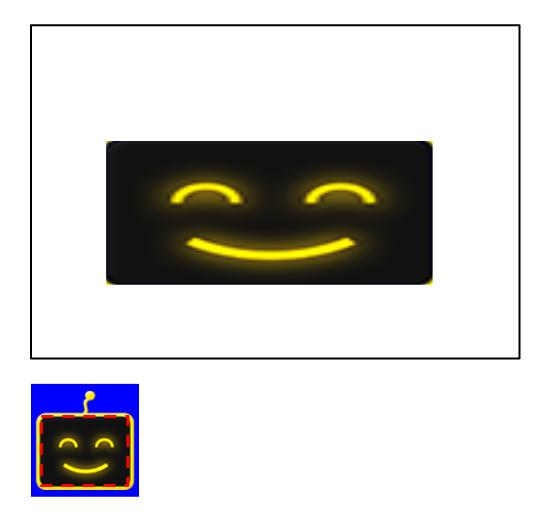
Color and Texture
Use "unpack({x,w,w,h})" to pass in a single table, or pass in each parameter seperately.
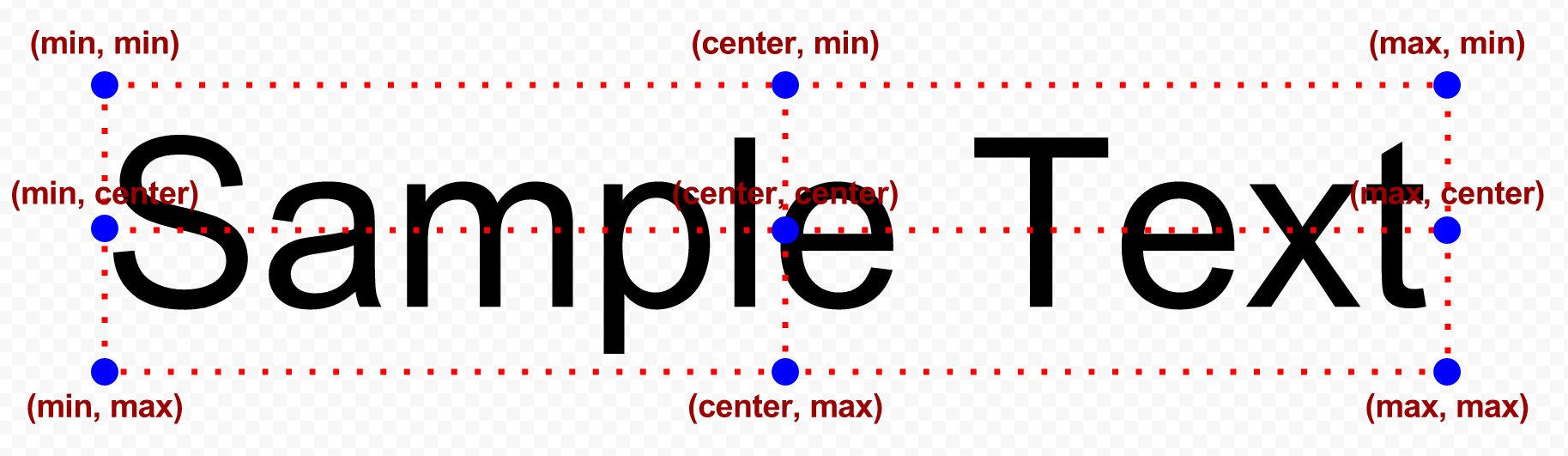
Text
Text works similar to other GUI elements, but there are some differences
Lines
Lines can only be 1 px thick right now.
Most of the regular GUI functions will work: Anchor, Position, Color, Visible, Layer, Parent, etc
Line Specific functions:
lineItem = GUIManager:CreateLinesItem()
Create a new Lines Graphic Item
AddLine(VectorPosition1, VectorPosition2, Color)
Draws a line from position1 to position2 with color
ClearLines()
Clears all the lines from a Lines Item
Other Commands
AddChild(GUIItem)
Adds a child to the gui item. A child will use its parent's position as its origin instead of (0,0). Children/Parents are covered elsewhere in the guide
SetRotation(radian float)
Set rotation, //TODO I think this rotates around the top left corner.
SetLayer(int)
Sets the layer of the item. 0 is the lowest layer. Check GUIManager.lua to see some layer constants.
SetIsVisible(boolean)
Sets the item and all children invisible
GetScreenPosition(Client.GetScreenWidth(), Client.GetScreenHeight())
Gets the absolute screen position of the item. If the item is a child, GetPosition() will return its relative position, not its absolute position.
SetInheritsParentAlpha(true)
Item will inherit its parent's alpha.
Examples
Drawing Overhead camer projection lines from GUIMinimap.lua
- The Ultimate NS2 Basics Tutorial: From Noob to Vet (Updated!)★ 5 (676)31k views784 ♥1 minUpdated Aug 28, 2013
- Natural Selection 2: Beginner Tips★ 4 (157)14k views117 ♥12 minUpdated Nov 30, 2014
- Большая энциклопедия по Natural Selection 2. Том 1: Боевая часть★ 5 (646)10k views385 ♥57 minRussianUpdated Jun 11, 2019
- Commander's Bible [UPDATED 6/5/2016]★ 4 (112)5.8k views110 ♥35 minUpdated Jun 5, 2016
- HOW TO DANCE★ 2 (79)2.6k views9 ♥1 minDanishUpdated Dec 23, 2015
- Spectator Controls★ 4 (48)1.8k views30 ♥1 minUpdated Feb 27, 2013



- Upgrading to PremiumTeam Fortress 2★ 5 (20k)1441k views11k ♥6 minUpdated May 11, 2022
- No More Room in Hell Official ManualNo More Room in Hell★ 5 (2.8k)569k views2.1k ♥29 minUpdated Apr 22, 2019
- NMRiH Community Hosting GuidesNo More Room in Hell★ 5 (526)351k views653 ♥1 minUpdated Aug 10, 2022
- ULTIMATE GUIDE FOR GAME DEV TYCOONGame Dev Tycoon★ 5 (5.8k)326k views10k ♥4 minUpdated 23 Jan, 2014
- How to 'Git Gud' Soon™MORDHAU★ 5 (2k)318k views3k ♥68 minUpdated Nov 16, 2024
- Лучшие кооперативные игры SteamPAYDAY 2★ 5 (1.5k)315k views2.1k ♥56 minRussianUpdated Apr 27, 2025






This guide was created by its original author on the Steam Community. Are you the author and want it removed? Request removal.