Dragon Age: Origins - Griffon Essential Mods
Introduction
Dragon Age: Origins - Griffon Essential Mods is a guide built from my personal mod list which I've carefully selected and used for all playthrough. This guide will provide you an improved vanilla experience, suitable for both newcomers and returning players alike. It should be the same amazing game but with gameplay oversight and visual design disparity getting patched up.
The goal of this guide:
- Quick and easy to setup: Stable mods with easy to follow install instruction that shouldn't make you spend more time on modding the game than playing it.
- Pure essential and lore-friendly: The mods I picked were carefully selected and tested, I make sure the following standard must be met: Changes should remain consistent with original gameplay design and visual style, no wild drastic changes so mods shouldn't feel out of place.
I will also provide information on why I consider the mods essential, of course you don't have to read all of my rambling and can skip straight to the download steps!
Mod Installation Method
Mods for DAO can be installed simply by drag and drop the files, while some are installed by using a mod installer provided by the game itself. This guide is made with manual installation method in mind due to the unusual file structure of this game. I encourage users to use this method as I've found it to be ideal for maintaining a stable mod setup.
Manual Installation Method:
1. Drag and Drop:
Most mods are installed by dragging their files to the following path:
Document\Bioware\Dragon Age\Package\Core\Override
Note: Do not use this method for mods that contain files contains dazip format.
2. DAZIP Files:
For mods that contain the dazip files, these mods are not meant to be installed by Drag and Drop method, but by using the DAUpdater.exe that can be found in bin_ship folder of your DAO folder. Run DAUpdater.exe and simply select the dazip you downloaded and press install.
On using mod manager:
While there are mod managers available for DAO, I don't think they handle mod compatibility particularly well due to its unusual file structure unlike most games. If you choose to use this method, I can't guarantee that these mods will work as intended nor will I be able to troubleshoot any issues you may encounter.
Mandatory Utilities
Due to being an old game and borderline unplayable on modern setups, these utilities are mandatory to make the game playable and moddable.
https://github.com/doitsujin/dxvk/releases/download/v2.7/dxvk-2.7.tar.gz
https://steamcommunity.com/sharedfiles/filedetails/?id=233222451
I. Bug Fixes
Why it is essential:
- Even if you want a pure vanilla experience without mods, these mods are a must-have. There are still many bugs and various oversights left by Bioware, even with the latest patch. Some of these mods also restored contents that weren't cut contents but couldn't be triggered in-game due to oversight.
- You might happen to find various bug fix mods on DAO Nexus, but I already covered the must-have ones in this section. I intentionally left out some well known "bug fixes" mods due to them having more subjective changes than actual fixes, Dain's Fixes is a big example but you can still install it if you wish as it has some QoL changes that you might prefer.
DOWNLOAD[www.nexusmods.com]
How to install:
- Use DAUpdater.exe (can be found in bin_ship folder of DAO's folder), select the dazip file then install.
- Download Hotfix V3_52 in Update Files, drag the folder to Document\Bioware\Dragon Age\Package\Core\Override (this will be the folder where you drag most mods into)
DOWNLOAD[www.nexusmods.com]
How to install:
- Drag the folder to Override folder.
- Delete IA Area compatibility folder because we are not using Improved Atmosphere mod.
DOWNLOAD[www.nexusmods.com]
How to install:
- Drag the erf file to Document\Bioware\Dragon Age\Package\Core\Override
DOWNLOAD[www.nexusmods.com]
How to install:
- Drag the folder to Override folder.
How to install:
- Extract proportions_dwarf.zip and drag its folder to Override folder.
II. Grey Warden Design Update
While the official version of Grey Warden armor didn't appear until DA2, you can actually see its first appearance in the CGI promotion for DAO and everyone would agree it should have been included in the game. It is ironic and unjust that you don't get to wear the actual Grey Warden armor in a Dragon Age game where you are one of the last Grey Wardens in Ferelden. These mod brought the unique Grey Warden sets to DAO which looks, works and fits beautifully in DAO.
DOWNLOAD[www.nexusmods.com]
How to install:
- Download the REQUIRED file, install using DAUpdater.exe.
- Download the Main File, drag the Grey Wardens of Ferelden folder into Override folder.
DOWNLOAD[www.nexusmods.com]
How to install:
- Drag the zz_tsm_GWoF_rebalanced folder to Override folder.
- Download medium_helmet_conflict_fix file in Optional Files and drag the file within to overwrite the same files in zz_tsm_GWoF_rebalanced folder. This patch is necessary for another mod we will install later.
 This is for people who prefer Duncan's unique armor design in DAO, which I'm very much prefer over the change made by Grey Wardens of Ferelden. This retexture will make Duncan's unique armor having similar characteristic to DA2 Grey Warden design. In order to use this mod along with Grey Wardens of Ferelden, you just need to follow the instruction below.
DOWNLOAD[www.nexusmods.com]
How to install:
- Go to Grey Wardens of Ferelden folder in Override folder, delete the following .utc files:
bdc140cr_duncan.utc
bdn120cr_duncan.utc
bec100cr_duncan.utc
bed100cr_duncan.utc
bhm300cr_duncan.utc
bhn100cr_duncan.utc
cir350cr_duncan.utc
pre100cr_duncan.utc - Drag the files from this mod to Override folder.
III. Chantry & Tranquil Design Update
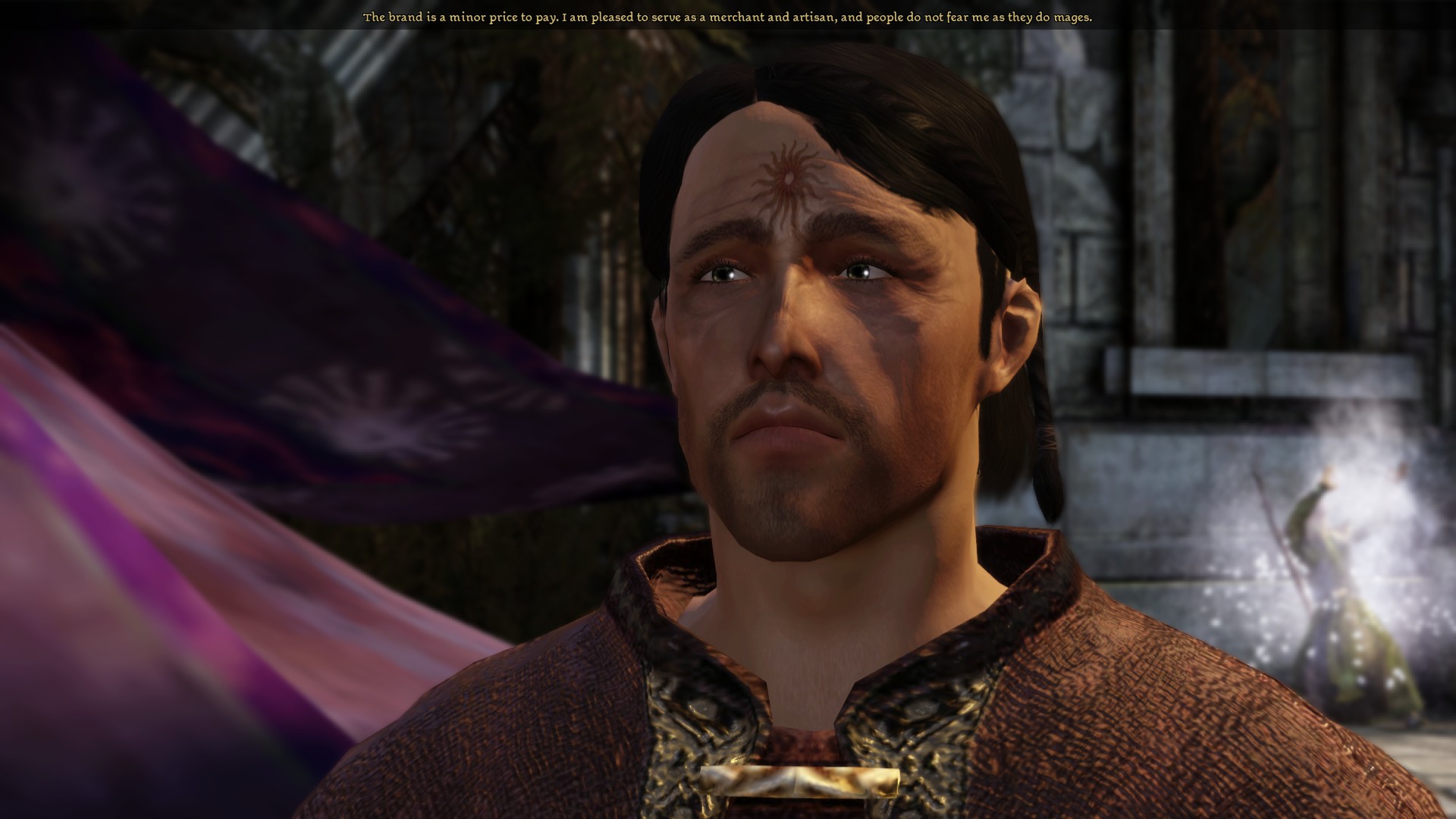 Why it is essential:
Tranquil are mages who went through a process that earned the brand on their forehead, which for some reason can be seen on these mages in later DA games but not in DAO. It's definitely an oversight that it is missing since you can even hear it being mentioned in the dialogue.This mod is essential because it's close to a bug fix itself.
DOWNLOAD[www.nexusmods.com]
How to install:
- Download Tranquil Tattoos and Head Morphs - Shaved - DAO-Style Elves file because this version doesn't make unnecessary changes to NPCs.
- Drag the files to Override folder.
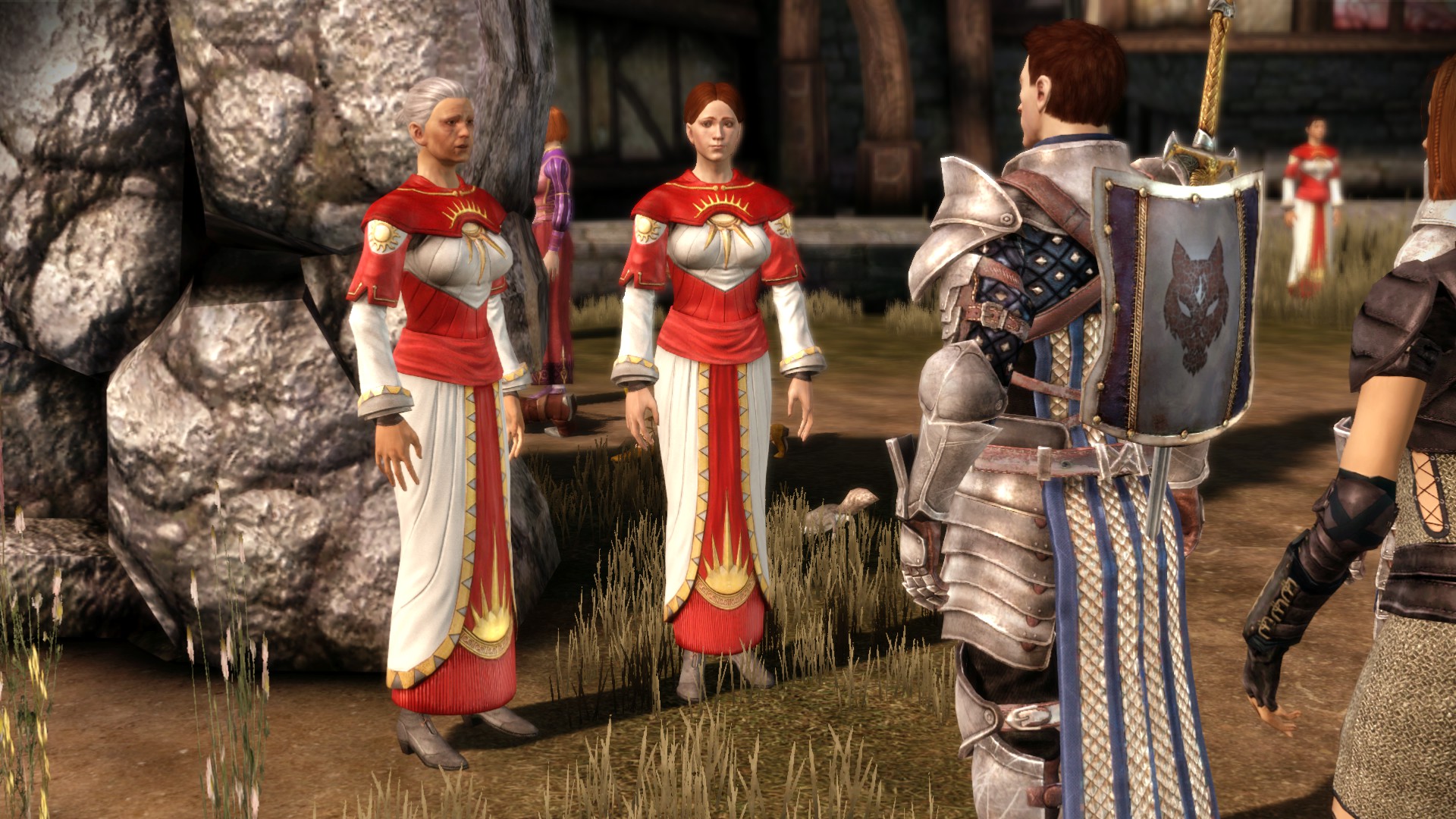 Why it is essential:
The priestly robes of the Dragon Age series have gone through WAY too many design changes. This mod makes the robes match the design used in Inquisition. I consider this essential because it's really a bother that these priests change their uniforms within such a short time span between each game as if they were running a fashion show rather than a religious organization.
DOWNLOAD[www.nexusmods.com]
How to install:
- Drag the folder to Override folder
IV. Elf Design Update
 Why it is essential:
The elven race of Dragon Age only received their unique visual design in the sequels. Initially, I thought they looked fine enough in DAO, but once an internet stranger told me "elves in DAO are just beautiful humans with pointy ears," I can't help but notice that major visual disparity and consider these mods essential to avoid the culture shock when moving on to the sequels.
How to install:
There are several zip files in this folder, but the only files we need are elf_update.zip and proportions-elf_da2.zip.
- Extract elf_update.zip, ONLY drag da2_elf-eye and da2_elf-head folder into Override folder.
- Extract proportions-elf_da2.zip and drag everything to Override folder.
DOWNLOAD[www.nexusmods.com]
How to install:
- Download the main file. Drag DA2 Elves Triple Mix folder into Override. Remove the Elves of Ferelden UTC folder.
- Download all 3 files in Update Files section.
- To install Fixed DLC Morphs, drag the 5 folders inside Fixed DLC Morphs into Morph files folder of DA2 Elves Triple Mix in Override folder. Overwrite.
- To install Fixed UTC Files, drag 2 files coa100cr_apostate_3.utc and ran290cr_melora.utc to Required UTC folder inside DA2 Elves Triple Mix in Override folder.
- To install Merrill - Vallaslin fix, drag uh_tat_pmta_0t.dds to For Merrill - REQUIRED folder inside Tattoo textures which belongs to DA2 Elves Triple Mix in Override folder.
V. Qunari Design Update
Similar to the elves, the Qunari race also only received its unique design in later games. The reason DAO's Qunari don't resemble their later appearances is that they were originally conceived as "black Conan the Barbarian with white hair," rather than horned people (and don't let BioWare tell you otherwise!). BioWare later retconned this by saying that Sten, unlike other Qunari, doesn't have horns which is a cute explanation. However, it still doesn't change the fact that other Qunari NPCs you encounter in DAO don't have horns, and horns aren't mentioned even once in the codex! Again, this is yet another major visual disparity that is best addressed with a mod, rather than leaving players with culture shock when moving on to the sequels.
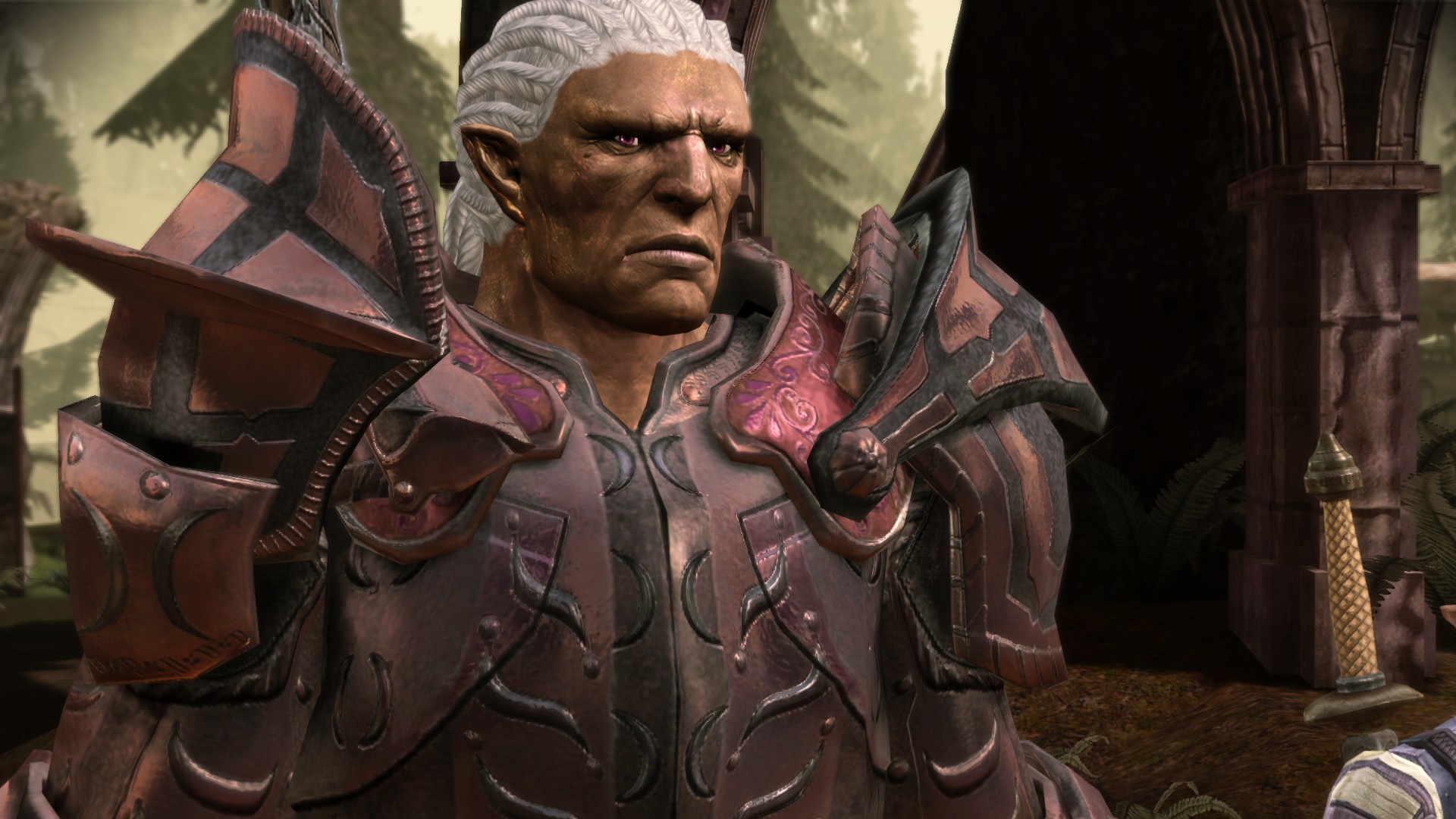
How to install:
- Install using DAUpdater.exe
DOWNLOAD[www.nexusmods.com]
How to install:
- Drag the folder to Override folder.
VI. Creatures Design Update
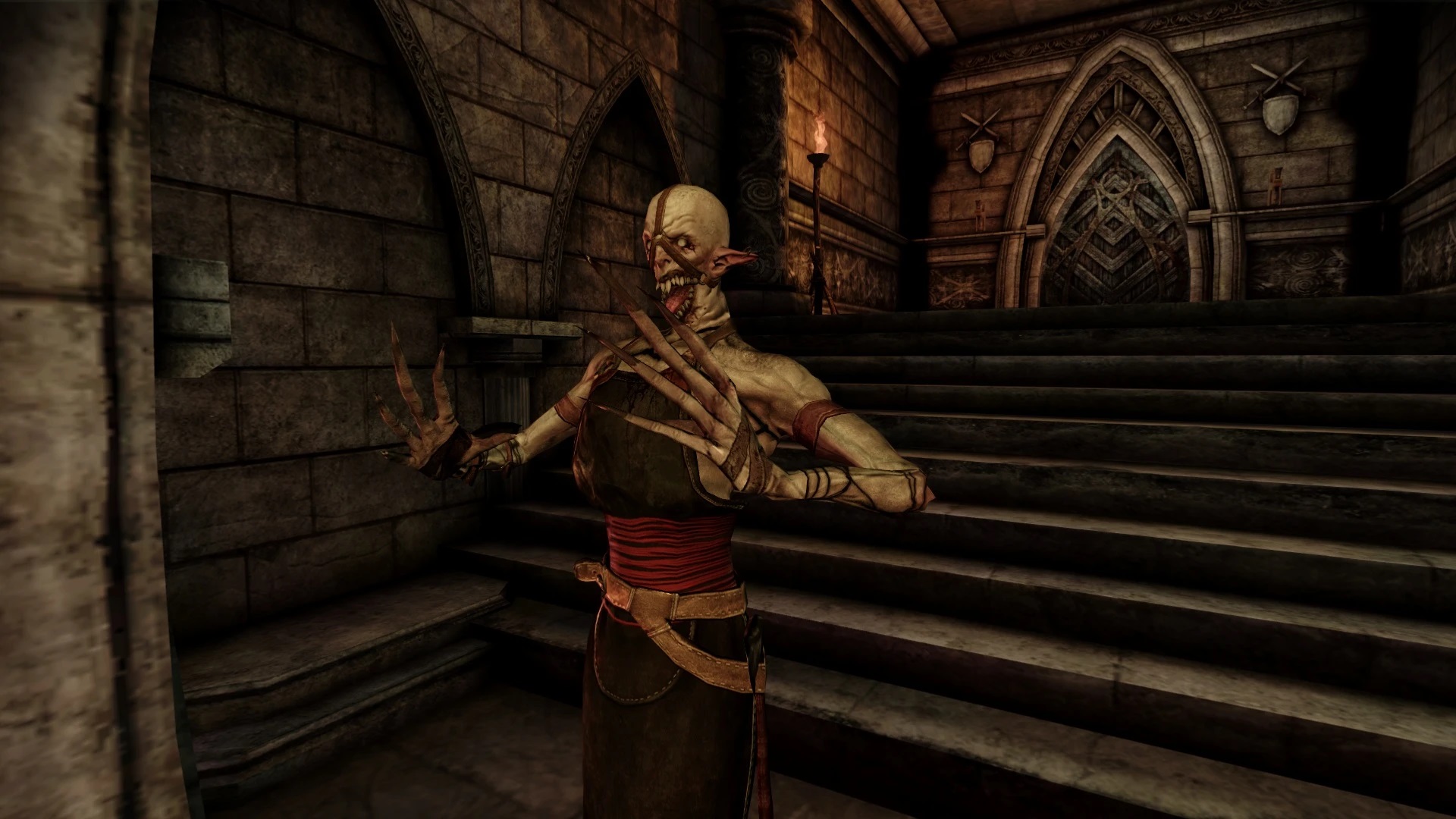 Why it is essential:
Darkspawn received the most drastic design change in later games, but most noticeably are the Emissaries who are now a certain creepy levitating tainted elf creature. This mod filled the biggest gap of both visual and lore disparity about the Emissary and that alone makes this mod very essential to me.
DOWNLOAD[www.nexusmods.com]
How to install:
- Install using DAUpdater.exe
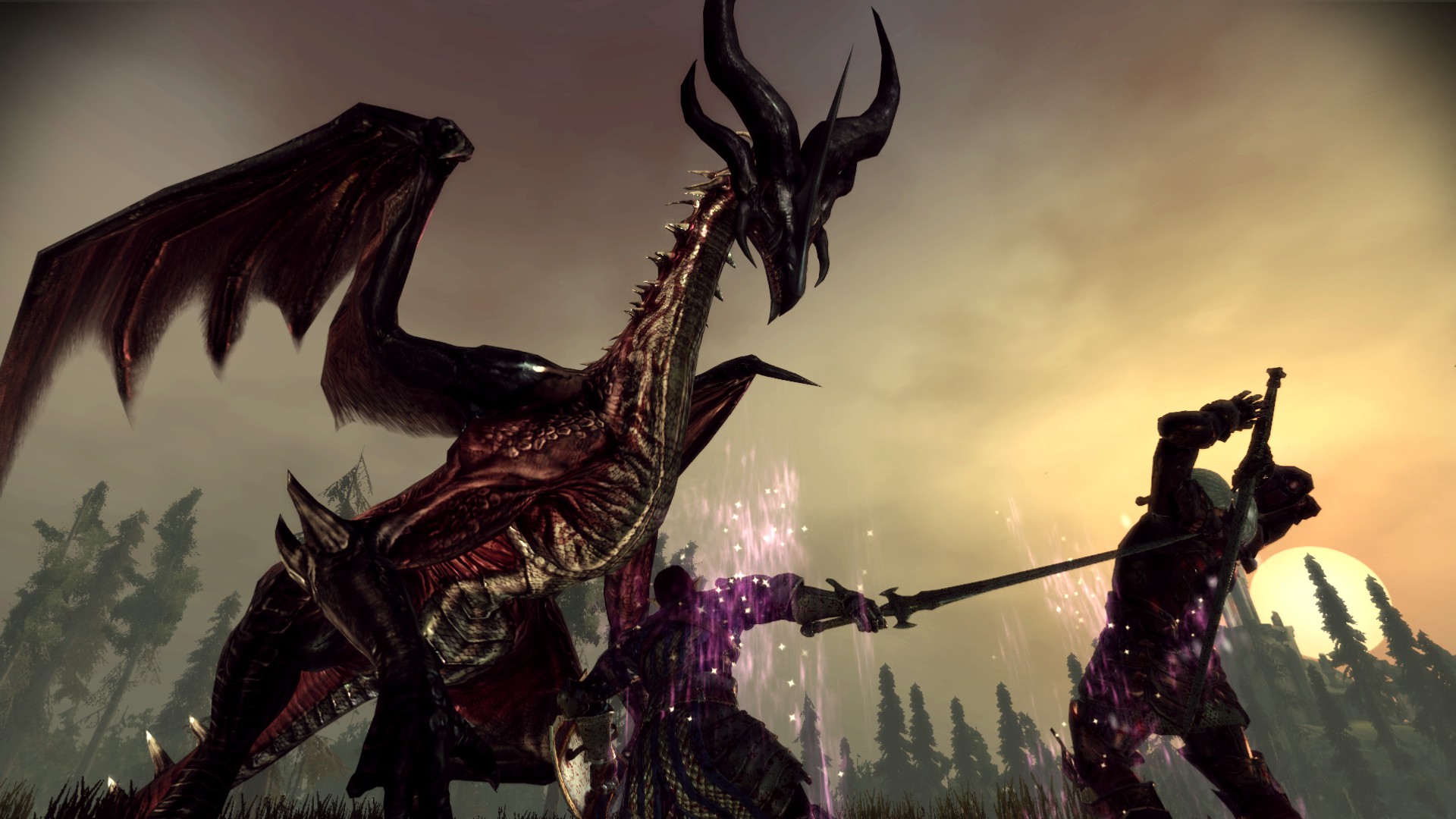 Why it is essential:
Avoid reading this if you don't want to get a spoiler, but Flemmeth is inarguably one of the most important characters throughout the franchise, it simply doesn't do her justice that her dragon appearance in Origins looks like another generic dragon.
DOWNLOAD[www.nexusmods.com]
How to install:
- Drag the folder to Override folder
VII. The Not-So-Essential
If you've followed and installed the above mods, you are basically good to go with the essential setup. You won't be missing much without these following mods, but you might find them a welcome addition regardless.
DOWNLOAD[www.nexusmods.com]
How to install:
- Install using DAUpdater.exe
DOWNLOAD[www.nexusmods.com]
How to install:
- Install using DAUpdater.exe
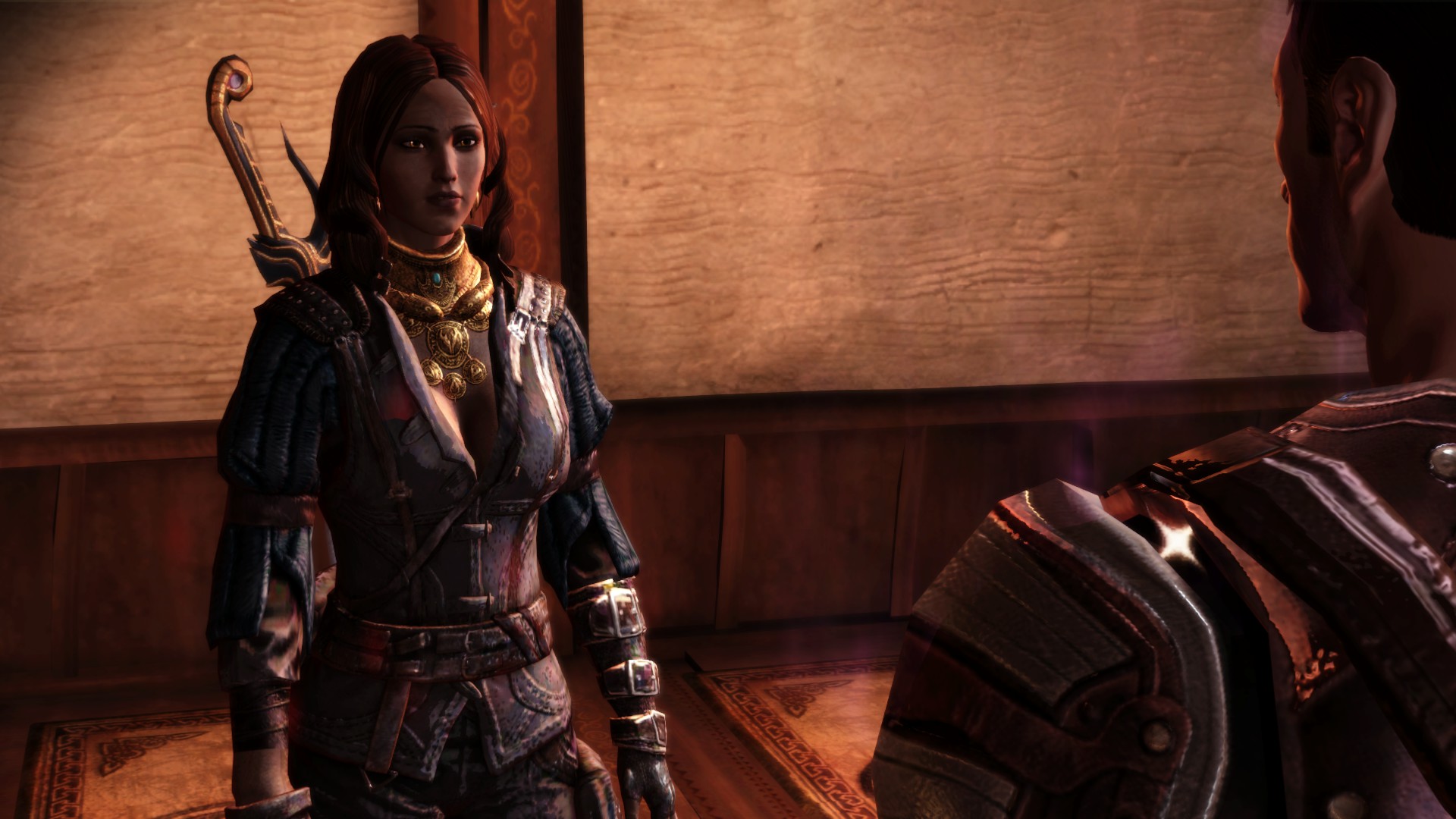 This mod will give Isabela (an important character throughout the series) updated face and clothes that are more similar to her DA2 counterpart. I prefer this mod over other straightforward DA2 Isabela ports because the author has the right idea of how Isabela should look "years earlier" in DAO.
How to install:
- Install using DAUpdater.exe
- Download tmp7704 Isabela variation fixpack[www.nexusmods.com] and drag its folders to Override folder. This pack fixes several issues of the original mod.
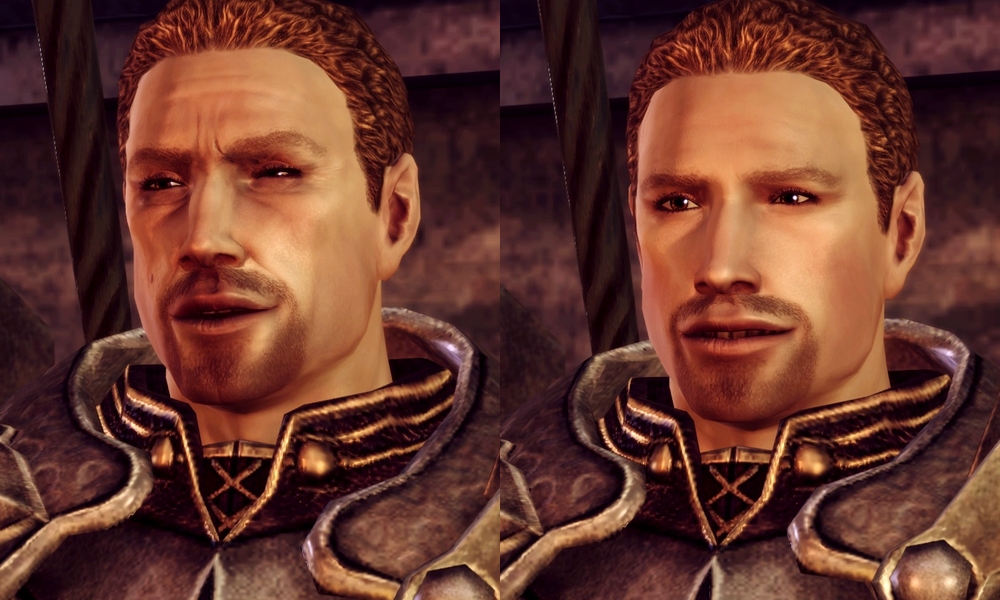 This mod will make Cullen (also an important character throughout the series) younger by getting rid of his wrinkles while retaining his vanilla look. The reason for this is because Cullen looks youthful in later game so it doesn't make sense that he looks oldest in DAO.
DOWNLOAD[www.nexusmods.com]
How to install:
- Download version B (if you prefer him to look even younger use A, but only download one version) then drop the file to Override folder.
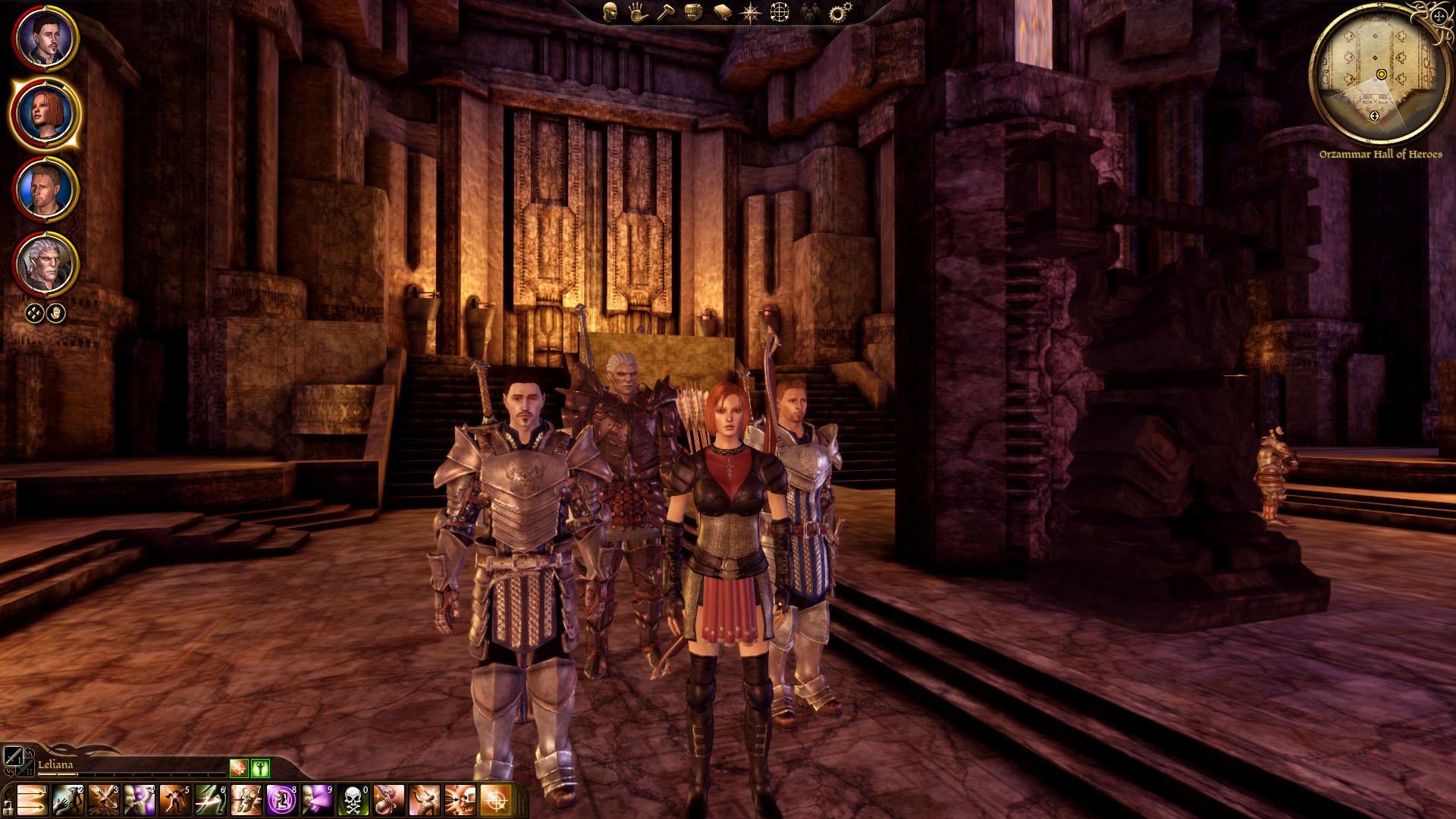 A very nice looking armor based on Leliana design in concept art and CGI trailers. I prefer this version over other Sacred Ashes Leliana armor mod because this one is well balanced and the armor looks great with vanilla visual. If you want Leliana to have her own unique looking armor then this mod is definitely it.
DOWNLOAD[www.nexusmods.com]
How to install:
- Install using DAUpdater.exe
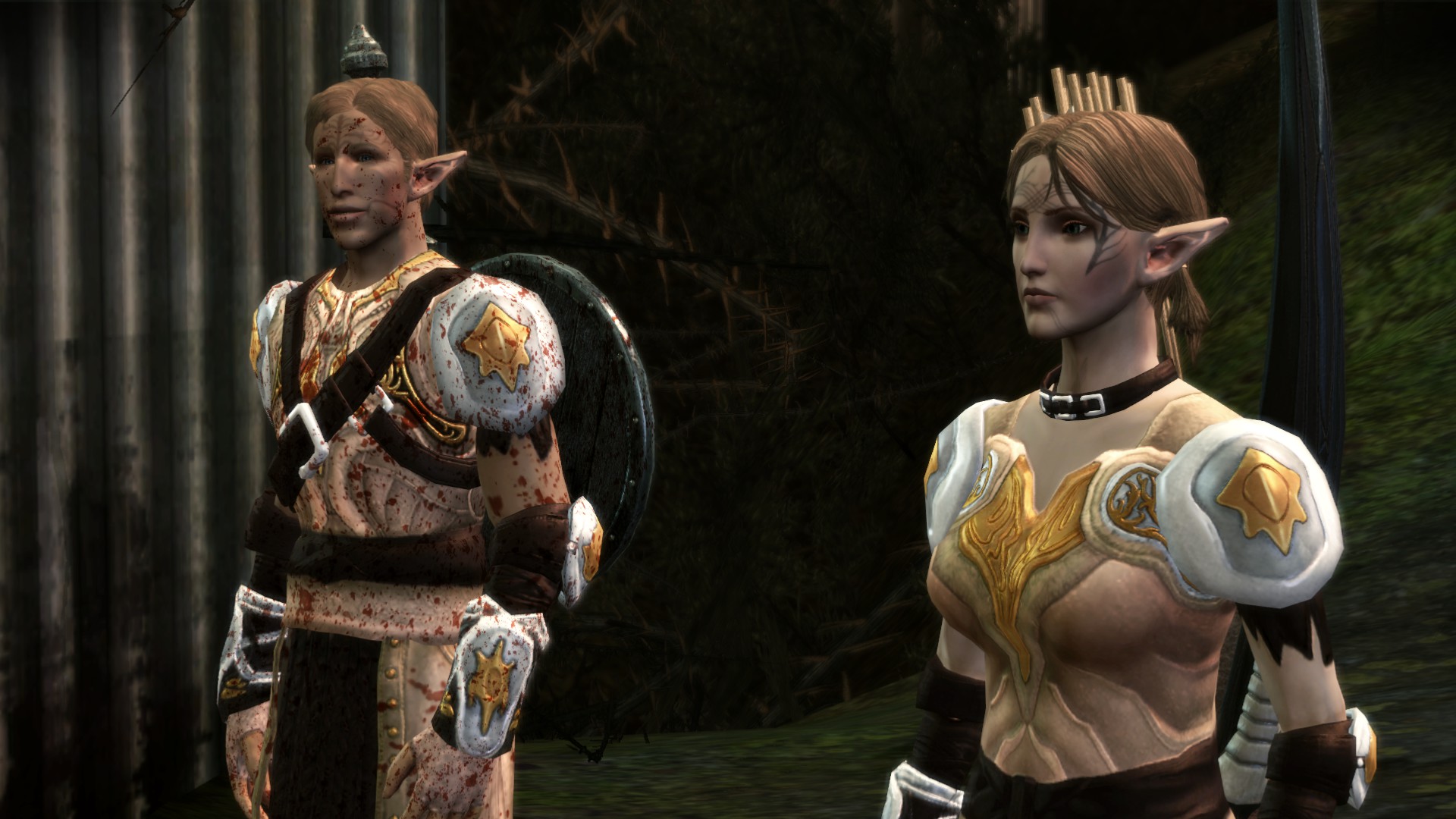 This is a retexture for all the light armors in this game so their appearance is more akin to the armor design in later games. The main reason I included this one because it has an excellent retexture for the Dalish armor which is a very lore friendly improvement over the weird vanilla bikini Dalish armor. I recommend to download the Dalish armor retexture only since the rest are just mix and match design which aren't necessary an improvement over the original. However, if you prefer all these design over vanilla, you can go for all in one version.
DOWNLOAD[www.nexusmods.com]
How to install:
- For the dalish armor only, grab Dalish a la carte file in Optional Files. Drag the folder to Override folder to install.
Conclude
With these mods installed, I can guarantee that you will have an enhanced and amazing experience with Dragon Age: Origins and its beautiful world. This guide will be updated if there are any oversights on my part or if there are mods to add or remove, I'll keep you posted in the changelog.
If you have trouble using the guide or want to provide feedback, leave a comment!
Thank you for using the guide and I wish you an amazing experience with Dragon Age: Origins
Thanks Bioware for creating one of the most amazing and unforgettable RPG of all time
Also, a special thanks to all the fine modders of DAO scene who have maintained the game with love and passion
Also, check out my similar guide for KotOR II - The Sith Lords:
https://steamcommunity.com/sharedfiles/filedetails/?id=2606429096
FAQ
1. There are famously recommended mods like Improved Atmosphere, Dragon Age Redesigned, etc. Why they are not included?
- Some of those mods have too many drastic changes that I feel just make the game different rather than improved. DAO vanilla on its own is already a robust experience, so I don't see the need to change things drastically if they are already fine as they are, thus staying true to the essential spirit of this guide. I did consider including a few more mods but ultimately decided against it, mainly because some are complicated to install and difficult to maintain compatibility with other mods.
2. Can I use other mods also?
Yes. This guide can serves as a base then you can try out other mods. However I won't be able to troubleshooting if you have trouble running other mods outside this guide.
3. I think you should/shouldn't add this mod
I'm open to suggestion on improving this guide, leave me your feedback in comment and I will consider it! I will also answer your questions on why something should/shouldn't be included.
Changelog
- Added instruction for 4GB patch and Younger Cullen mod.
09/03/2021:
- Removed Ferelden Elves from the list as I've found it to be redundant. If you have already installed Ferelden Elves, delete the "Ferelden Elves" folder in your Override folder.
11/03/2021:
- Added Law and Order Fixes to Bug Fixes.
12/03/2021:
- Replaced Tranquil Tattoo - Origins with Tranquil Brand 2.0 since it has better texture.
16/03/2021:
-Added hotfix instruction for QUDAO Fixpack
- Improved guide's structure.
17/03/2021:
- Swapped back Tranquil Tattoo - Origins. Even though Tranquil Brand 2.0 has better texture it doesn't cover all Tranquil NPCs and I've found it doesn't retain vanilla face complexity.
18/03/2021:
- Added Retcon Light Armor Texture Rehaul to Less Essential.
19/03/2021:
- Added Qunari Update - Grey Warden of Ferelden Compatibility Patch to Qunari Design Update.
22/03/2021:
- Added Chantry Robes - Inquisition Colors along with fixed texture to a new Chantry & Tranquil Design Update section with Tranquil Tattoo - Origins
23/03/2021:
- Added TSM Grey Wardens of Ferelden Rebalanced.
- Revised Grey Wardens of Ferelden section.
14/11/2024:
- Replaced the original Chantry Robes - Inquisition Colors mod with newer fixed version by gioveb.
- Replaced DA2 Elves for DAO - Retain Variety with the more completed DA2 Elves Triple Mix along with new installation instruction.
- Replaced Qunari Update download link with working dazip version.
04/12/2024:
- Changed Elf update instruction to include elf proportions file.
- Added Less Gaudy Tints.
11/12/2024:
- Added new Creatures Design section with mods that update some creature designs.
- Added Warden Armors Texture Tweaks.
- Replaced Sten of the Beresaad with Cookies for Sten.
26/12/2024:
- Removed Warden Armors Texture Tweaks and Less Gaudy Tints after consideration.
14/01/2025:
- Replaced my own Qunari Update - Grey Warden of Ferelden Compatibility Patch with newer fix from TSM Grey Wardens of Ferelden Rebalanced.
20/01/2025:
- Added Awakening Silverite Mines Bugfix, Dwarf Proportions fix and tmp7704 Isabela variation fixpack.
05/08/2025:
- Added DXVK as a recommended utility, now part of "Mandatory Utilities" section along with 4GB Patch instruction as DAO has become more unstable for modern setups.
- Added Blick's Fixes - Qwinn's Reloaded as complementary for QUDAO.
- Removed Mabari Update after consideration.
- How to Fix Dragon Age: Origins (Ultimate Fix Guide)★ 5 (1.2k)171k views2.7k ♥9 minUpdated Jan 4, 2015
- Making DA: Origins LAA (Steam)★ 5 (1.4k)145k views1.9k ♥1 minUpdated Sep 15, 2016
- Getting a smooth experience in 2024 - LAA, DLC Updates, Bugfixes and Modifications.★ 5 (430)45k views1.1k ♥8 minUpdated Nov 9, 2024
- Русификатор текста и звука Dragon Age: Origins - Ultimate Edition★ 5 (1.5k)44k views1.4k ♥1 minRussian
- All Missing DLC Without Bioware Social Network★ 5 (824)42k views1.4k ♥1 minUpdated Jun 7, 2021
- The right gifts for your companions★ 5 (890)39k views2.1k ♥4 minUpdated Mar 26, 2014


- Upgrading to PremiumTeam Fortress 2★ 5 (20k)1441k views11k ♥6 minUpdated May 11, 2022
- No More Room in Hell Official ManualNo More Room in Hell★ 5 (2.8k)569k views2.1k ♥29 minUpdated Apr 22, 2019
- NMRiH Community Hosting GuidesNo More Room in Hell★ 5 (526)351k views653 ♥1 minUpdated Aug 10, 2022
- ULTIMATE GUIDE FOR GAME DEV TYCOONGame Dev Tycoon★ 5 (5.8k)326k views10k ♥4 minUpdated 23 Jan, 2014
- How to 'Git Gud' Soon™MORDHAU★ 5 (2k)318k views3k ♥68 minUpdated Nov 16, 2024
- Лучшие кооперативные игры SteamPAYDAY 2★ 5 (1.5k)315k views2.1k ♥56 minRussianUpdated Apr 27, 2025






This guide was created by its original author on the Steam Community. Are you the author and want it removed? Request removal.