[ENG] Removing monsters from the game
The preface
It is important to understand that even after the monsters are removed, many of the elements that create an atmosphere of fear will remain in place. Scripts that trigger frightening events, footsteps, growls, and other audio effects will continue to work. This means that the game will still maintain its gloomy and tense atmosphere, but without the immediate threat from enemies.
This approach is ideal for those who want to enjoy the story, exploration and puzzles, gaining achievements without being distracted by monsters.
It is important to note that towards the end of the game, after you collect all the spheres, you should be attacked by monsters that will stun your character and throw him in prison. Even if you remove monsters from the game, the script for this event will remain active. This means that, despite the absence of enemies, your character will be hit by an invisible monster and he will be stunned, and you will also end up in prison. This moment can be an unexpected twist in your calm passage, as it retains some of the original mechanics of the game, even if you have eliminated the immediate threat. This way, you can continue to explore the Story and puzzles, but be prepared for this element to remain in the game, adding a little tension to your experience.
Monster Removal: The Main Company
To remove monsters in the main campaign of the game, you need to go to the root folder of the game, or more precisely, to
D:\SteamLibrary\steamapps\common\Amnesia The Dark Descent\entities\enemy
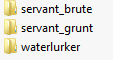 In this directory you will find three folders representing all the monsters of the main campaign.
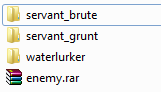
Our task is to archive these 3 folders, i.e. Select all 3 folders -> RMB -> Add to archive "Enemy.rar ". The following picture should be obtained:
After that, we must delete 3 folders with our monsters, and leave the archive, therefore we should have only one archive left enemy.rar
Now you can start the game and the monsters won't bother you anymore!
Monster Removal: DLC "Justine"
To remove monsters in DLC "Justine", follow these steps:
Go to the folder:
D:\SteamLibrary\steamapps\common\Amnesia The Dark Descent\entities\test
Here you will find the enemy_suitor folder, which contains information about the monster.
We perform the following actions: RMB on the folder enemy_suitor -> Add to archive "enemy_suitor.rar", after these actions, we have 1 folder enemy_suitor and an archive enemy_suitor.rar , we delete the folder and we should only have the archive.
Now, when you launch the game, you can enjoy the game without the threat of meeting a monster!
How to add monsters back
If you want to return the monsters, simply unzip the archives where the folders were placed.
D:\SteamLibrary\steamapps\common\Amnesia The Dark Descent\entities\enemy
The archive, which contains 3 folders, and therefore our monsters, you just need to unpack this archive.:
- RMB on the archive "enemy.rar " -> Extract Here
- Or go to the archive, select 3 folders with our monsters and move them to the current folder (enemy)
After that, delete the archive, eventually you should have these 3 folders left.
Monsters will now appear in the main campaign.
D:\SteamLibrary\steamapps\common\Amnesia The Dark Descent\entities\ptest
There is an archive in this folder "enemy_suitor.rar", in which we put our only monster from the DLC.
Just unzip the archive to the current folder:
- RMB on the archive "enemy_suitor.rar" -> Extract Here
- Or open the archive and move the monster folder (enemy_suitor) to the current folder (ptest).
After performing one of the actions, you will have 1 archive and 1 folder, delete the archive!
Now you will be chased by a monster in the DLC Justine again.
- Idiotic Monsters and You: A Guide for Outwitting the Grunts and Brutes★ 5 (586)24k views504 ♥18 minUpdated Nov 16, 2017
- Insanity Incarnate: 100% Achievement Guide (Does Not Include Masochist Achievement)★ 5 (1k)23k views1k ♥14 minUpdated Mar 29, 2020
- A Simple guide to Amnesia★ 5 (361)23k views365 ♥7 minUpdated Mar 25, 2013
- Достижения Amnesia: The Dark Descent★ 5 (811)19k views868 ♥3 minRussianUpdated Oct 12, 2018
- Amnesia: Top Ten Custom Stories★ 5 (366)18k views543 ♥22 minUpdated Jun 18, 2013
- Dark Descent + Justine: Collectibles locations maps★ 5 (832)16k views1k ♥1 minBulgarianUpdated Dec 29, 2016



- Upgrading to PremiumTeam Fortress 2★ 5 (20k)1441k views11k ♥6 minUpdated May 11, 2022
- No More Room in Hell Official ManualNo More Room in Hell★ 5 (2.8k)569k views2.1k ♥29 minUpdated Apr 22, 2019
- NMRiH Community Hosting GuidesNo More Room in Hell★ 5 (526)351k views653 ♥1 minUpdated Aug 10, 2022
- ULTIMATE GUIDE FOR GAME DEV TYCOONGame Dev Tycoon★ 5 (5.8k)326k views10k ♥4 minUpdated 23 Jan, 2014
- How to 'Git Gud' Soon™MORDHAU★ 5 (2k)318k views3k ♥68 minUpdated Nov 16, 2024
- Лучшие кооперативные игры SteamPAYDAY 2★ 5 (1.5k)315k views2.1k ♥56 minRussianUpdated Apr 27, 2025






This guide was created by its original author on the Steam Community. Are you the author and want it removed? Request removal.