ETS2 Realism Done Right – The All-in-One Guide
Intro – Why Realism?
Mods are cool and all - I use them myself sometimes in single player. But the truth is, they’re not always stable and honestly not needed if you just want a setup that works every time you launch the game. ETS2 on its own already has enough realism to give you that grounded, immersive trucking vibe.
This guide is for both solo players and TruckersMP drivers who want to keep things clean, immersive, and focused on proper sim-style driving without having to deal with mod crashes or waiting for updates to catch up.

Best DLCs for Immersion (Optional)
These DLC's are completely optional, but! IF you want to get the most out of ETS2 without buying every single expansion? Here’s a list of the most useful and immersive DLCs that improve realism, map variety, and cab life. Whether you're playing single-player or TruckersMP.
- West Balkans – Dense, narrow roads and the best visual quality. Top pick for realism.
- Iberia – Long highway hauls, big delivery zones, and clean scenery.
- Road to the Black Sea – Adds Romania, Bulgaria, and Turkey. Diverse terrain.
- Beyond the Baltic Sea – Eastern Europe focus with authentic truck stops.
- Going East! – Expands Poland, Slovakia, and Hungary. Older but still solid.
- Greece – Coastal cities, island ferries, and mountain drives.
Connected route:
Base Game → Going East → Road to the Black Sea → West Balkans → Greece
Optional add-ons:
Beyond the Baltic Sea (north), Iberia (west, via France), Nordic Horizons (upcoming north)
- Heart of Russia – Explore central Russia including Moscow, Volga and Oka rivers, old towns, and deep forests. Long haul heaven. (Coming soon)
- Iceland – Drive the scenic Ring Road (Hringvegur) through volcanic fields, glaciers, and raw nature. Sparse, dramatic, and very unique. (TBA)
- Coaches DLC – Swap your truck for licensed passenger buses like the Volvo 9700 DD or Scania Touring. Scheduled routes, passenger stops, and city-to-city gameplay. Best for experienced drivers. (TBA)
- Nordic Horizons – Major rework of Scandinavia with improved road quality, snow mechanics, seasonal effects, and new cities. A must-have for realism lovers. (Early 2026)
- Heavy Cargo Pack – Construction equipment, transformers, etc.
- High Power Cargo Pack – Large loads with upgraded trailers.
- Special Transport DLC – Oversized cargo, pilot cars, and custom routes (SP only).
- Cabin Accessories DLC – Add GPS, snacks, laptop, phone, hanging items, etc.
- Interior Packs (Renault, DAF, Scania, etc.) – More cabin details per brand.
- Wheel Tuning Pack – Custom tires, hubs, and rim styles.
Want to preview before you buy? Check out this Cabin Accessories DLC showcase and see it in action inside the cab.
- Paint Jobs Packs – National, racing, and custom liveries.
- Tuning Packs (Scania / Volvo / DAF) – Add bumpers, lights, and custom grills.
- All map DLCs are supported in multiplayer.
- Cabin Accessories and tuning parts are mostly visible (some only to you).
- Special Transport is single-player only, but great for immersive missions.
DLC's Supported by TruckersMP (Official): https://truckersmp.com/knowledge-base/article/103
Start with map and cargo DLCs first - they give the biggest boost to realism. Everything else builds on that foundation.
Graphics Setup (Low-End & High-End)
You don’t need to crank every setting to max to get a realistic experience in ETS2. The key is focusing on settings that add to immersion without sacrificing performance or making the game look too “gamey.” Here are two recommended setups based on your PC specs.
If your rig can handle it, feel free to push most settings to ultra but keep them balanced so the game feels natural and clean. This will give you crisp visuals without going overboard. list]
- Fullscreen Mode: Enabled
- Brightness: 50%
- Resolution: Native (1920x1080 or 1440p+)
- Refresh Rate: 144Hz+
- Vertical Synchronization: Disabled
- FPS Limit: 144–240
- FPS Limit in Background: 30 or 60
- Scaling: 400%
- Anti-Aliasing: SMAA + TAA
- TAA Tuning: Adaptive Clarity
- TAA Luma Sharpening: 1.00
- Texture Quality: High or Ultra
- Anisotropic Filtering: Max (16x)
- Normal Maps: Enabled
- Reflection Scaling: 100%
- Reflection Detail: High
- Mirror Quality: Ultra
- Mirror Resolution: Ultra
- Mirror Distance: Ultra
- Shadow Quality: Ultra
- Far Shadows: Enabled
- Interior Shadows: Enabled
- SSAO: High
- Light Visibility Ranges: High
- Traffic Headlights: Enabled
- Secondary Vehicle Lights: Enabled
- Depth of Field: Disabled
- Sunshafts: Enabled
- Vegetation Detail: Ultra
- Grass Density: High
- Weather Quality: Ultra
- Pedestrians: Enabled
This setup gives you a beautiful, clean view that feels like you’re truly sitting inside a cab, not watching a flashy cinematic.
If your system struggles a bit, you can still achieve a solid immersive experience by lowering a few settings. This will help keep your frame rate smooth without sacrificing too much visual quality.
- Fullscreen Mode: Enabled
- Brightness: 50%
- Resolution: 1920x1080 (16:9)
- Refresh Rate: 144Hz
- Vertical Synchronization: Disabled
- FPS Limit: 400
- FPS Limit in Background: 400
- Scaling: 100%
- Anti-Aliasing: SMAA + TAA
- TAA Tuning: Adaptive Clarity
- TAA Luma Sharpening: 1.00
- Texture Quality: Low
- Anisotropic Filtering: 0x
- Normal Maps: Enabled
- Reflection Scaling: 50%
- Reflection Detail: Low
- Mirror Quality: Medium
- Mirror Resolution: Medium
- Mirror Distance: Ultra
- Shadow Quality: Very Low
- Far Shadows: Enabled
- Interior Shadows: Enabled
- SSAO: Disabled
- Light Visibility Ranges: High
- Traffic Headlights: Enabled
- Secondary Vehicle Lights: Enabled
- Depth of Field: Disabled
- Sunshafts: Disabled
- Vegetation Detail: Low
- Grass Density: Disabled
- Weather Quality: Low
- Pedestrians: Disabled
While it won’t look as sharp or detailed as the high-end setup, this configuration will keep ETS2 running smooth and maintain that immersive trucker vibe you want.
IF YOU HAVE A BETTER LOW END CONFIG, PLEASE COMMENT AND ILL ADD IN
For those comfortable with fine-tuning beyond the in-game menus, ETS2 allows some advanced tweaks by editing configuration files. These can adjust shadow sharpness, ambient occlusion strength, or texture detail more precisely. However, this is only recommended if you know what you’re doing and have backed up your files. Most players will get great results sticking to the in-game settings outlined above. Config file location: Documents\Euro Truck Simulator 2\config.cfg
Note:
- If FPS ever dips below 60, reduce:
- uset r_scale_x / r_scale_y to 1.5
- or r_sun_shadow_texture_size to 2048 - Don’t touch in-game graphics settings after this unless you plan to re-edit the config file. ETS2 resets some values when you apply changes via UI.


Wheel Setup in G HUB
If you're running a Logitech wheel, set it up properly in G HUB first — otherwise ETS2 won’t give you proper force feedback. These are the settings I’ve tested and stuck with. It feels solid and responsive without being overly stiff or floaty.
- Sensitivity: 50 (neutral, keeps wheel response natural)
- Operating Range: 900° (this must match in-game — trucks turn wide)
- Centering Spring Strength: 50 (optional, adds a bit of return force)
- Centering Spring in Non-FFB Games: OFF (leave this unchecked)
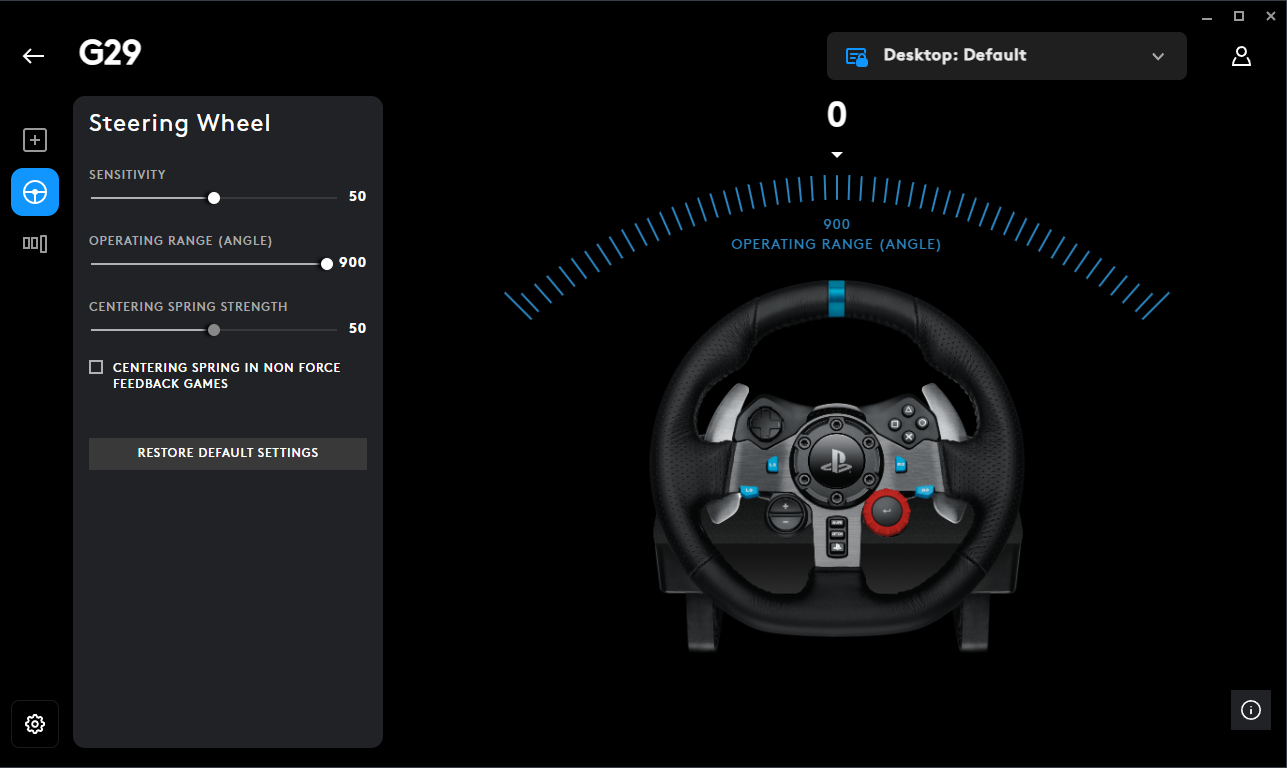
900° is key, that’s the closest to how actual truck steering works. Your wheel should turn as much in-game as it does in real life.
Tip: If you want more resistance or “weight,” bump the spring strength to around 60. If you want looser, drop it to 40. I usually stick with 50 feels right for long drives. I personally dont use centering spring settings, i let the game handle it and turn it off in GHUB.
Also make sure there are no conflicting keybinds or pedal inputs in G HUB that override the game ETS2 handles everything better when it’s in full control.
If you're using Thrustmaster, Fanatec, or anything else, the idea stays the same:
- Match 900° steering angle (or your wheel’s max)
- Turn off any extra auto-centering features (FFB handles that)
- Keep damping low heavy vehicle, but not unrealistic steering
Once you’ve dialed this in and It will match with the in-game Force Feedback setup, the steering starts to feel like it actually belongs to a 40-ton truck.
Advanced Realism Tweaks (braking, steering, deadzone, FFB)
If your truck feels way too twitchy, brakes grab too fast, or the wheel just doesn’t feel right this section is for you. The controls.sii file in ETS2 can be edited to make the game feel smoother and more realistic, especially if you use a wheel and pedals (but it helps for keyboards too). Here's what to tweak.
To make it feel more real like a real truck where you ease into braking you can add a curve. Open your `controls.sii` and find the line starting with `mix abackward`.
Replace it with this:This line adds a curve to your brake pedal. That `2.5` at the end is the curve amount:
- 1.0 = No curve (default)
- 2.0 = Smooth start, firm stop
- 3.0 = More progressive
Tweak that number based on how it feels. I personally like 2.5–3.0.
Change it to:
This adds a nice curve to your steering. Makes it gentle around the center and more responsive as you turn further. You can test with `2.0`, `3.0`, or even `4.0`.
If your steering still feels too sharp at high speeds, this should help a lot.
You can tweak the gain up/down if your wheel feels too heavy or too light. I usually float between 4.5 to 5.5 depending on the truck.
- Find your `controls.sii` file in: Documents/Euro Truck Simulator 2/profiles/[[b]your_profile_id[/b]]/controls.sii
- Make a backup of it before editing! (VERY IMPORTANT)
- Open it in Notepad or Notepad++ (i use my IDE VS code)
- Edit the values above
- Save and set the file to Read-Only if you don’t want the game to reset your changes
- Restart the game fully
Realistic Steering Setup (Force Feedback)
First off if you’re using a keyboard or gamepad, don’t overthink it. Just set your gearbox to Sequential, and make sure your Gameplay Settings match what’s listed in the realism section above. That’s more than enough. Keyboard doesn’t give you analog control, so fine-tuning physics won’t matter much.
Now, if you’re on a wheel — especially something like the Logitech G29, T300, or similar this section is for you. I use a G29 myself, and this setup is meant to feel grounded, like you’re actually driving a heavy vehicle. No overdone shaking or twitchy turning, just solid road feedback and weight.
- Steering Sensitivity: 0.50
- Steering Non-Linearity: 0.00
- Steering Animation Range: 900° (match this to your wheel’s rotation in Logitech G HUB or your wheel software)
This gives you a 1:1 feel when you turn your wheel, it matches in-game exactly. No twitchiness, no arcade-style flicks.
This is where the realism kicks in. These are the settings I run, tweak to your liking, but this gives you a heavy, real-world feel without overdoing it.
- Force Feedback: Enabled
- Overall Gain: 100% (sometimes I bump to 110 or 120 depending on mood or road type)
- Centering at High Speed: 100%
- Centering at Low Speed: 42%
- Internal Friction: 10%
- Engine Resonance: 20%
- Terrain Surface: 80%
- Bumps: 72%
- Collisions: 32%
- Gearbox Grind: 32%
- Understeer Slip: 32%
- Assisted Steering: 0%
- Terrain Surface Vibration: 100%
- Bumps Vibration: 100%
- Collisions Vibration: 100%
This config gives you the feeling of weight. You’ll feel the road surface change, dips, trailer resistance, and that subtle tug when turning too sharp with a loaded trailer. The engine rumble is there but not annoying. Gearbox grind makes you think twice before sloppy shifts, especially if you’re using an H-shifter like me.
This isn’t “cinematic” it’s meant to feel like a 40-ton machine fighting back a bit when you push it.
If you want to actually *feel* like you're trucking, not just playing a game, this is a solid base to start from. Wheel users - dial in these settings, take a heavy trailer, and go climb a mountain. You'll know why it matters.

Modern Truck Setup (2016+)
If you’re driving newer trucks in ETS2 (especially Volvo FH, Scania S/R NG, DAF XG+, MAN TGX Euro 6), their real-world counterparts are completely different from older models. These trucks come standard with auto transmissions, advanced safety systems, and stiffer physics. Here's how to adjust your game settings to reflect that.
- Real-life: All automatic with I-Shift system
- Game: Use Adaptive Automatic or Sequential Override
- Best Setup in game (I.M.O): Transmission Type: Adaptive Auto, Smart Sequential: Enabled
Scania S / R NG (2016+)
- Real-life: Opticruise automatic is standard; manual is rare
- Game: Use Auto or Sequential if paddles
- Tip: Use retarder manually for hills, as Scania does IRL
DAF XG / XF (2021+)
- Real-life: TraXon automated only, no manual offered in EU
- Game: Use Adaptive Auto, map engine brake for realism
MAN TGX Euro 6 / New Gen
- Real-life: TipMatic transmission, fully auto
- Game: Stick to full auto with manual override if preferred
(I didn't verify this with a real trucker who drives those trucks, but if you drive please let me know if i need to make changes or add anything)
- Advanced suspension geometry for cab comfort and reduced sway
- ABS and EBS as legal requirements
- Load-sensing brakes and electronic retarder integration
- Stronger cab mounts with reduced flex on rough terrain
To simulate this in ETS2, tweak your physics settings like this:
- Cabin Suspension Stiffness: 30–35%
– Modern cabs are better damped and don’t bounce around like old rigs. - Truck Stability: 20–25%
– Reflects lower center of gravity and automatic stability control systems (ESC). - Trailer Stability: 0%
– Most modern trailers are designed to resist rollovers without needing fake stability assists. - Braking Intensity: 60–70%
– This simulates real-world EBS (electronic brake force distribution) which gives trucks better stopping power even when loaded. - Retarder Strength: Slightly increased
– New trucks rely heavily on retarder for downhill braking and engine braking. Manual use is realistic. - Driveshaft Torque: 100%
– Keeps the full torque feedback from engine to wheels. Important for uphill realism and load handling.
- Adaptive Cruise Control (ACC) → keep enabled, reduce following distance for realism
- Lane Assist → in real trucks: subtle vibration/alert, not auto-steering
- Rain Sensor / Auto Lights → standard in modern cabs, should be on
- High Beam Assist → toggleable, realistic on highways
These settings give you the right balance: modern trucks should feel firm, confident, and safe — but still heavy and deliberate. If your truck feels like a race car, dial it back.
NOTE: This section is aimed at newer trucks released after 2016. If you're using older models (pre-Euro 6), refer to the section 3 & 6 .
Gameplay Settings (Classic Trucks)
These settings are for the most authentic truck driving experience in Euro Truck Simulator 2. No shortcuts, no arcade handling — just raw weight, momentum, and control. Perfect for wheel and pedal users or anyone who wants to feel the responsibility of moving 40 tons of steel.
- Truck Stability: 0%
- Trailer Stability: 0%
- Cabin Suspension Stiffness: 20%
- Suspension Stiffness: 25%
- Braking Intensity: 60%
- Uneven Surface Simulation: 130%
- Air Brakes Simulation: Enabled
- Realistic Fuel Consumption: Enabled
- Driveshaft Torque: 100%
- Cabin Accessories Physics: Enabled
This setup makes the truck feel heavy and realistic. You’ll need to anticipate curves, control your braking zones, and accept that late braking or oversteering has real consequences.
- Fatigue Simulation: Enabled
- Traffic Offenses: Enabled
- Automatic Engine & Electricity Start: Disabled
- Retarder Auto Usage: Disabled (use manually)
- Engine Brake Auto Usage: Disabled
- Parking Brake Auto Engage: Disabled
- Truck Speed Limiter: Enabled (90 km/h cap, EU standard)
- Lane Assistant Mode: Disabled
- Adaptive Cruise Control: Disabled
- Smart Cruise Control: Disabled
- Rain Sensor / Auto Headlights / Auto High Beams: Disabled
No assists. You start, stop, and manage everything yourself. Use the engine brake and retarder manually, and plan your rest breaks.
- Random Road Events: 0%
- Detours: 0%
- Rain Probability: 10–20% (adjust based on how realistic you want weather)
- Time Zones: Disabled (unless you’re doing cross-country long hauls)
- Show Blockers: Enabled
This removes scripted interruptions while keeping weather dynamic but reasonable. Play around with the Random Events and Detours sliders, depending on your play style - I myself have the above config because of my personal preference.
- Transmission Type: H-Shifter (if available) or Sequential
- Adaptive Automatic Transmission: Disabled
- Smart Sequential Shifting: Disabled
Manual shifting is key. If using paddles, stick to sequential. Avoid automated gearboxes if you want true realism.
- Advanced Trailer Coupling: Enabled
- Trailer Cables: Player Trailers
- Cruise Control Grid Step: 5 km/h
- Parking Difficulty: Always Select
Advanced coupling means you line up precisely. No automatic hookups or easy alignments.
- Steering Camera Rotation: Enabled
- Steering Rotation Factor: 100%
- Physical Camera Movement: Enabled
- Auto Camera Centering Delay: Disabled
- Interior Horizon Locking Factor: 100%
Turn these on if you want to feel cabin motion and better spatial awareness. Disable if it makes you dizzy.
This is as close to real trucking as ETS2 gets without mods. Some systems (air pressure, load weight, traffic offenses) are still simplified and need better simulation work. But with these settings, you’ll think and drive like a pro. Expect to:
- Brake earlier and plan stops.
- Downshift properly — it matters.
- Feel sway on ramps, curves, and uneven surfaces.
- Pay for mistakes like speeding or losing focus.
If you play with keyboard, consider easing braking and stability settings. Otherwise, this is built for realistic, immersive driving.

Realistic Sound Setup
Euro Truck Simulator 2 gives you a surprising amount of control over audio. Setting these up properly can transform immersion inside the cab. Below is a breakdown of every option and how to tune them for realism.
- Engine Volume → 80–100%. The truck should dominate the soundscape.
- Exhaust Volume → 60–80%. Brings out rumble and downshifts without overwhelming.
- Truck Turbo Volume → 70–80%. Essential for realism when hauling heavy loads uphill.
- Truck Noise → 70%. Covers suspension creaks, wheel noise, and vibration.
- Interior Volume → 70–80%. Adds cab ambience (wind, rattles, road hum).
- Radio Volume → 30–40%. Should be background noise, not overpowering.
If you want custom sound for your engine, follow this guide:
https://steamcommunity.com/sharedfiles/filedetails/?id=3543889240
- CB Radio → 40–50%. For realism, keep quieter than navigation.
- User Interface Sounds → 30–40%. Prevents GPS beeps and menus from breaking immersion.
- Backup Beeper → Toggle on if you roleplay modern EU fleet trucks.
- Open Window Noise → Enable. Changes sound balance realistically when rolling down windows.
- Reverb Effects → On. Adds depth in tunnels, industrial depots, and enclosed spaces.
Popular examples:
- TruckersFM → Dedicated to ETS2/ATS players, 24/7 community radio.
- BBC Radio 2 (UK) → Real long-haul vibe, perfect for UK–EU routes.
- Deutschlandfunk (Germany) → News & music, suits central EU driving.
- NRJ France → Contemporary hits, fits well with French DLC routes.
- Radio Veronica (Netherlands) → Classic hits, great for Benelux trucking. To add them, edit live_streams.sii in your Documents/Euro Truck Simulator 2 folder. Copy a working URL from a station and restart the game. Example template:
- Kriechbaum / EVR Engine Packs → Each truck brand sounds unique (Scania V8 vs Volvo, etc.).
- Environmental Sound Mods → Realistic rain, thunder, wind, and city ambience.
- Distinguish brands by engine note.
- Hear traffic pass with windows open.
- Notice the turbo spool when climbing hills.
- Listen to thunder roll across the map.
Set up correctly, sound makes the cab come alive in a way graphics and physics alone can’t.
Cab Life & Driver Immersion (Optional)
Euro Truck Simulator 2 isn’t only about driving physics. Realism also comes from how you live inside the cab. Adding immersion details like cabin accessories, radio stations, fatigue management, and realistic driver habits makes ETS2 feel like a true trucking simulator, not just a game.
For deeper ETS2 immersion, SiSL’s Mega Pack adds curtains, CB radios, dash cams, and hanging air fresheners.
Interior Packs (DAF, Volvo, Scania, MAN) provide brand-accurate dashboards and gauges, making each truck feel unique.
- TruckersFM – 24/7 community radio for ETS2/ATS
- BBC Radio 2 (UK) – perfect for UK–EU long hauls
- Deutschlandfunk (Germany) – central EU news and music
- NRJ France – French pop hits for western routes
- Radio Veronica (Netherlands) – Dutch classics, great for Benelux trucking
Roleplay like a European trucker: drive 9–10 hours, then rest. Makes ETS2 long hauls and career mode feel authentic.
Keep Rain Probability around 15–20% for natural weather. With sound mods, thunder, wipers, and wind create realistic ETS2 cab conditions.
Shut off the engine at depots and fuel stations.
Use indicators, hazards, retarder, and engine brake properly in TruckersMP Simulation 1.
Respect EU speed limits: 80–90 km/h on highways, 50 km/h in cities. Feels more realistic than racing at 120.
Essential Realism Mods (Optional)
Even though this guide is focused on playing without mods, I know some of you want that extra immersion. If you're one of those players, here are some mods I personally use and recommend & all are focused on realism.
Note: I'm not linking them here. Just search the exact names on the Steam Workshop.
These are the mods I personally use: https://steamcommunity.com/sharedfiles/filedetails/?id=3542994168
- Realistic Truck Physics Mod v9.0.8 (by Frkn64) – Improves suspension, braking feel, and weight distribution for a more authentic Euro Truck Simulator 2 realistic experience.
- Air Ride A3 v1.2 – Adds soft suspension behavior, especially noticeable on highways, enhancing immersion without cheats.
- Sound Fixes Pack v25.28.2 – ETS2 – Reworks ambient and traffic sounds, including weather effects, to boost immersion.
- Realistic Truck-Effect-Sounds V1.1 by Max2712 – Adds mechanical clunks, rumbles, and vibrations, making engine and truck sounds more lifelike.
- Volvo & Renault Open Pipe Sound by ilzy – Clean, deep engine sounds that bring authentic truck audio to Euro Truck Simulator 2.
- Realistic Vehicle Lights Mod v7.4 (by Frkn64) – More natural light spread for indicators and brake lights, improving night driving realism.
- Real European Companies Reloaded [DX11] – Replaces generic logos with real company brands to enrich the game environment.
- Real European Gas Stations Reloaded – Substitutes fictional gas stations with real-world counterparts for added immersion.
- Realistic Mirror FOV (ETS2) – Fixes side mirror angles to match actual truck views for better spatial awareness.
- Real Traffic Density ETS2 – Smarter, denser traffic patterns that adapt realistically to time of day and location.
- Realistic Train Lengths – Eliminates unrealistic short trains, making rail traffic feel much more legit.
- AI Traffic Cars from ATS – Adds vehicle variety from American Truck Simulator, increasing road diversity in ETS2.
- Better German Police Car – Cosmetic enhancement that improves the authenticity of police vehicles on the road.
- Truck Accessory Pack – Subtle add-ons like lights, bars, and mirrors without being over the top.
- Expanded FH Customisation – Adds more tuning options specifically for the Volvo FH16 2012 model.
- Animated Steering Wheel – Driver’s hands follow the wheel movements, great for players who use immersion cams.
These mods are great for single-player realism and immersive Euro Truck Simulator 2 gameplay. For TruckersMP, you’re restricted to vanilla, so focus on disciplined, realistic driving behavior instead.
Realistic Cargo Weight Limits (Optional)
No one hauls 60 t with a base-spec 4×2. Let’s use numbers that don’t break immersion.
- 4×2 tractor + 3-axle trailer → 40 t gross (about 20 t payload)
- 6×2 or 6×4 → 44 t gross (24–26 t payload) where it’s legal
- 8×4 heavy haul → 50–60 t payload with permits and pilot cars
- Nordic HCT sets → 60–76 t gross on approved Finnish/Swedish roads
- EU law (96/53/EC) fixes a five-axle artic at 40 t.
- Some countries (DE, NL, UK) only allow 44 t for intermodal/container traffic.
- Anything heavier needs “abnormal” paperwork, escorts, 60 km/h top speed.
- UK STGO permits allow 80–150 t moves, but only with escorts, pilot cars, and low-speed limits (not in ETS2 base game).
- Non-Nordic doubles exist but are limited to specific countries and approved routes.
- Finland/Sweden allow HCT sets up to 76 t gross on certain roads.
- A 4×2 can physically pull doubles, but not legally or safely at full weight — in real ops, it’s 6×2/6×4 minimum.
Simple math: aim for 10 hp per tonne. Feels right every time. EU law also requires retarders above 44 t in-game, fit one once you’re hauling 30 t+.
- Stick to 44 t max on Simulation servers unless it’s a planned convoy.
- Right lane on hills if you’re the heavy one – don’t block the 20 t reefers.
- Oversize? Flash beacons, shout in chat, keep gaps big.
- Pick a cargo weight that fits the list.
- Grab an engine that beats the “Min hp” line.
- Retarder on for anything over 30 t – your brake pads will thank you.
- Running SCS Special Transport (55–70 t)? Take an 8×4 FH16 750, lock to 60 km/h, follow the escorts.
Source: EU Directive 96/53/EC, UK STGO tables, Nordic HCT regs.

Truck Build Templates (Roleplay-Ready)
This section gives you pre-built realistic truck loadouts for different playstyles - whether you're doing a career-style roleplay, heavy cargo contracts, or building a clean VTC fleet.
These aren't just for looks - they reflect how trucks are actually used in Europe and add depth to your sim experience.
- Chassis: 4x2 or 6x2 mid-lift (fuel economy & weight compliance)
- Engine: 430–500 HP (standard Euro 6 fleet spec)
- Transmission: Automatic or Smart Sequential
- Paintjob: Company-style or plain white/blue
- Accessories: Minimal - sun visor, front plate, low-profile lights
- Interior: Standard - GPS, fridge, maybe a phone or dashcam
Use this setup for TruckersMP, job roleplay, or realistic VTC driving. These trucks are everywhere IRL.
- Chassis: 6x2 or 6x4
- Engine: 500–540 HP
- Transmission: Sequential or H-Shifter (manual preferred)
- Paintjob: Custom or national color (UK, FR, PL)
- Accessories: Roof bar, light bar, wheel tuning, subtle flare
- Interior: Coffee cup, snack bag, phone mount, driver GPS
Great for those doing long-distance contracts in single-player. This build lets you show some personality but keeps it grounded.
- Chassis: 8x4 or 6x4 heavy-duty
- Engine: 600+ HP (Scania V8, Volvo 750, MAN D38)
- Transmission: H-shifter or Manual Sequential
- Paintjob: Utility / pilot scheme / yellow hazard
- Accessories: Bull bar, beacon lights, long chassis fenders
- Interior: Trip monitor, oversize load sign, co-driver GPS
Perfect for using the Special Transport DLC or oversized mod packs. Drive with discipline - wide turns, early braking.
- Chassis: 4x2 or 6x4
- Engine: 500–540 HP
- Transmission: Any
- Paintjob: Custom skin or high-polish metallic
- Accessories: Chrome everything, underglow, LED strobes
- Interior: Fully loaded with soft toys, curtains, TV, CB radio
Use for TruckersMP convoys, screenshots, or Twitch streams. Not practical, but fun.
If you’ve got a build you’re proud of, post it in the comments. I might add it here with credit.
TruckersMP – How to Download & Set Up
Want to drive with other people on the road in real time? TruckersMP is the go to multiplayer mod for ETS2. It has servers with realism realistic rules, convoys, VTCs, and more.
What You Need:- A legal copy of Euro Truck Simulator 2 on Steam
- At least 2 hours of playtime in ETS2 (Steam will verify this)
- A free TruckersMP account (create one with your Steam login)
Step-by-Step Setup:
- Go to: https://truckersmp.com/
- Click “Register” and log in with your Steam account
- Download the launcher (top right: “Download Client”)
- Run the installer and select your ETS2 install path (usually auto-detected)
- Launch TruckersMP Launcher and choose Euro Truck Simulator 2 (Multiplayer)
- Log in, pick a server (Simulation 1 for realism), and drive!
(not my channel but a video that is on point)
Things to remember before you play:- Turn off speed limiter only if you’re on modded servers (Keep it on if you want realism as some EU countries have a law where you need to be below 90KM/h speed limit at all times)
- Follow in-game traffic laws or you can get kicked/banned
- Do not disrupt traffic or other players, if you do expect a ban sooner or later
- Use /fix to repair your truck in emergencies (limited use)
- Set CB Radio to Channel 19 for general voice chat
Realism Note: TruckersMP enforces realistic driving on Simulation 1. If you’re overtaking on curves, speeding in cities, or crashing - expect admin action.
Want full realism? Stick to Simulation 1, disable assists, and drive like your job depends on it.
Useful Links:- TruckersMP Download Page[truckersmp.com] – Official client download
- TruckersMP Knowledge Base[truckersmp.com] – Setup guides, rules, and help articles
- TruckersMP Forum[forum.truckersmp.com] – Community discussions, support, and updates
- Supported Mods (Forum Thread)[forum.truckersmp.com] – List of allowed mods in multiplayer
- Supported DLCs (Steam Buying Guide)[truckersmp.com] – DLCs that work with TruckersMP
Launch Options (Steam & TruckersMP Launcher)
Depending on how you launch ETS2, use the methods below to apply some custom launch options to your game.
Steam launch options won’t apply to you because when you use the TruckersMP Launcher, since it bypasses Steam. Here’s how to add them manually:
- Open the TruckersMP Launcher
- Click the Settings (⚙️) icon (bottom left corner)
- Under Console options (advanced), paste your launch arguments (space-separated)
- Click Save
- Launch ETS2 Multiplayer from the launcher
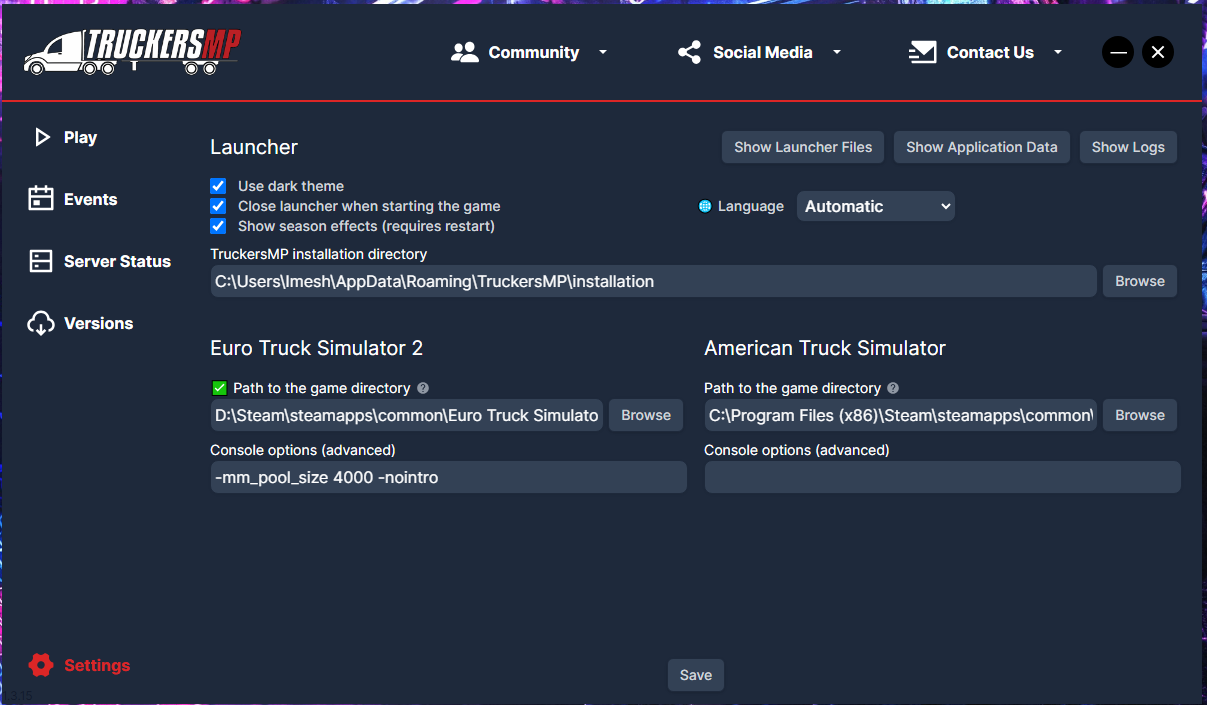 Example:
 If you're not using TruckersMP and launch ETS2 directly from Steam, set launch options this way:
- Open your Steam Library
- Right-click Euro Truck Simulator 2
- Select Properties
- Under the General tab, find the Launch Options field
- Paste your desired launch options there
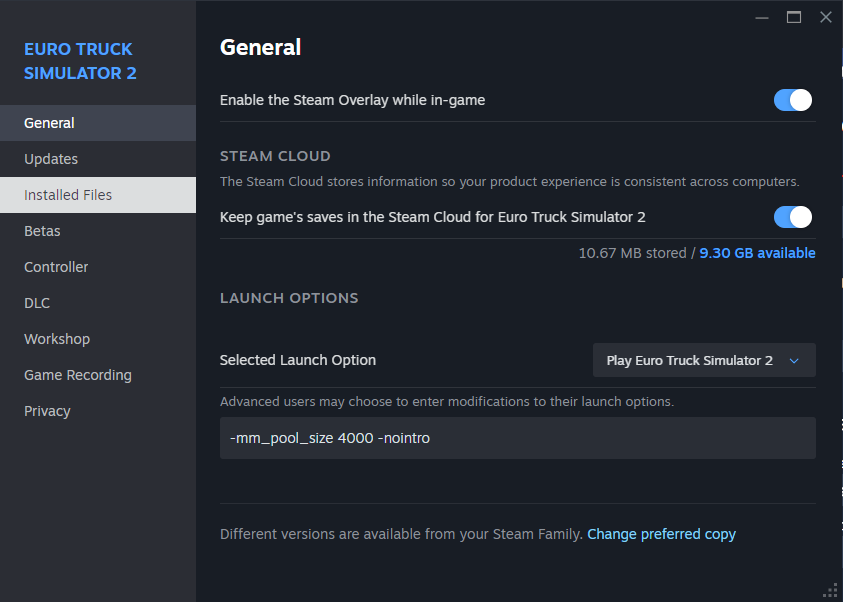 Example:
 Additional Single Player Options:
Use only the switches you actually need, advanced options can affect game stability or mod loading behavior.
Personal note:
Always separate each argument with a space. Don’t mix experimental flags unless you know what they do.
How to Turn On Console Commands in ETS2 (Developer Console Guide)
If you want to teleport across cities, fly around in free camera mode, or tweak the game for realism? You'll need to enable the Euro Truck Simulator 2 developer console first.
Here’s how to turn on the ETS2 console - quick, easy, and actually works in 2025.
- Close the game. (If you have it running, IMPORTANT)
- Open your Documents folder:
Path: C:\Users\YourName\Documents\Euro Truck Simulator 2 - Find a file named: config.cfg
- Open it using Notepad (I used VS Code).
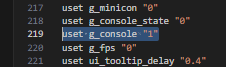
- Scroll down or use Ctrl + F to find these two lines: uset g_developer "0" uset g_console "0"
- Change both lines to the following:uset g_developer "1"
uset g_console "1"
- Save the file and close Notepad.
- Launch ETS2 again.
- While in-game, press the ~ (tilde) key (just below ESC) to open the console.

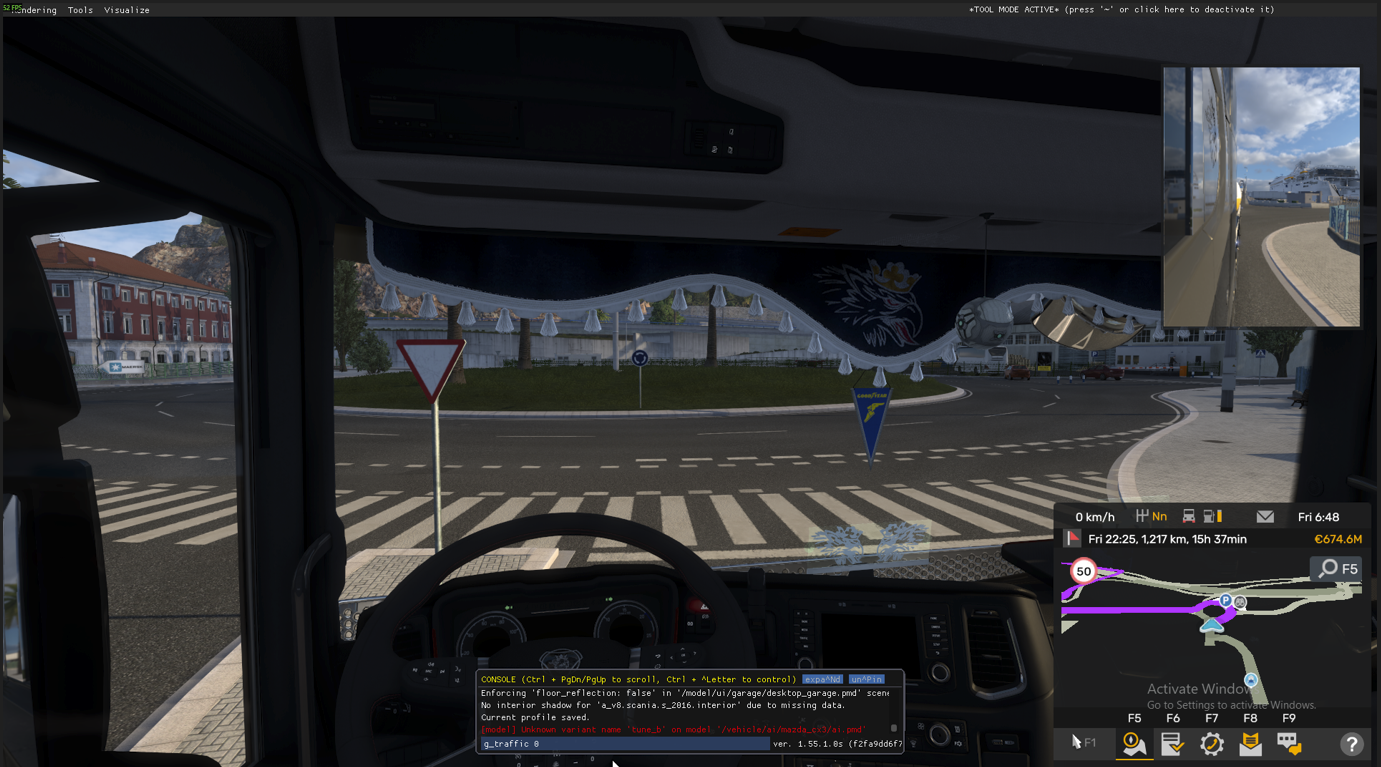
- Teleport: goto paris – Instantly fly your camera to Paris.
- Set time: g_set_time 14 – Changes time to 2 PM.
- Remove traffic: g_traffic 0
- Disable police fines: g_police 0
- Free camera speed: g_flyspeed 100
To activate free camera, press 0 (not numpad), then use numpad keys (8, 4, 5, 6) and mouse to move. To teleport your truck, move the camera and press F9.
Tip: You can use goto + F9 to quickly move your truck across the map without driving.
Want peace and quiet to test a truck? Run g_traffic 0 and g_police 0 for a clean drive.
Clean shots = perfect for guides, thumbnails, or pretending you drive for Scania IRL.
- delivery_finish
- g_teleport
- teleport x y z
- /tp or /goto (those are for TruckersMP only)
They’re either from mods, cracked builds, or old dev tool leaks.
Build a Trucking Empire the Smart Way (Career Mode)
This section covers a strategic money-making path for Euro Truck Simulator 2 for Single Player Career Mode, this is written in a business man mindset, keep the cash flowing, not saving until you are high level
- Only run Quick Jobs - no need to buy a truck yet. The company (game) provides the truck, fuel, repairs, tolls.
- Your goal here is pure profit, no expenses.
- Focus on:
- On-time deliveries with zero damage
- Building XP to unlock better-paying jobs
- On-time deliveries with zero damage
- Upgrade your skills in this order:
- Long Distance (unlocks better-paying routes)
- High Value Cargo
- Fragile Cargo
- Long Distance (unlocks better-paying routes)
- Pick jobs based on € per km, not just total payout. Often, shorter routes are more profitable with less risk.
- Avoid accidents or damage - repair bills will eat your profits.
Don’t spend. Stack cash. You're an employee now - your goal is to get out and start your own operation with enough leverage to stay ahead.
- Once you reach around €20-30k and level 5, take a €100,000 loan.
- Buy a used truck through the Used Truck Dealer. Prioritize:
- Low mileage
- No major engine/transmission issues
- MAN TGX, Renault Premium, Iveco - reliable budget picks
- Low mileage
- Why used? Low capital cost, full Freight Market access, more routes.
- Avoid buying new trucks early - waste of startup capital.
- Focus on engine upgrades, not cosmetics.
From now, your truck is an income-generating asset.
- Stick to Freight Market jobs - higher pay than Quick Jobs.
- Sleep and maintain your truck as needed to avoid breakdowns.
- Pick medium distance loads (10,000 - 20,000 € range) for good € per km.
- Avoid long hauls with heavy tolls or risky routes early on.
- Keep working jobs yourself. You’re more efficient than any AI driver.
- Hold expansion. Focus on:
- Clearing most of your loan
- Saving at least €100-150k
- Upgrading your truck (Volvo FH16 or Scania R recommended)
- Clearing most of your loan
- Pick up Cargo DLCs if you can. They unlock higher-value loads (heavy machinery, ADR, etc).
- Start mastering ferry routes to cut fuel and toll costs.
- Example: Valencia > Ashdod via Palermo, Naples, Bari, Thessaloniki
- Example: Valencia > Ashdod via Palermo, Naples, Bari, Thessaloniki
- Use job filters to find the best paying route per km, not just by total.
Think like a business owner: expand only when your current asset is operating at peak capacity.
- Once you’ve upgraded your truck and you’re sitting on solid savings, scale.
- Take a €400,000 loan only if:
- You can afford a Garage Upgrade (home base to 3 slots)
- Buy a second (used) truck
- Hire your first driver
- You can afford a Garage Upgrade (home base to 3 slots)
- Assign your driver a basic truck. No top-tier gear yet.
- Monitor Driver Manager:
- Long Distance should be their first skill
- After level 2, switch to Balanced mode
- Long Distance should be their first skill
- Expect a slow ramp-up. Bots usually take 2-3 in-game days to become profitable.
- Eventually, your drivers will earn thousands daily (30k/day+ at peak).
- What you should now have:
- A top-tier personal truck
- One or more income-generating AI drivers
- Some debt, but manageable repayment
- A top-tier personal truck
- Next steps:
- Expand to 5 trucks per garage before buying new garages
- Buy more used trucks for new hires
- Consider trailers for yourself and AI for better rates
- Expand to 5 trucks per garage before buying new garages
- Use ferry exploit and resting while in AI truck to earn passive cash
- Keep skill diversity among drivers - ADR, Just-in-Time, etc.
Every truck must earn its keep. If a driver underperforms, reassign or replace them.
- Your truck is an asset. Your drivers are investments. Loans are tools.
- Cash flow is king - always have a buffer for fuel, repairs, tolls.
- Don’t overspend early on visual mods or luxury items.
- Focus on skills that boost profit: Long Distance > High Value > Fragile > ADR.
- Use quick saves before risky maneuvers or long trips.
- Try Real Economy mods for more challenge if things get too easy.
Play it smart. Scale slow. Profit consistently. That’s how you build a trucking empire.
Wrap-Up – Keep It Grounded
If you’ve made it this far, you’re clearly not here for arcade vibes you want that grounded, weighty feel of actually hauling tons across Europe. That’s what this entire setup is built around.
It’s not about chasing ultra graphics or piling on mods. It’s about building discipline driving smart, braking early, shifting properly, and respecting the road. You’ll miss gear changes, you’ll oversteer once or twice, and yeah you’ll probably forget to rest and get hit with a fine. That’s the point.
ETS2 doesn’t simulate everything perfectly (air pressure system is still not quite there, and traffic fines can feel a bit off), but with the right settings, you’ll get as close as possible to a realistic trucking experience without needing third-party mods or plugins.
Whether you’re on keyboard, controller, or a full wheel setup, the rule stays the same:
Keep it grounded. Drive like your load matters.
You’re not just playing a game - you’re clocking in. Respect the weight.

Search Tags: ETS2 realistic setup, Logitech G29 ETS2 settings, TruckersMP guide, ETS2 force feedback fix, Euro Truck Simulator 2 physics
FAQ
Does this realism setup work in TruckersMP?
Yes. All settings, physics tweaks, and configs work in TruckersMP Simulation servers. Just avoid mods since TMP blocks most of them.
Can I use this guide for American Truck Simulator too?
Yes. Most physics, wheel configs, and graphics tweaks apply to ATS as well. DLC order will differ, but the realism settings carry over.
What are the best force feedback settings for Logitech G29 in ETS2?
Set 900° steering, sensitivity 50, non-linearity 0, and use the FFB setup listed in this guide (overall gain 100%, terrain 80%, bumps 72%). This gives heavy, realistic truck feel without arcade twitch.
What’s the realistic maximum cargo weight per truck setup?
- 4×2 → 40 t gross (~20 t payload)
- 6×2 or 6×4 → 44 t gross (~24–26 t payload)
- 8×4 → 50–60 t payload (special permits)
- Nordic HCT → 60–76 t gross (Scandinavia only)
Do console commands work in TruckersMP?
No. Developer console commands only work in single-player. TMP blocks teleport and time commands.
Which DLCs actually add realism?
Top map picks: West Balkans, Iberia, Road to the Black Sea, Beyond the Baltic.
Cab life: Cabin Accessories + Wheel Tuning.
Heavy haul: Special Transport, Heavy Cargo.
Can keyboard or controller players still use this guide?
Yes. Focus on gameplay realism settings (fuel, fatigue, no assists). You won’t get FFB realism, but braking/physics configs still apply.
What’s the difference between modern trucks and classic trucks in this setup?
Modern trucks (post-2016) use auto transmissions, tighter physics, and advanced assists. Classic trucks feel looser, heavier, and are best with manual gearboxes.
Does this guide lower FPS with all the tweaks?
No. Graphics configs are optimized for both low-end and high-end PCs. Follow the right setup for your rig to balance FPS and realism.
Is this setup beginner-friendly or only for hardcore sim players?
Both. Beginners can use the no-mod configs and auto transmissions. Sim veterans can dial in wheel settings, console tweaks, and full manual trucks.
Check out my other guides here
Fix ETS 2 Crashing
https://steamcommunity.com/sharedfiles/filedetails/?id=3560268844
Engine Sound Mod
https://steamcommunity.com/sharedfiles/filedetails/?id=3543889240
Graphics Mod Next Gen
https://steamcommunity.com/sharedfiles/filedetails/?id=3550041689
Learn to make money
https://steamcommunity.com/sharedfiles/filedetails/?id=3553525893
Search Tags: ETS2 immersion, ETS2 cabin accessories, Euro Truck Simulator 2 realistic setup, TruckersMP immersion, ETS2 fatigue simulation

Author: Axiata (Steam guide creator)
https://steamcommunity.com/id/axiata
- Russian Maps / Euro Truck Simulator 2 (RUS)★ 5 (1.1k)104k views3.1k ♥3 minRussianUpdated Feb 22, 2016
- Консольные команды и настройки для ETS2 и ATS★ 5 (940)80k views1.6k ♥6 minRussianUpdated May 15, 2018
- Радио для ETS2★ 5 (619)66k views909 ♥5 minRussianUpdated Mar 3, 2025
- Dual Monitor / Screen Guide★ 5 (497)47k views861 ♥9 minUpdated Sep 7, 2023
- Radios Españolas ETS2 y ATS - Spanish Radios - Actualizado 2025 Euro Truck Simulator 2 Radios Españolas★ 5 (602)26k views578 ♥4 minSpanishUpdated Mar 2, 2025
- Euro Truck Simulator 2 100% Achievement-Guide [ENG]★ 5 (864)25k views1.5k ♥12 minUpdated Aug 4, 2025





- Upgrading to PremiumTeam Fortress 2★ 5 (20k)1441k views11k ♥6 minUpdated May 11, 2022
- No More Room in Hell Official ManualNo More Room in Hell★ 5 (2.8k)569k views2.1k ♥29 minUpdated Apr 22, 2019
- NMRiH Community Hosting GuidesNo More Room in Hell★ 5 (526)351k views653 ♥1 minUpdated Aug 10, 2022
- ULTIMATE GUIDE FOR GAME DEV TYCOONGame Dev Tycoon★ 5 (5.8k)326k views10k ♥4 minUpdated 23 Jan, 2014
- How to 'Git Gud' Soon™MORDHAU★ 5 (2k)318k views3k ♥68 minUpdated Nov 16, 2024
- Лучшие кооперативные игры SteamPAYDAY 2★ 5 (1.5k)315k views2.1k ♥56 minRussianUpdated Apr 27, 2025






This guide was created by its original author on the Steam Community. Are you the author and want it removed? Request removal.