Feral Interactive native Linux version in 2023 (Arch)
Basic info
Deus Ex Mankind Divided has a native Linux OpenGL port released on November 3 2016 by Feral Interactive.
Although this port is slower than the Windows version (due to being OpenGL based), and there's usually no reason to choose it over Proton, someone might still want to run this version for nostalgic, historical, stability, moral (and so on) reasons.
By default, this version (as of October 2023) doesn't start on current systems.
Solution
You'll most likely hit the following error:
libfmodL.so.7 => not found
libfmodstudioL.so.7 => not found
libicui18n.so.51 => not found
libicuuc.so.51 => not found
libicudata.so.51 => not found
libCoreFoundation.so.476 => not found
libcef.so => not found
libpdf.so => not found
All these libraries are bundled with the game, they are just (for whatever reason) not loaded. The first possible way to fix this is using the following launch parameter:
LD_LIBRARY_PATH="../lib/x86_64/:$LD_LIBRARY_PATH" %command%
The second possible way is modifying the "DeusExMD.sh" file located in the game root folder:
LD_LIBRARY_PATH="${GAMEROOT}/lib/x86_64/:$LD_LIBRARY_PATH" export LD_LIBRARY_PATH
Add this to line 19 rigth above "while [ $# -gt 0 ]; do"
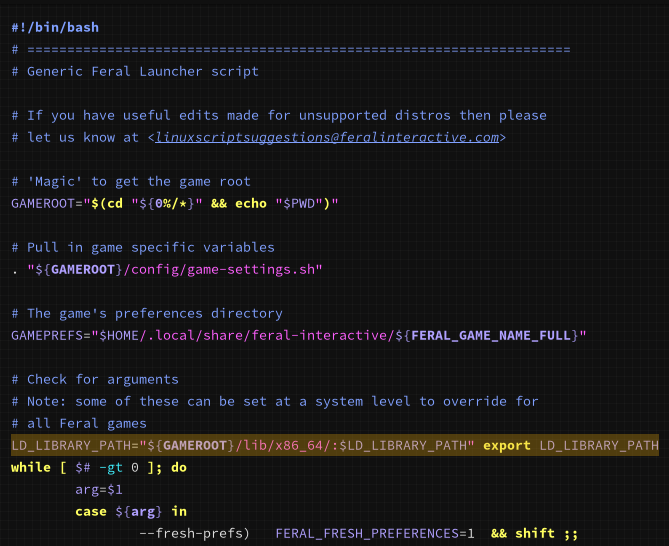
So it looks like this (this is not the complete file!):
#!/bin/bash
# ====================================================================
# Generic Feral Launcher script
# If you have useful edits made for unsupported distros then please
# let us know at <[email protected]>
# 'Magic' to get the game root
GAMEROOT="$(cd "${0%/*}" && echo "$PWD")"
# Pull in game specific variables
. "${GAMEROOT}/config/game-settings.sh"
# The game's preferences directory
GAMEPREFS="$HOME/.local/share/feral-interactive/${FERAL_GAME_NAME_FULL}"
# Check for arguments
# Note: some of these can be set at a system level to override for
# all Feral games
LD_LIBRARY_PATH="${GAMEROOT}/lib/x86_64/:$LD_LIBRARY_PATH" export LD_LIBRARY_PATH
while [ $# -gt 0 ]; do
arg=$1
case ${arg} in
--fresh-prefs) FERAL_FRESH_PREFERENCES=1 && shift ;;
--system-asound) FERAL_SYSTEM_ASOUND=1 && shift ;;
--version) FERAL_GET_VERSION=1 && shift ;;
*) break ;;
esac
done
The game should now start without errors. Please note that there's some first-run process (be it shader compilation, extracting files or whatever) that needs to be completed. If the game crashes during this process, just start it again, the process will continue. Might crash several times.
More Deus Ex: Mankind Divided™ guides
- Uses for Neuropozyne★ 5 (274)28k views440 ♥2 minUpdated Apr 30, 2017
- All Unique Weapon Locations - Video Guide★ 5 (289)22k views558 ♥2 minUpdated Sep 13, 2016
- Deus Ex Mankind Divided Achievements★ 5 (648)22k views732 ♥14 minUpdated Sep 19, 2017
- Praxis Kits Location★ 5 (660)21k views1.5k ♥5 minUpdated Oct 14, 2016
- Full achievements guide ('chronologically' / by location)★ 5 (1k)21k views1.9k ♥40 minUpdated Jun 4, 2018
- Deus Ex: Mankind Divided 100% Achievement Guide★ 5 (534)19k views974 ♥26 minUpdated Sep 4, 2024


🔥 Popular guides
- Upgrading to PremiumTeam Fortress 2★ 5 (20k)1441k views11k ♥6 minUpdated May 11, 2022
- No More Room in Hell Official ManualNo More Room in Hell★ 5 (2.8k)569k views2.1k ♥29 minUpdated Apr 22, 2019
- NMRiH Community Hosting GuidesNo More Room in Hell★ 5 (526)351k views653 ♥1 minUpdated Aug 10, 2022
- ULTIMATE GUIDE FOR GAME DEV TYCOONGame Dev Tycoon★ 5 (5.8k)326k views10k ♥4 minUpdated 23 Jan, 2014
- How to 'Git Gud' Soon™MORDHAU★ 5 (2k)318k views3k ♥68 minUpdated Nov 16, 2024
- Лучшие кооперативные игры SteamPAYDAY 2★ 5 (1.5k)315k views2.1k ♥56 minRussianUpdated Apr 27, 2025






This guide was created by its original author on the Steam Community. Are you the author and want it removed? Request removal.