How 2: Change the Menu Music in TS Classic
Programs Needed
DISCLAIMER: I am not going to teach you how to make a .wav file in this guide, but there are plenty of youtube videos on it. Anyway, onto the required programs:
- Serz, which can be found in the Railworks Directory
- Audacity, for making your new theme (if you choose to make your own) [audacityteam.org]
IMPORTANT NOTE:
I have noticed that as of late 2020, that Audacity no longer works, and if that is the case just find a standard wav converter on the web. Don't worry, there's plenty to choose from.
Step 1: Getting Your New Menu Theme
For my tutorial, I will be refering to my TSRemix theme that I made myself.
Step 2: Locating the Menu Music's Location
In the normal Railworks directory, go to the following
(Wherever you installed steam to)\Steam\steamapps\common\RailWorks\Assets\Kuju\RailSimulatorCore\Audio
Place your .wav file inside this directory.
Step 3: PROXYXML File Editing
Go into the UIAudioControl PROXYXML File (if you have a PROXYBIN File run the PROXYBIN File through Serz).
Press Ctrl + F and find UI_FrontEndLoop . When you find it it should say the following (in the green box)
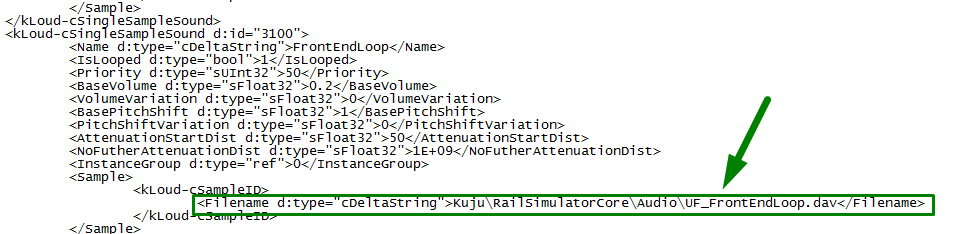
Change this line, removing the UI_FrontEndLoop.dav to (whatever the name of the .wav file is).wav
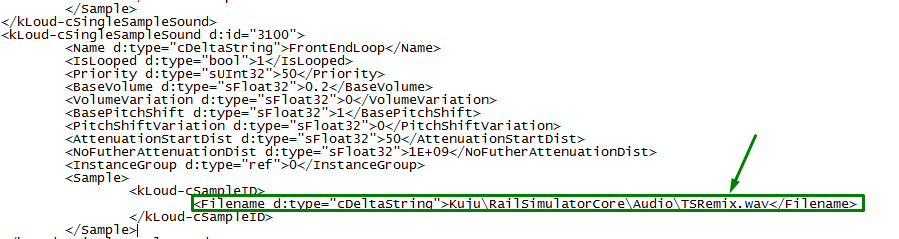
My example is above.
You could just keep the UI_FrontEndLoop but all you would have to do is change the name for the .wav file to UI_FrontEndLoop and the .dav to .wav .
Step 4: Testing
Final Remarks
- Mattg17
- Driving and Firing Steam Engines★ 5 (1.1k)33k views1.1k ♥14 minUpdated Jan 3, 2013
- [ENG] TS2015 - Controls Overview★ 5 (641)26k views837 ♥3 minUpdated Mar 10, 2015
- Route maps★ 5 (408)22k views575 ♥28 minUpdated Mar 21
- Fixing the Out of Memory Error★ 5 (206)13k views302 ♥12 minUpdated Jun 15
- Horn and Bell Use★ 5 (352)11k views345 ♥11 minUpdated Dec 26, 2025
- The Simple guide to - Scenario Creation★ 5 (278)10k views541 ♥15 minUpdated Nov 25, 2015



- Upgrading to PremiumTeam Fortress 2★ 5 (20k)1441k views11k ♥6 minUpdated May 11, 2022
- No More Room in Hell Official ManualNo More Room in Hell★ 5 (2.8k)569k views2.1k ♥29 minUpdated Apr 22, 2019
- NMRiH Community Hosting GuidesNo More Room in Hell★ 5 (526)351k views653 ♥1 minUpdated Aug 10, 2022
- ULTIMATE GUIDE FOR GAME DEV TYCOONGame Dev Tycoon★ 5 (5.8k)326k views10k ♥4 minUpdated 23 Jan, 2014
- How to 'Git Gud' Soon™MORDHAU★ 5 (2k)318k views3k ♥68 minUpdated Nov 16, 2024
- Лучшие кооперативные игры SteamPAYDAY 2★ 5 (1.5k)315k views2.1k ♥56 minRussianUpdated Apr 27, 2025






This guide was created by its original author on the Steam Community. Are you the author and want it removed? Request removal.