How to create a private server to play with your friends!? | (Listen Server)
Intro / basics + tutorial video
____ Click HERE to join us and Say Hello on Insurgency 2 United if my guide was helpful!____


 video starts at 3:33
 • With over 10k concurrent players[steamcharts.com] on this Insurgency Free Weekend it has been recently quite hard to find available slot on Co-op servers. this Steam guide will help us getting a coop / duel session between friends!
http://steamcommunity.com/sharedfiles/filedetails/?id=298328006
• Easier than dedicated one to create, Listen servers are run on the same machine as the game client.
When the client disconnects, the server is shut down, as the server and host client are run together.
So check game cache integrality (game properties) before host it in order to avoid crashs.
• Listen servers usually cannot support too many players, due to bandwidth and CPU requirements.
So please optimize your internet connection so close others useless programs and run only the minimal requiered.
(Do not even try if you are on the neighbourhood wireless!)
Or you can also use Steamer tool:
https://steamcommunity.com/sharedfiles/filedetails/?id=1952703939
How to proceed?!
• Launch the command prompt (executable name cmd.exe )
Enter:
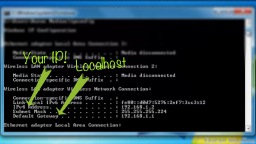
Port Forwarding:
• Copy/paste your default gateway IP in your web browser: (url tab)
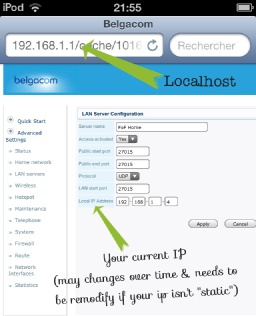
Insurgency requieres only the port for the Steam Server:
• port: 27015 UDP & your IPv4 address
• Right click on the game on your steam library and click "Properties". Once you're there, click on "Set Launch Options". An empty caption box will show up.
In it, simply type:
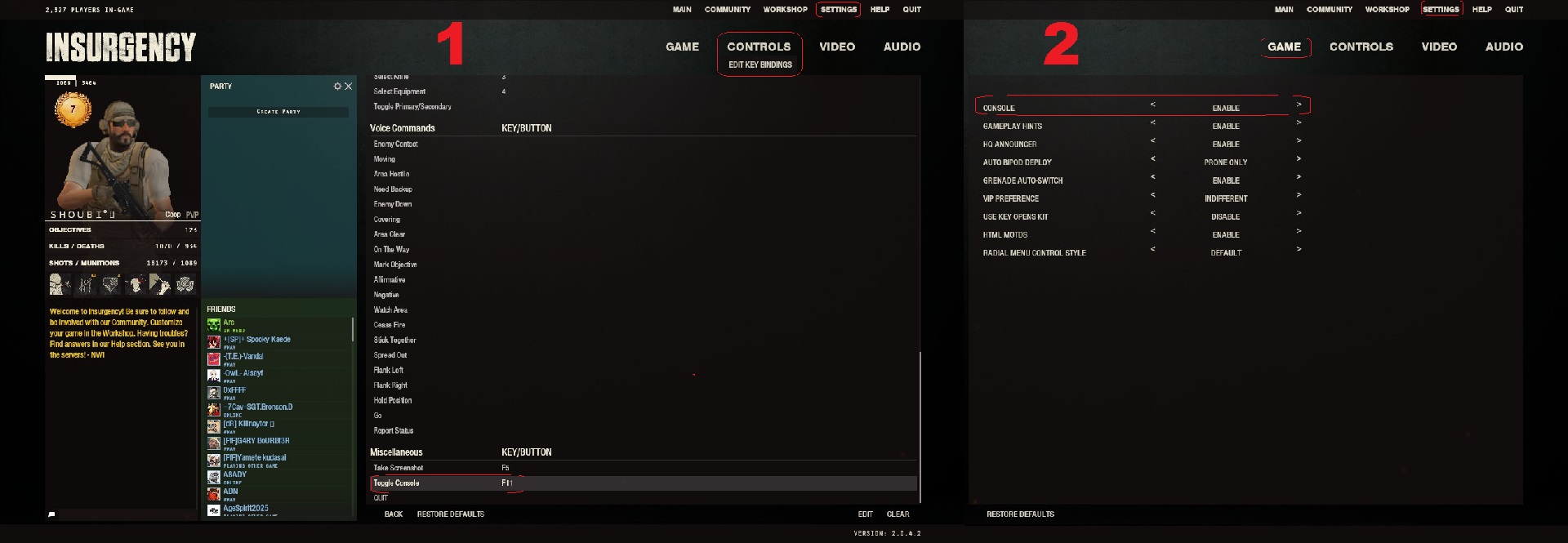
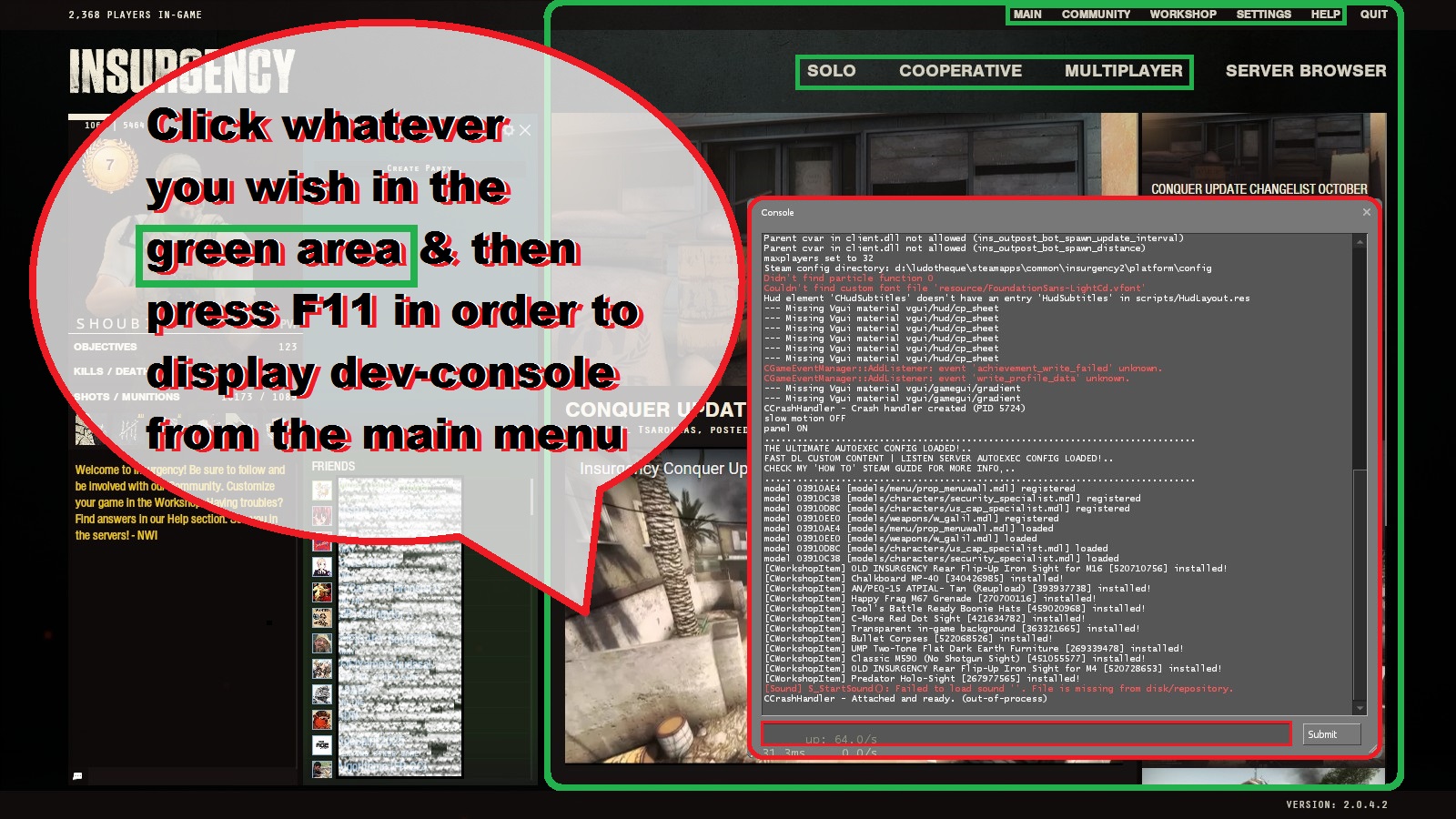 • You will notice that a console has now appeared on the main menu. Keep it there! (Dev-console is used to submit some commands variables == cvar)
• You can also pop it up when needed by binding it (F11 as an example) with the following cvar: (with quotes)
• If you go above your limit all the other players in your server will see their ping increased to extreme heights.
• You just have to test how many players your network can handle but most of the times 6+ slots becomes harder to manage. • Once it's done display console again and type in:
• There you go! You have a fully working server now! Invite your friends in! (most of the time they are able to join you directly from steam friend list or internet server browser as usual)
• If it still doesn't work or you're having other issues see the troubleshooting section bellow:
Server Configuration and Handy Tweaks
connect <IP>;password <passwd> (And how your steam friend join it later once secured)
nextlevel <...>
set next lvl
http://steamcommunity.com/sharedfiles/filedetails/?id=306803897 Grab 'autoexec.cfg' file and add it in your 'CFG' folder located in your Insurgency directory (Steam\SteamApps\common\insurgency2\insurgency\cfg)
•Download it HERE! [www.dropbox.com]exec autoexec.cfg (apply changes if it doesn't work!)
Troubleshooting
If your friends still cannot join your server even after you've set it up properly it's most likely because something is blocking network traffic coming from outside. Many anti-virus and firewalls do that by default and you'll have to either temporarily disable them or add Steam and Insurgency to the restrictions.[www.dummies.com]
If it still doesn't work you might want to try these ports too:UDP 1200
UDP 27000 to 27015
UDP 27020
TCP 27030 to 27039
TCP 27015
If you don't know how you just have to follow the instructions on this website[portforward.com]
There you simply have to enter your router's brand and model and then ports for what game you want to forward.
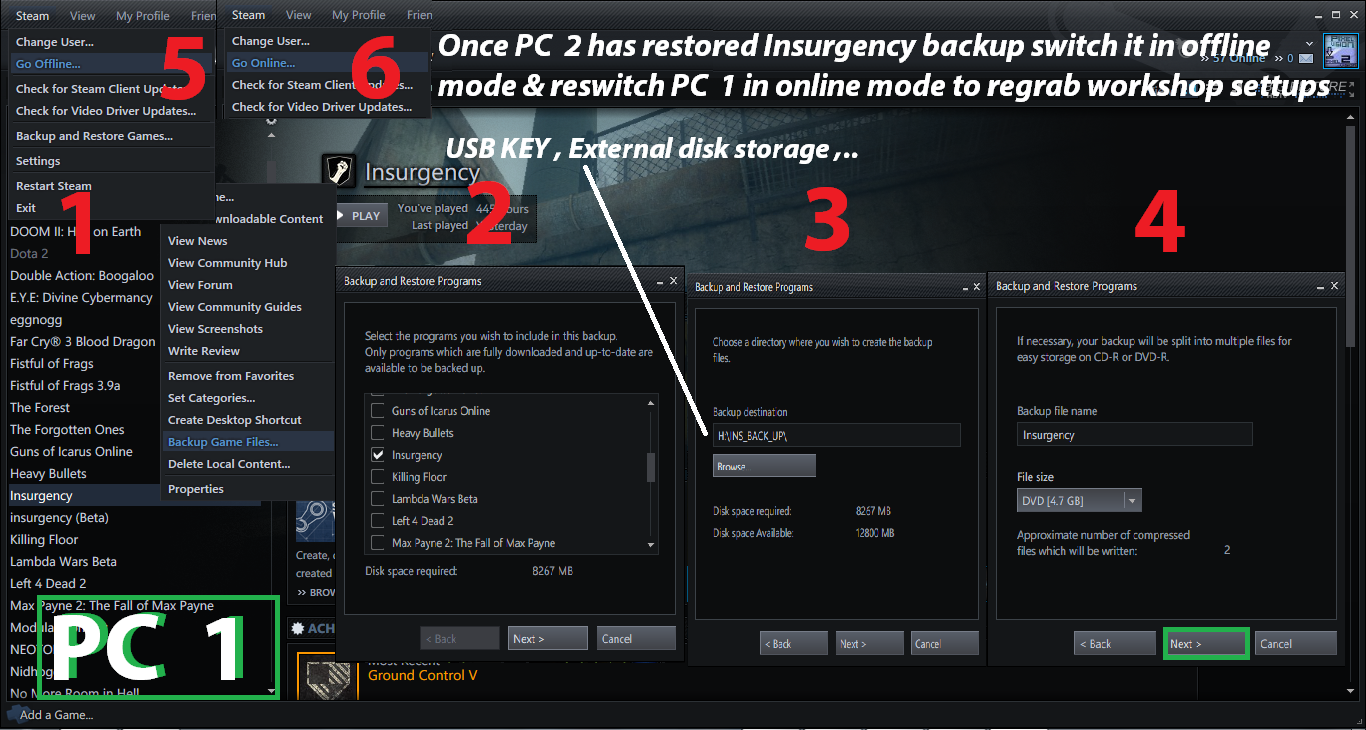
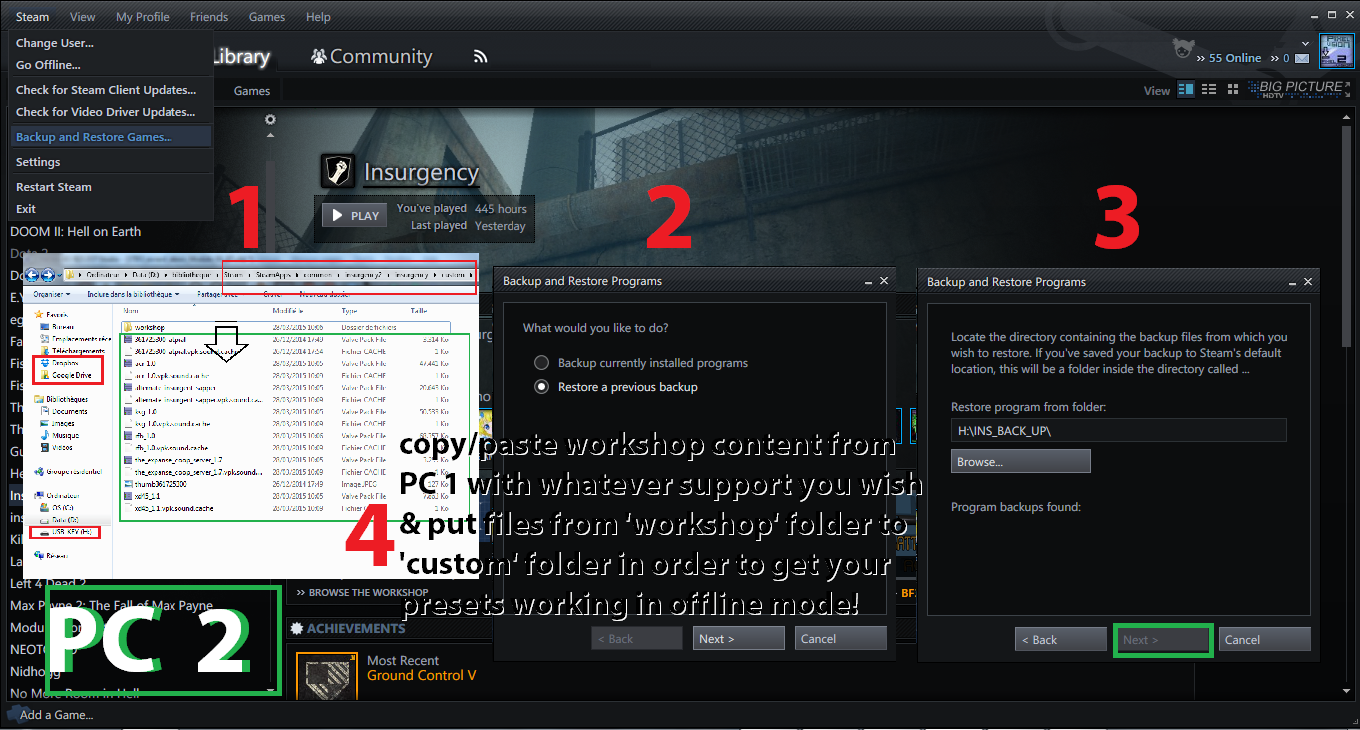
Real LAN Party with a few computers & 1 Shared Steam account!
http://steamcommunity.com/sharedfiles/filedetails/?id=422190563

] sv_lan 1
] map district_coop [PartyTeamMgr] Grace period started. Initializing Steam libraries for LAN server Logging into anonymous gameserver account. Updating player list, server change Client "(1)SHOUBI°♫" connected (192.168.0.21:27005). "(1)SHOUBI°♫" STEAM_1:0:9523700 00:04 48 73 spawning 30000 192.168.0.21:27005 ] status hostname: SHOUBI°♫ version : 1.7.2.3/1723 5980 insecure udp/ip : 192.168.0.11:27015 os : Windows type : listen map : district_coop at: -9439 x, 5479 y, 85 z players : 2 humans, 5 bots (6/0 max) (not hibernating) # userid name uniqueid connected ping loss state rate adr # 2 1 "SHOUBI°♫" STEAM_1:0:9523700 02:51 15 0 active 30000 loopback # 23 2 "(1)SHOUBI°♫" STEAM_1:0:9523700 01:01 838 85 active 30000 192.168.0.21:27005 #end
Outro
Dueling custom server infos
https://steamcommunity.com/sharedfiles/filedetails/?id=2612282363
Donate on website and get !donor command to changemap from regular stock vanilla ones over dueling custom maps ones!!!
more info on the guide!
- The vital importance of BULLETS★ 5 (1k)30k views598 ♥5 minBulgarianUpdated Apr 12, 2020
- General 'real life' tactics that work in Insurgency and any other tactical shooter.★ 5 (727)25k views1k ♥14 minUpdated Apr 1, 2014
- В помощь новичкам★ 5 (663)23k views360 ♥8 minUpdated Oct 23, 2022
- Полезная бурда по экипировке в Insurgency★ 5 (612)23k views503 ♥24 minRussianUpdated Feb 26, 2017
- Секретное достижение ODA 420: что это такое? Как его получить?★ 5 (424)23k views395 ♥1 minRussian
- Моды Insurgency для максимального реализма/Insurgency mods for maximum realism★ 5 (616)19k views1.3k ♥17 minRussianUpdated May 19, 2022





- Upgrading to PremiumTeam Fortress 2★ 5 (20k)1441k views11k ♥6 minUpdated May 11, 2022
- No More Room in Hell Official ManualNo More Room in Hell★ 5 (2.8k)569k views2.1k ♥29 minUpdated Apr 22, 2019
- NMRiH Community Hosting GuidesNo More Room in Hell★ 5 (526)351k views653 ♥1 minUpdated Aug 10, 2022
- ULTIMATE GUIDE FOR GAME DEV TYCOONGame Dev Tycoon★ 5 (5.8k)326k views10k ♥4 minUpdated 23 Jan, 2014
- How to 'Git Gud' Soon™MORDHAU★ 5 (2k)318k views3k ♥68 minUpdated Nov 16, 2024
- Лучшие кооперативные игры SteamPAYDAY 2★ 5 (1.5k)315k views2.1k ♥56 minRussianUpdated Apr 27, 2025






This guide was created by its original author on the Steam Community. Are you the author and want it removed? Request removal.