How to customize your BOTS
Step 1
it's usually placed in [C:\Program Files (x86)\Steam\steamapps\common\Half-Life\czero]
or
you can just go to your steam library then right click CS:CZ > Properties > Browse local files
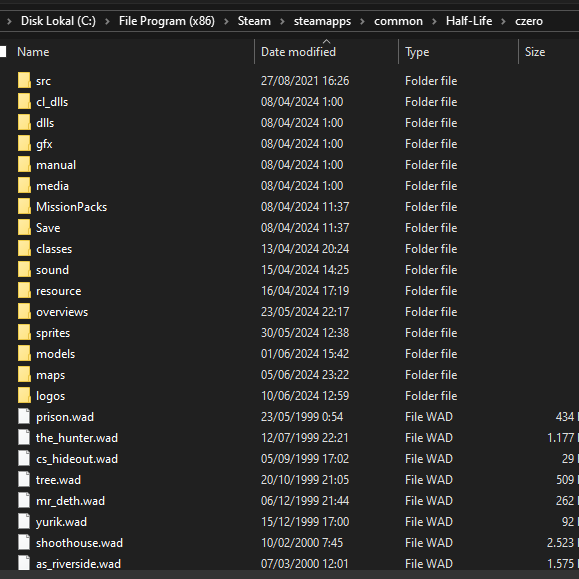
Step 2
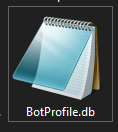
and then open it use Notepad
Step 3
This section include all the bots name, difficulty, their favorite weapon, and favorite class
You can just change their name, based on what difficulty you want to change
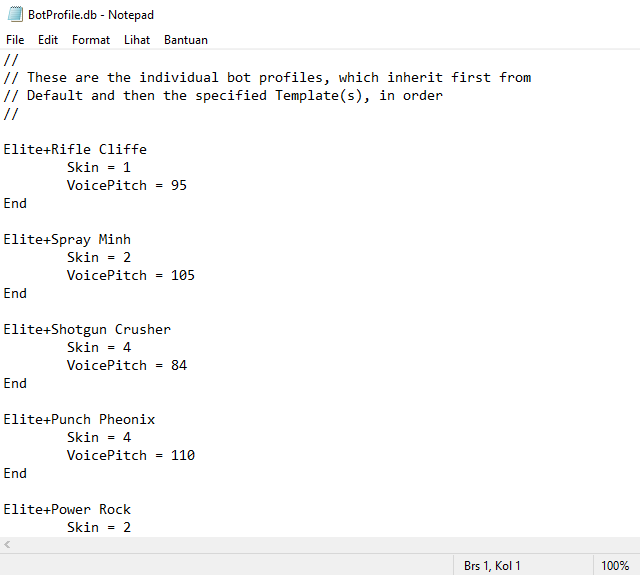
Skin = (Their class favorite in order)
Voicepitch = (Their sound pitch while they talk, lower = heavier, higher = chipmunk)
Elite bots are appear in EXPERT difficulty only
Expert bots are appear in EXPERT difficulty only
Very Hard bots are appear in HARD difficulty only
Hard bots are appear in HARD difficulty only
Tough bots are appear in NORMAL and HARD difficulty
Normal bots are appear in NORMAL difficulty only
Fair bots are appear in NORMAL and EASY difficulty
Easy bots are appear in EASY difficulty only
You can just change their name be as creative as you want and they will appear based on what difficulty you choose
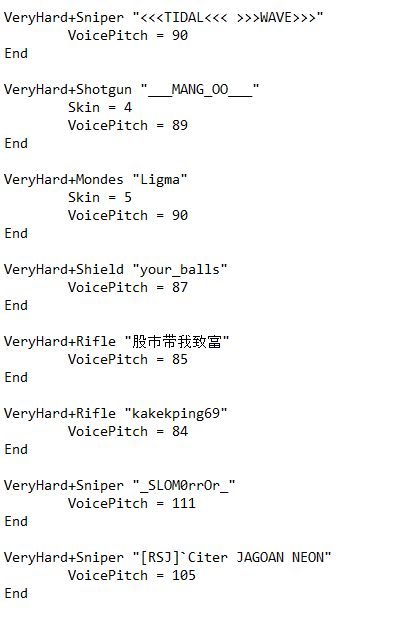
Here an example of customed bots name of mine and they're appear in HARD difficulty only...
have fun customizing your own bots!~~
Warning
- Some name of bots would error if you use symbols such as [.,:;] and else, because system will read them as a config that will cause a domino effect error that cause all bots name beneath them will be error
- But no worries, not overall symbols are restricted, cuz some symbols such as [<>~`[]()] are allowed (just check my sample @Step 3), But just in case... better avoid some custom character/symbols and just use an alphabet and numeric
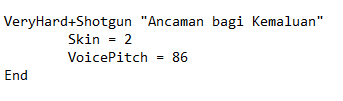
- The 'space' usage between the name sometimes also cause an error. So, you must input quotation mark (") before and after the name, like this...
- Counter-Strike: Condition Zero Bot Commands and Navigation Mesh Editing... The Definitive Guide★ 5 (803)25k views646 ♥12 minUpdated May 10, 2014
- Русификация Counter-Strike: Condition Zero от Фаргус★ 5 (460)19k views510 ♥1 minRussianUpdated Feb 24, 2025
- Startparameter - Launch Options★ 4 (111)17k views97 ♥3 minUpdated Jan 7, 2021
- The Counter-Strike: Condition Zero Custom Mission System★ 5 (260)9.5k views215 ♥16 minUpdated Dec 31, 2014
- How to change the bots' ability★ 4 (144)6k views191 ♥1 minUpdated Feb 21, 2022
- This guide explains weapon/player skins and how to install them★ 4 (102)5k views91 ♥2 minUpdated Jan 7, 2021





- Upgrading to PremiumTeam Fortress 2★ 5 (20k)1441k views11k ♥6 minUpdated May 11, 2022
- No More Room in Hell Official ManualNo More Room in Hell★ 5 (2.8k)569k views2.1k ♥29 minUpdated Apr 22, 2019
- NMRiH Community Hosting GuidesNo More Room in Hell★ 5 (526)351k views653 ♥1 minUpdated Aug 10, 2022
- ULTIMATE GUIDE FOR GAME DEV TYCOONGame Dev Tycoon★ 5 (5.8k)326k views10k ♥4 minUpdated 23 Jan, 2014
- How to 'Git Gud' Soon™MORDHAU★ 5 (2k)318k views3k ♥68 minUpdated Nov 16, 2024
- Лучшие кооперативные игры SteamPAYDAY 2★ 5 (1.5k)315k views2.1k ♥56 minRussianUpdated Apr 27, 2025






This guide was created by its original author on the Steam Community. Are you the author and want it removed? Request removal.