How to Improve Prison Architect Performance / Lag
READ FIRST: Who Is This Guide For?
This guide is for people who want to maximise performance in Prison Architect.
Whenever this guide says "do X" or "don't do X", I am ONLY considering performance and the ways you can control it. I am NOT saying that doing these things will improve your prison or your game experience. There are other guides and wikis for that.
Following this guide exactly may in fact hurt your experience, so when reading this guide, you have to decide on your own what you're willing to sacrifice for performance. If you're not running a mega prison and not running on a potato, you may prefer to play with settings, mods, and designs that use more CPU but enhance your experience.
Are There Mods for Improving Performance?
No.
Modders do not have the same level of access to the game's code that they might have for other games like Minecraft. Because of this, I do not know of any mod that is intended to improve performance that doesn't sacrifice vanilla functions*. Most mods will in fact hurt performance due to the scripts they need to run, so if you want to maximise performance, you should disable mods which you can live without.
However, there are mods which are worth the potential performance impact, and mods which sacrifice certain vanilla functions for very specific potential improvements.
*2025-09-19: I've since learnt of one such mod, but it deserves its own section. See the Shader Mod section below this section for more info.
Shader Mods / Fixing FPS Drops in Snowy Weather
So why is this mod not in the "Mods For Improving Performance" section? Because I don't experience a drastic slowdown in snowy weather, and I personally noticed no increase or only slight FPS increase with this mod installed. At one point my graphics drivers crashed.
However, I probably made user errors, my hardware is not your hardware (jjwalker also says this in their mod description), and I've seen a few people independently mention large FPS drops in snowy weather. If you have the target graphics setup for this mod, this mod could greatly improve performance.
It also looks pretty.
Save Editing
- If cloud save is checked in the Save Menu, temporarily uncheck it
- Save a copy of your prison
- Open the Save Game menu again and click on the file path at the bottom of the list of saved games
- Find your save file and drag it into Notepad++ or similar text editor
- Find the parameter to change, make changes, and save
- Load prison in-game and check if everything works
- Save a copy to cloud if you want
System Options
- Start Prison Architect
- Open Task Manager (Ctrl-Alt-Del > Task Manager or Ctrl-Shift-Esc)
- Right click Prison Architect > Go to details
- Right click PrisonArchitect64.exe > Set priority > High
You will have to do this each time you start Prison Architect. Making Prison Architect start in High priority every time requires starting it with cmd.exe, registry editing, or a third-party program. I can't recommend any of those options unless you know what you're doing.
I am not familiar with other operating systems.
Game Options
- Turn off filtering
- Change autosave frequency to whatever you can tolerate
- Turn off Toggle Shadows
- Go over your mod list and turn off mods you can live without
- Make sure you're not recording a time lapse
- Mutators will be covered later
- Turn on Vertex Buffer Objects, save, exit and reload
Objects, Entities, and Utilities
Sell or dump boxes and materials which you are not using, or at least make sure your Storage zone is compact. Having boxes and materials scattered over a wide space can cause lag.
If you have large numbers of unwanted entities like dead bodies or unwanted objects like dirty laundry, you can use the Murgh Devtools mod to delete them.
Planning and Construction for New Prisons
While you may already have a large prison that you want to improve performance for, there are a few things you can consider if you are planning a new large prison:
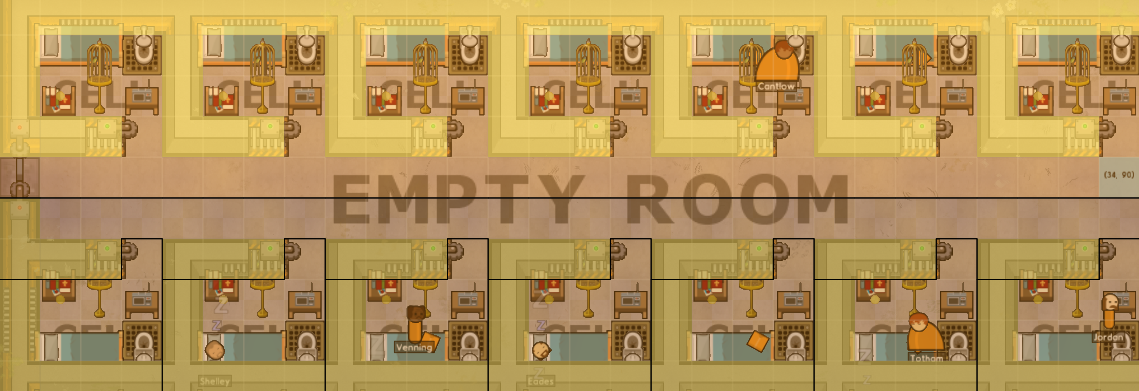 (In this example, I've used the Empty Room to artificially force the south cells to be individual cells.)
Why? Switch over to Logistics > Food Distribution to see (the example cell block is in centre-left):
(In this example, I've used the Empty Room to artificially force the south cells to be individual cells.)
Why? Switch over to Logistics > Food Distribution to see (the example cell block is in centre-left):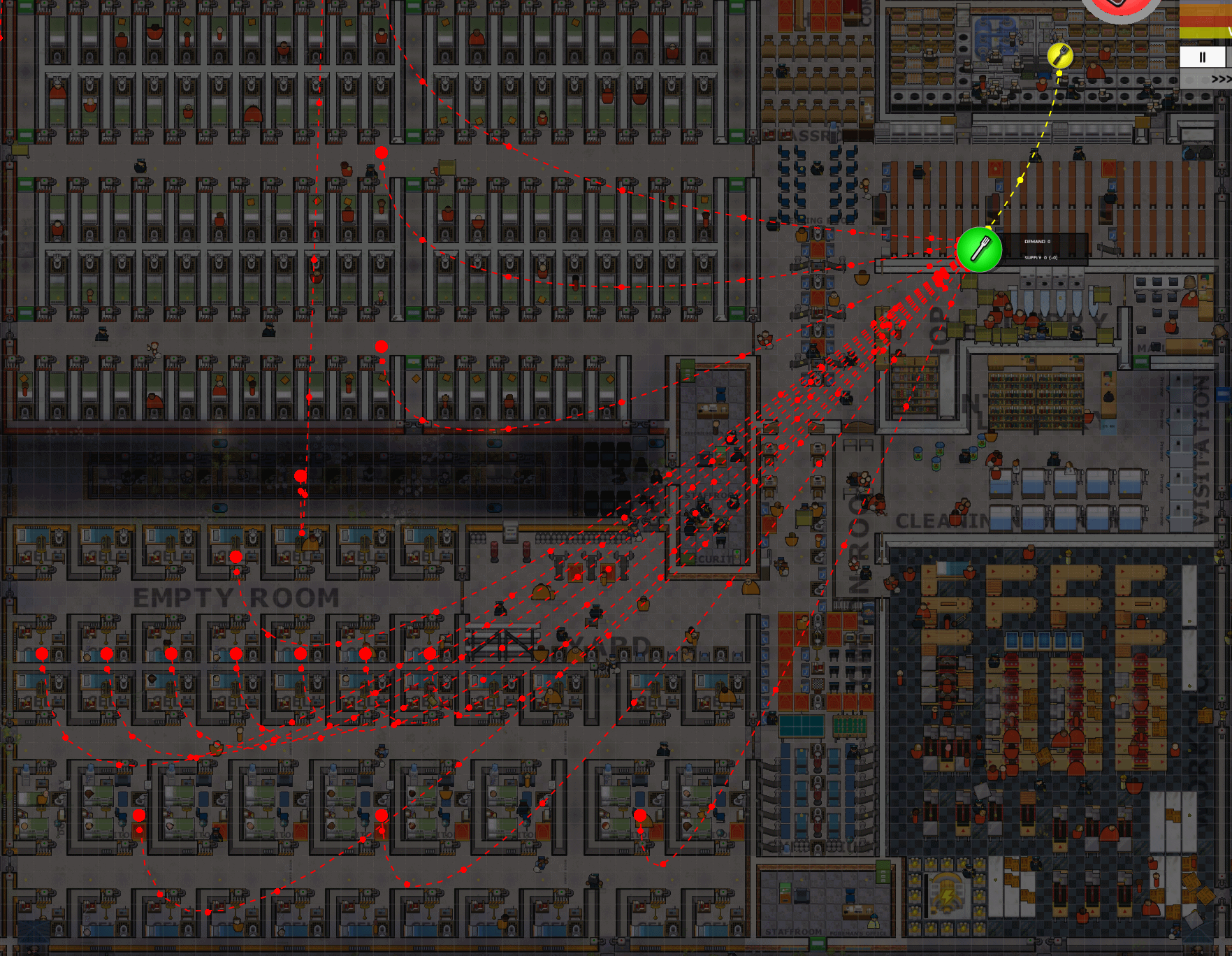
Or see Logistics > Laundry Distribution:
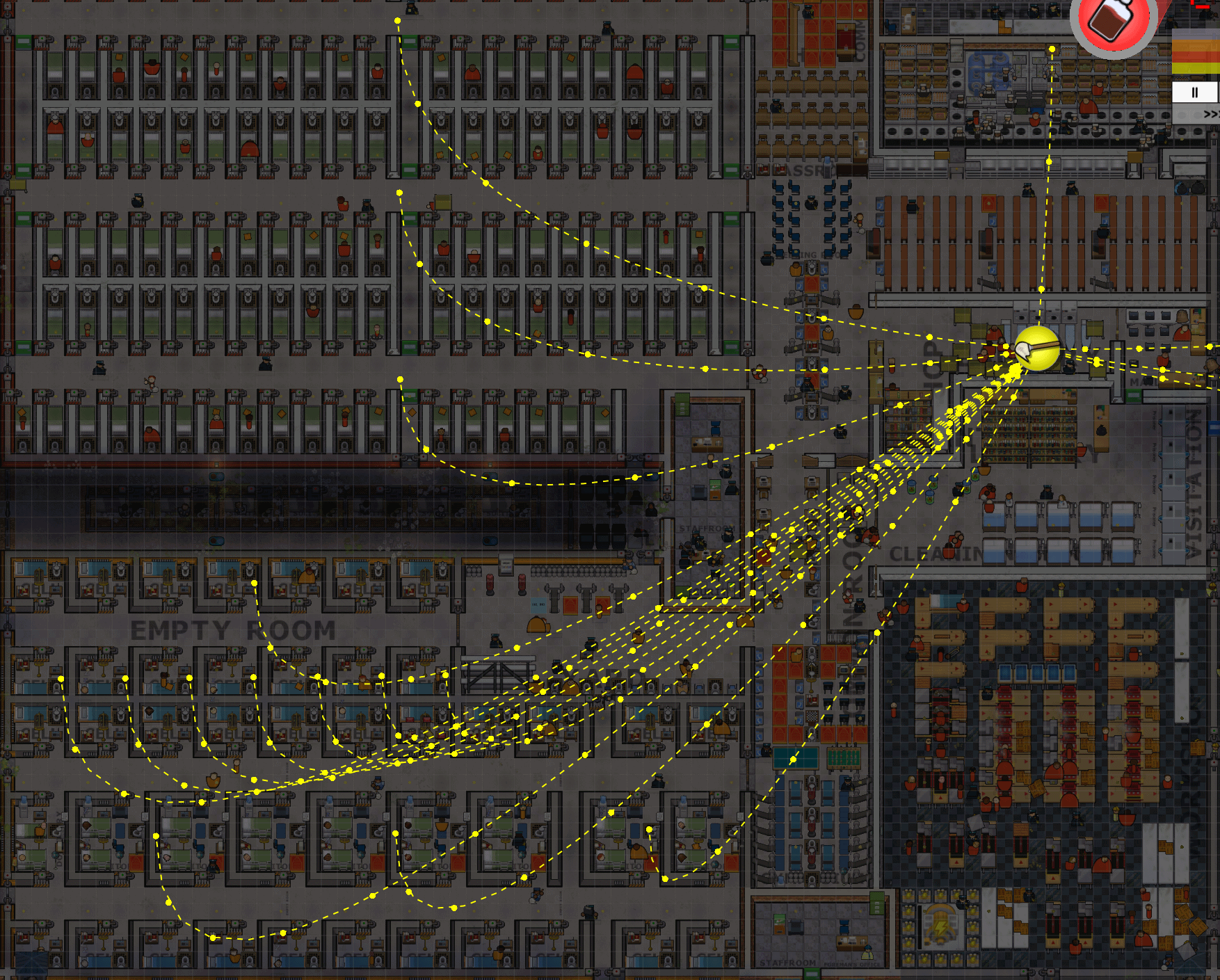 The north cells are a single block and can connect to a canteen and a laundry with one connection. The south cells are connected individually to the canteen and laundry, making calculations more complicated.
Some common reasons cells might be forced to be individual cells:
The north cells are a single block and can connect to a canteen and a laundry with one connection. The south cells are connected individually to the canteen and laundry, making calculations more complicated.
Some common reasons cells might be forced to be individual cells:- The cell door opens directly into an outdoors corridor
- A room type that doesn't allow grouping has been zoned right up to the cell door
Unlike cells, dormitories do not group into cell blocks in vanilla. The Ozone's Fixes mod allows dormitories to group.
Land Expansions
For best performance, don't buy land expansions.
This obviously might not be the experience you want, so as mentioned at the top, you can decide which parts of this guide you're willing to do.
Note there appears to be an issue where buying too many land expansions will cause job assignments to break, independent of performance as measured by FPS. I have not systematically tested how many is too many or whether "too many" varies with the system.
I have not tested if an unexpanded Large map has better performance than a Small map expanded to the same size. The unexpanded Large map will have a time warp factor applied to make the game time pass slower relative to real time, while the Small map will not, so game time to real time ratio should never be used as a measure of lag.
Staff Needs, Gangs, and DLC Settings
These options add more behaviours to your staff and your prisoners respectively, adding more elements to gameplay. But more behaviours means more work for the game. Staff pathfinding for needs especially is very inefficient in large prisons, with staff crossing the prison multiple times to fulfill needs when they already have everything they need in the room they're in.
DLC settings which create new entity and object states and new entities, like Dynamic Reputations (Island Bound), Tropical Fever (Jungle Pack), and Rats (Perfect Storm), while not as intensive as Staff Needs and Gangs, should also be re-considered.
The performance impact of the free DLCs (Free for Life and Cleared for Transfer) is probably not as severe since they don't create new entities or pathfinding, but be aware that they might still have a performance impact.
Dynamic Reputations: Can be disabled mid-game, though prisoners will keep the reputations they've gained
Tropical Fever and Rats: I have not tested whether existing sick prisoners or existing rats need to be deleted. Look forPrisoner Transfers (Cleared for Transfer):
Weather, Temperature, and Fog of War
Weather can only be changed mid-game if you have Perfect Storm DLC (it seems the game didn't have code for refreshing the weather table mid-game until Perfect Storm). If you don't have Perfect Storm, you can edit the save file to delete
Temperature and Fog of War can be changed mid-game. You will lose the ability to use hot water for sinks and showers (which affects tray washing speed and sector grading respectively), and you will lose the ability to estimate your guard coverage, as well as the realism. But you spare the game from setting these statuses for every tile.
Wiring and Connections (Logical Wiring)
These are the objects in the Utilities > Wiring tab. I call their wires logical wiring to distinguish them from electrical wires.
Door Control Systems can only be connected to servos, while Door Timers can be connected to any other logical wiring object.
You could reduce the number of connections per object by connecting a Door Timer to a few Logic Circuits set to = , and then connecting the Logic Circuits to a few servos each. I haven't tested the performance impact of this compared to using multiple Door Timers.
Decay/Floor Dirt (DO NOT USE THE REDUCE DIRT BUILD UP MUTATOR)
DO NOT use the Reduce Dirt Build Up mutator to resolve decay/floor dirt. The mutator runs buggy calculations on tiles and actually decreases performance by 10-15%. ONLY the setting above resolves decay/floor dirt.
Existing dirt will still need to be cleaned. You can wait for janitors and gardeners to clean it or follow Step 4 of @🐶Big-Z🧟's guide to instantly clean it.
You will need a texteditor which supports searching for regular expressions. For example notepad++ would suffice.
Open the 'Find and replace...' dialogue. Ensure it is set to search with regular expressions. Search for 'Con \d+\.\d+' and replace all occurrences with a space. This will clean up your prison.
You will still need janitors and gardeners to handle laundry and forestries respectively, but you might not need to hire as many.
Deliveries
Alternatively, you can use the Fast Deliveries mutator, which causes all objects (ingredients, workshop metal plates, etc.) to spawn in Deliveries, eliminating transport jams and unloading jobs. This mutator may not cause building materials to teleport to workmen.
Other Mutators
Cheats
Edit the save file to add the following in the section at the top:
I've Done Everything In This Guide, Is There Anything Else I Can Do?
Feel free to comment if you've tested something that I haven't.
- HOW TO BUILD A PRISON (updated 8/2/2020)★ 5 (1.4k)51k views2.5k ♥25 minUpdated Feb 7, 2021
- GC13's Easy Guide to a Successful Prison★ 5 (689)47k views1.3k ♥30 minUpdated Aug 23, 2015
- Prison Architect Mega-Guide [V.1.7]★ 5 (1k)39k views2k ♥118 minUpdated Jul 27, 2019
- Professional Prison Security★ 5 (684)28k views1.4k ♥4 minUpdated Mar 8, 2019
- Rooms sizes and efficiency (alpha 0.30)★ 5 (550)26k views987 ♥24 minUpdated Dec 23, 2015
- Get ALL 100% Achievements★ 5 (754)26k views1.3k ♥10 minUpdated May 19, 2020





- Upgrading to PremiumTeam Fortress 2★ 5 (20k)1441k views11k ♥6 minUpdated May 11, 2022
- No More Room in Hell Official ManualNo More Room in Hell★ 5 (2.8k)569k views2.1k ♥29 minUpdated Apr 22, 2019
- NMRiH Community Hosting GuidesNo More Room in Hell★ 5 (526)351k views653 ♥1 minUpdated Aug 10, 2022
- ULTIMATE GUIDE FOR GAME DEV TYCOONGame Dev Tycoon★ 5 (5.8k)326k views10k ♥4 minUpdated 23 Jan, 2014
- How to 'Git Gud' Soon™MORDHAU★ 5 (2k)318k views3k ♥68 minUpdated Nov 16, 2024
- Лучшие кооперативные игры SteamPAYDAY 2★ 5 (1.5k)315k views2.1k ♥56 minRussianUpdated Apr 27, 2025






This guide was created by its original author on the Steam Community. Are you the author and want it removed? Request removal.