How to install mods
Part 0: Some Things Before We Start
Also very important
DO NOT USE MODS ONLINE, NO ONE LIKES CHEATERS. You can use them with your friends online but that is outside the scope of this guide.
Part 1: Disabling the Anti-Cheat
Before we can begin installing mods we will need to get the game ready for mods.
We will need to disable the Easy Anti-Cheat (Doing this will prevent you from using online features, you have been warned!)
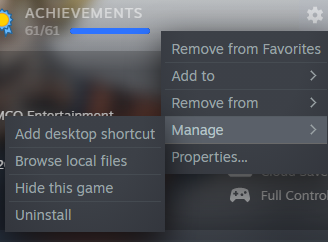 Then going into folder 'EasyAntiCheat'
 And find the file EasyAntiCheat_x64.dll
Now all you have to do is to ether rename it or move it out of the EasyAntiCheat folder (dont delete just in case you need it)
And now Easy Anti-Cheat should be disabled!
Part 2: Eternity Tools
First you will need to download Eternity Tools from here[videogamemods.com]
Move it into a folder (any folder) and unzip it using WinRAR[www.rarlab.com]
You should see something like this
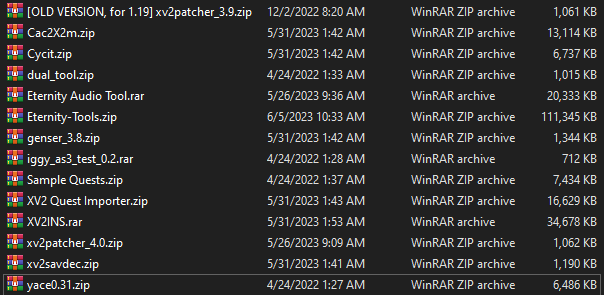 Dont get scared! you just need 2 files, xv2patcher_4.0.zip and XV2INS.zip
First unzip xv2patcher_4.0.zip and you should see something like this
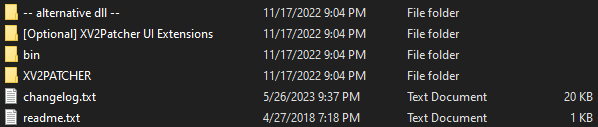
Drag both XV2PATCHER and bin into the DB Xenoverse 2 folder
This is what i should look like before: And what i should look like after: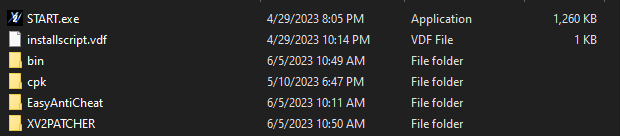
Now you may be wondering what is -- alternative dll -- and [Optional] XV2Patcher UI Extensions
Well -- alternative dll -- is for when you have gamepad issues and [Optional] XV2Patcher UI Extensions is for Optional things like controlling CPU allies. I explain it more further down the guide in Part 5.1 and part 5.2
Unzip XV2INS.zip into any folder and you should see this
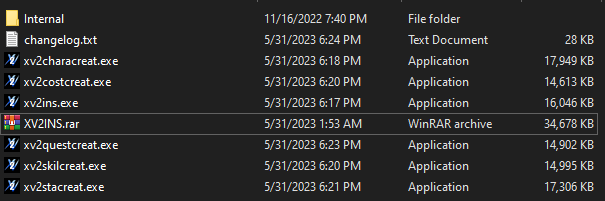 All you will need is xv2ins.exe all the other stuff is for modders so unless you want to get into making mods you wont need them
Open xv2ins.exe and you should see this
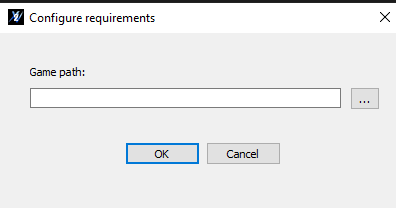 What it needs is DBXV2.exe (NOT START.exe)
DBXV2.exe is located in the bin folder
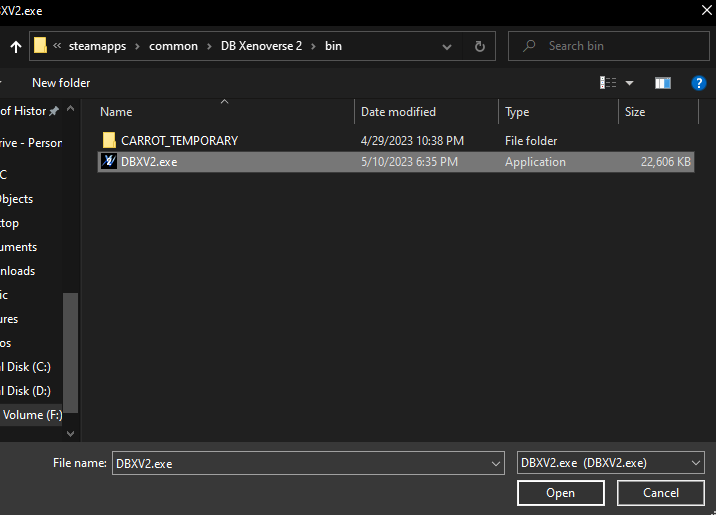 Once you have selected DBXV2.exe click open and then after a few seconds you should see this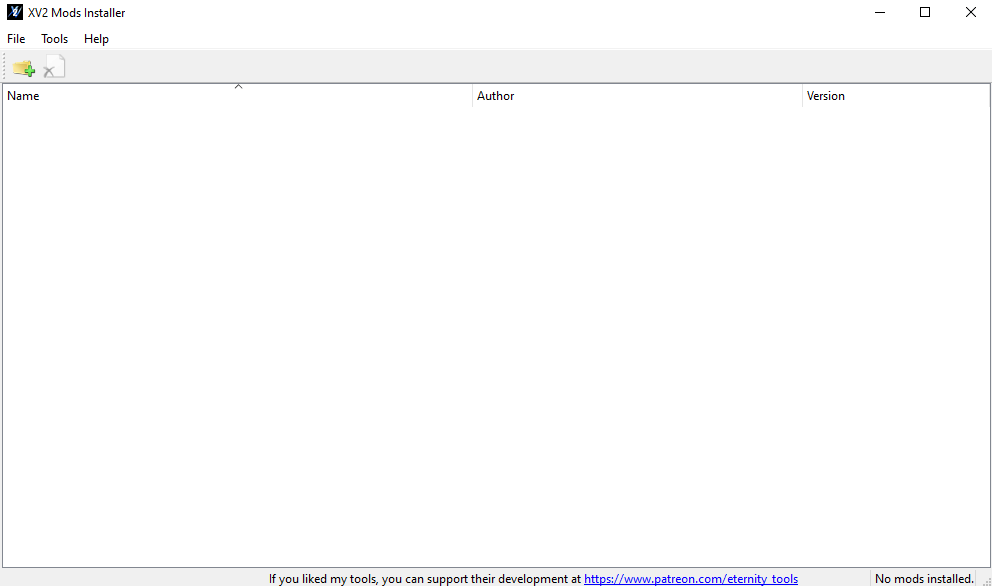
Congratulations! Xenoverse 2 is now mod ready! All you have to do now is install some mods.
You can see how to do that further down at Part 3 of this guide
Part 3: Getting and installing Mods
Before we can install mods we will need to download them.
I use https://videogamemods.com/xenoverse/ for mods but you can get them from anywhere (might not be the safest thing to do tho)
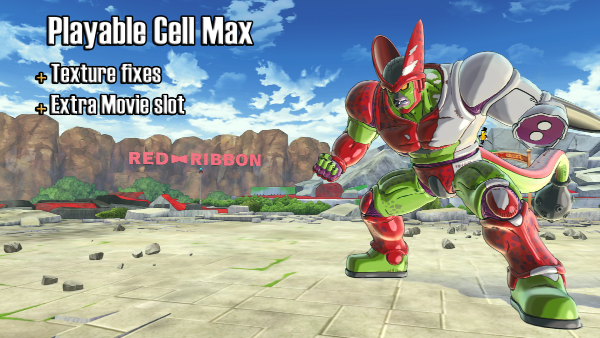
I suggest downloading one mod for now to make sure everything is working.
Once you have downloaded a mode you should see a file called [mod name].x2m or a zip file with extra files usually you shouldn't need to use the other files but if you do there should be a text file to tell you what to do
For the Playable Cell Max mod it is just a .x2m so it will be simpleOpen xv2ins.exe if you dont already have it open and click this icon
 Now all you have to do is find your mod and open it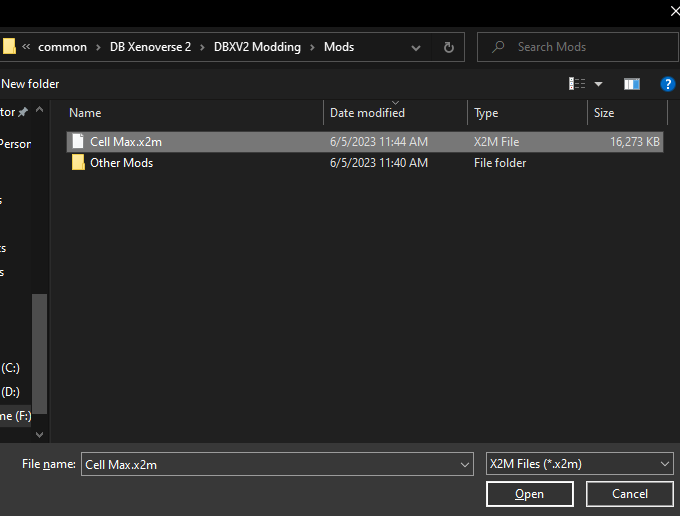
The Mods have to be installed into "slots" (and may come with extra things to install into other slots) for now you can just click "install to new slot(s)" Now your mod should show up
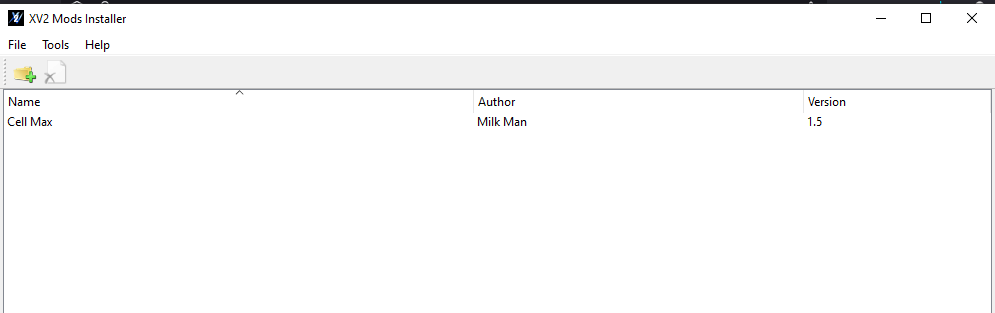 From here you can close the XV2 Mod Installer to open the game DO NOT open it through steam and DONT open it with START.exe ether. You must go into the bin folder and start it from DBXV2.exe instead.
And now if you have done everything correctly your mod should show up!
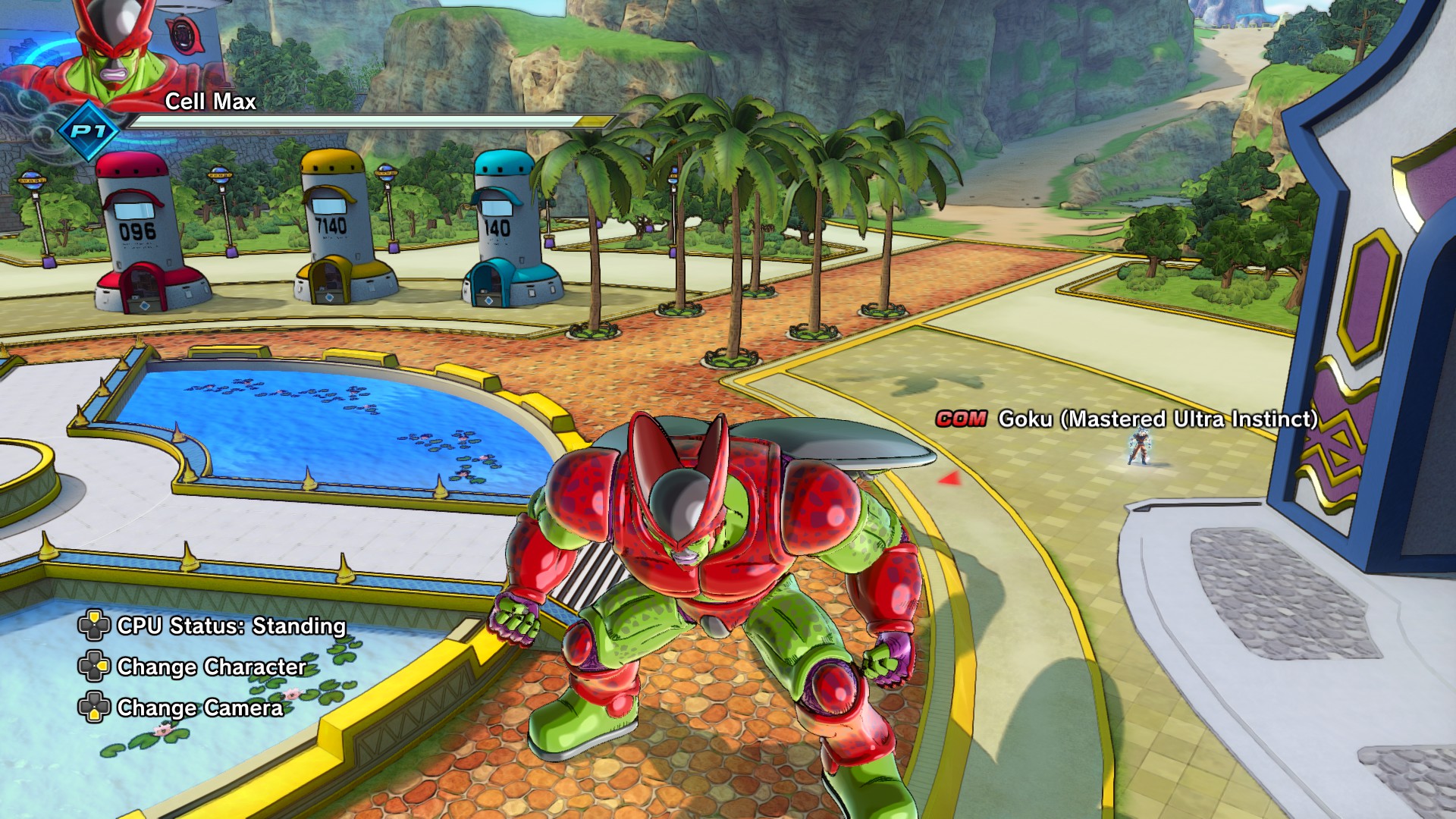
You are now ready to mod Xenoverse 2!
Part 4: Save Editor
The Xenoverse 2 Save Editor is for Editing your save (Duh) you can get a million TP metals or unlock anything! Its very useful
Disclaimer: DO NOT USE ANY ACCOUNT YOU HAVE EDITED ONLINE. No one likes cheaters
Second Disclaimer: BACK UP YOUR SAVE FILE
First download the Xenoverse 2 Save Editor from here[videogamemods.com]
Once you have unziped it into a folder open Xenoverse 2 Save Editor.exeIt will prompt you for the game location
Find the DB Xenoverse 2 folder and click 'select folder'
You should now see this
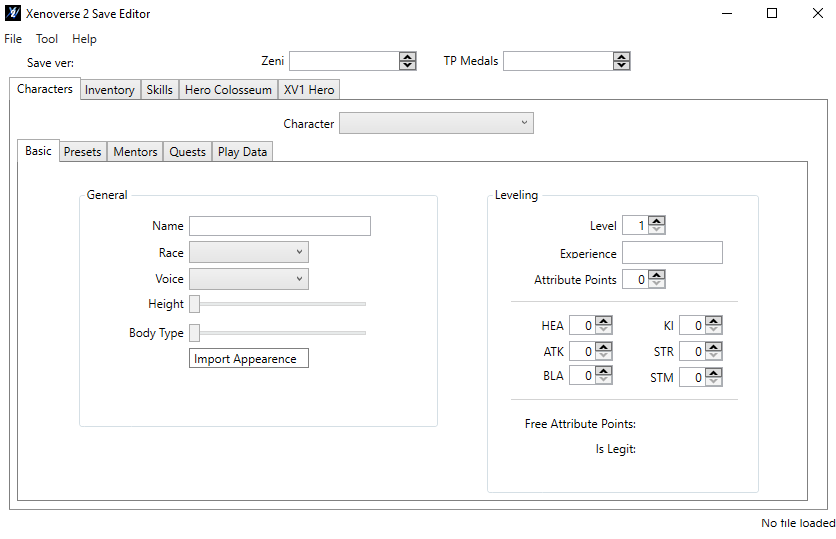
Next click 'file' in the top left corner and then click 'open'
Now you will have to find your DBXV2.sav file
It is located in were ever steam was installed then you go into userdata\[your user ID]\323470\remote\DBXV21
Your save file should be there
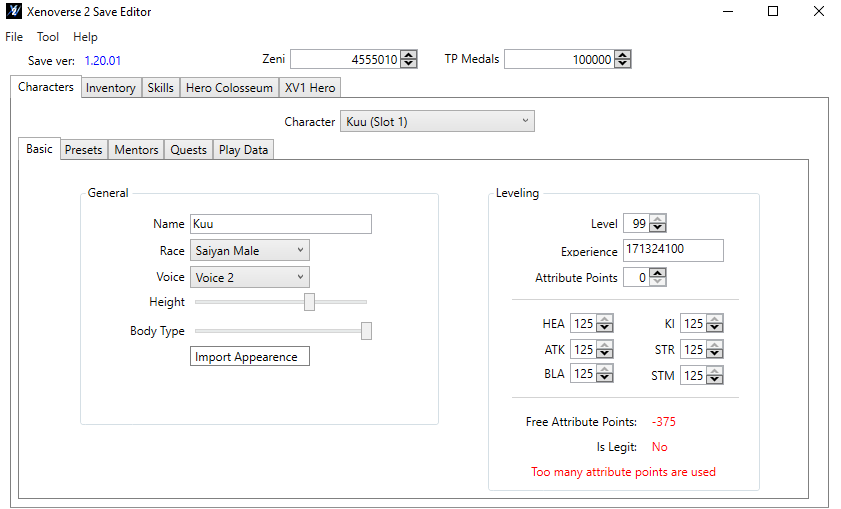
As you may notice i have way to many Attribute points
That is because you can cheat every Attribute to max with this
Remember, do not use this Online
You should now be done!
Part 5: Other Things
This part is for other things that dont need their own part
If you are having Gamepad problems this is for you
In the alternative dll you will find a file called 'dinput8.dll'
Drag dinput8.dll into the bin folder
Then delete xinput1_3.dll (both can not be in the bin folder
This should fix your Gamepad problem(s)
The XV2Patcher UI Extensions allows for these extra features
- Taking control of cpu allies
- Hiding the battle interface
- Dump auto-generated portraits
If you want these all you have to do is merge the Data folder into the games data folder. (done by dragging the Data folder into the DB Xenoverse 2 folder)
Then go into XV2PATCHER folder and open xv2patcher.ini with notepad and set
hide_battle_ui, dump_auto_gen_portrait and take_ally_control to true or what ever you want it to be (hide_battle_ui and dump_auto_gen_portrait should be set to true automatically)
Then you should be done
Part 5.3: Safe Mod SitesThis is a list of sites where you can get mods
Sadly only one for now but if i find anymore i will add them!
Also if you have any you would like to suggest comment below!
Part 6: Conclusion
Xenoverse 2 is a very fun game to mod and mess with.
Good luck with modding Xenoverse 2!
If you have any suggestions for this guide please comment below.
Also if you have issues with this guide please comment below.
- Dragon Ball Xenoverse 2 - All 186 Parallel Quests - RANK Z - Videos★ 5 (738)33k views1.9k ♥77 minUpdated Jul 11
- How to play a Female Majin★ 5 (404)28k views807 ♥13 minUpdated Dec 23, 2016
- The Numbers Guide★ 5 (625)27k views1.3k ♥9 minUpdated Dec 16, 2016
- Buu's house : Majin kids foods & rewards★ 5 (454)25k views929 ♥14 minUpdated May 1, 2017
- I wish for... a simple Wish Guide!★ 5 (484)25k views1k ♥2 minUpdated Apr 13, 2022
- How To Unlock Transformations / Débloquer les éveils★ 4 (188)23k views328 ♥4 minUpdated Nov 27, 2016






- Upgrading to PremiumTeam Fortress 2★ 5 (20k)1441k views11k ♥6 minUpdated May 11, 2022
- No More Room in Hell Official ManualNo More Room in Hell★ 5 (2.8k)569k views2.1k ♥29 minUpdated Apr 22, 2019
- NMRiH Community Hosting GuidesNo More Room in Hell★ 5 (526)351k views653 ♥1 minUpdated Aug 10, 2022
- ULTIMATE GUIDE FOR GAME DEV TYCOONGame Dev Tycoon★ 5 (5.8k)326k views10k ♥4 minUpdated 23 Jan, 2014
- How to 'Git Gud' Soon™MORDHAU★ 5 (2k)318k views3k ♥68 minUpdated Nov 16, 2024
- Лучшие кооперативные игры SteamPAYDAY 2★ 5 (1.5k)315k views2.1k ♥56 minRussianUpdated Apr 27, 2025






This guide was created by its original author on the Steam Community. Are you the author and want it removed? Request removal.