How to use an XBOX controller in The Binding of Isaac
Setting up Joy2Key
(My guide on general Isaac tips and tricks can be found here)
Firstly, download Joy2Key here[joytokey.net] and extract it to wherever you like
Go into the extracted folder and pin the .exe to your taskbar and open it, it will look like this:
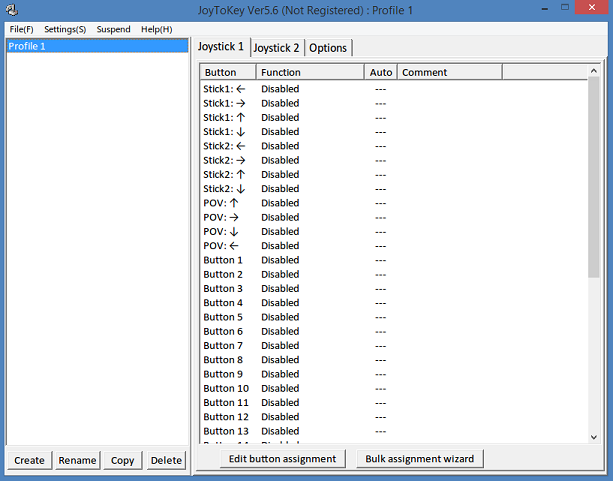
Rename Profile 1 'The Binding of Isaac'
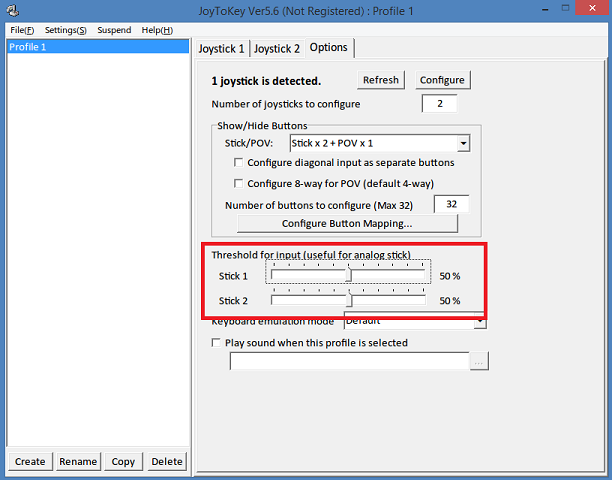 Click on 'Options' and hopefully your gamepad has been detected. At the bottom set the analog stick thresholds to around 50% - if you aren't comfortable with their sensitivity ingame, you can change this to whatever suits you. I find 50% to be a nice comfortable setting.
Now go to 'Joystick 1' to set up the gamepad buttons:
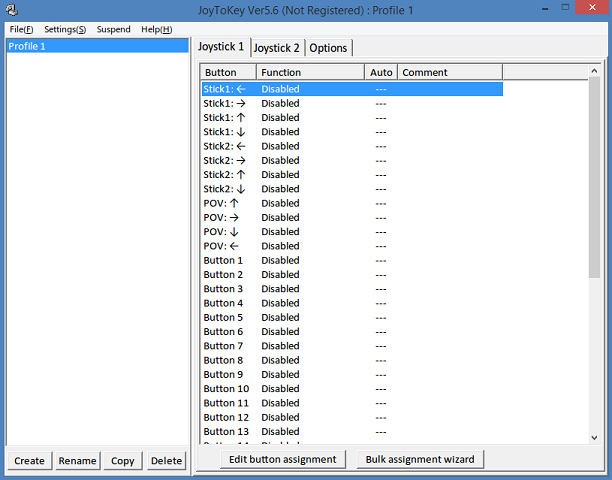 You can now set the buttons to whatever you like. Moving/pressing the buttons on your controller will highlight which one it is on Joy2Key in yellow.
My setup is:
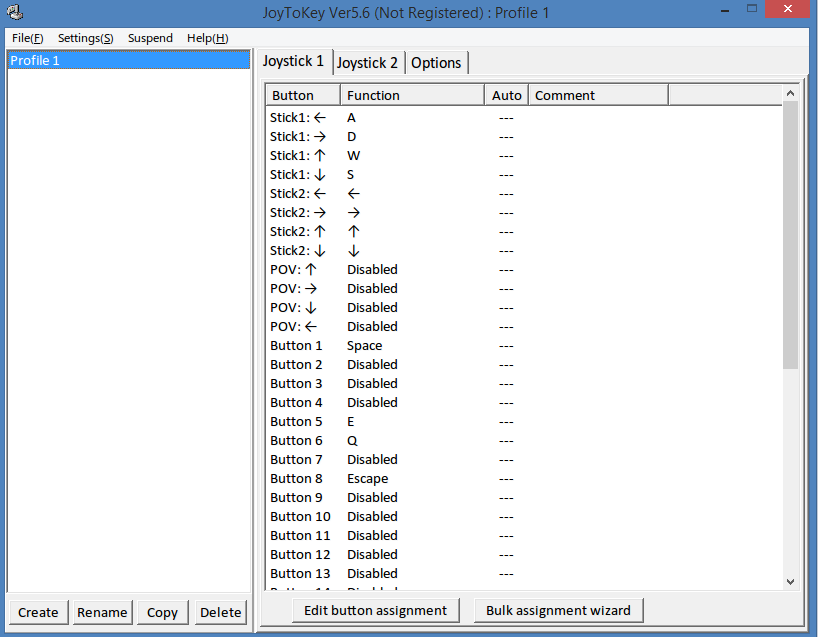 Setup:
Left analog stick moves Isaac
Right analog stick shoots tears
Active Items (Spacebar) are used by pressing A.
Bombs (Shift/E) are used by pressing LB
Pills/Cards (Q) are used by pressing RB
The menu (Escape) is brought up by pressing start
That's it! Enjoy Isaac on your controller! Remember to open Joy2Key each time before you play Isaac and close it when you're finished!

More The Binding of Isaac guides
- Achievement Guide for The Binding of Isaac★ 5 (1k)39k views1.5k ♥9 minUpdated Sep 29, 2018
- Making Bad Items Useful★ 5 (720)37k views549 ♥17 minUpdated Dec 5, 2015
- The Bindening™: A Comprehensive Guide to Everything Isaac★ 5 (2.1k)32k views2.8k ♥155 minUpdated Jul 4, 2015
- Unlocking Broken Achievements [Windows/Mac]★ 5 (565)31k views506 ♥6 minUpdated Mar 12, 2021
- Comprehensive Guide To The Binding Of Isaac★ 5 (980)29k views1.3k ♥75 minUpdated Aug 19, 2015
- «The Binding of Isaac»: руководство по достижениям★ 5 (1.2k)25k views1.4k ♥11 minRussianUpdated Sep 26, 2014




🔥 Popular guides
- Upgrading to PremiumTeam Fortress 2★ 5 (20k)1441k views11k ♥6 minUpdated May 11, 2022
- No More Room in Hell Official ManualNo More Room in Hell★ 5 (2.8k)569k views2.1k ♥29 minUpdated Apr 22, 2019
- NMRiH Community Hosting GuidesNo More Room in Hell★ 5 (526)351k views653 ♥1 minUpdated Aug 10, 2022
- ULTIMATE GUIDE FOR GAME DEV TYCOONGame Dev Tycoon★ 5 (5.8k)326k views10k ♥4 minUpdated 23 Jan, 2014
- How to 'Git Gud' Soon™MORDHAU★ 5 (2k)318k views3k ♥68 minUpdated Nov 16, 2024
- Лучшие кооперативные игры SteamPAYDAY 2★ 5 (1.5k)315k views2.1k ♥56 minRussianUpdated Apr 27, 2025






This guide was created by its original author on the Steam Community. Are you the author and want it removed? Request removal.