[OUTDATED] How to install Wesker & Jill Boss Mod
Introduction
ATTENTION!
It seems that after the update RE5 recieved on February 27, 2023 this mod stopped working properly.
You may try it using a downgraded version of the game (with the patch linked below or any other) but I don't guarantee it'll work so keep that in mind.
Welcome!
In this guide I'll do my best to show you how to properly install the Wesker & Jill Boss Mod.
This mod works on the Campaing, Desperate Escape/Lost In Nightmares and Mercenaries modes.
This is my first steam guide and english is not my main language. Any tips and/or criticism
are more than welcome!
Note
- This method works ONLY on the Gold Edition, so keep that in mind.
- Before installing this mod you'll need RICK's QoL Patch installed.
https://steamcommunity.com/sharedfiles/filedetails/?id=1533171339
Files
Install & Setup
- Extract the Fluffy Manager and the Trainer. It can be anywhere you want.
- Open the manager and select "Resident Evil 5" on the games list.
- On the Wesker Mod there will be 4 folders, move them inside of the "modsmanager\Games\RE5\Mods" folder located on the Fluffy Manager.
- Refresh the mod list and the 4 folders will appear on the list.
- Click on the "1 - Boss Wesker Prerequisites" first and wait while the manager creates a backup of the original files and install the mod. Then click on "2 - Boss Wesker Patch".
- Now you have to choose either the "3 - Boss Wesker Midnight Duo" or "4 - Boss Wesker Coat Duo". Select only one of them! (This is only a cosmetic choice, both have the same features but with different clothing for Wesker).
- Now, open the trainer with admin privileges and open the game.
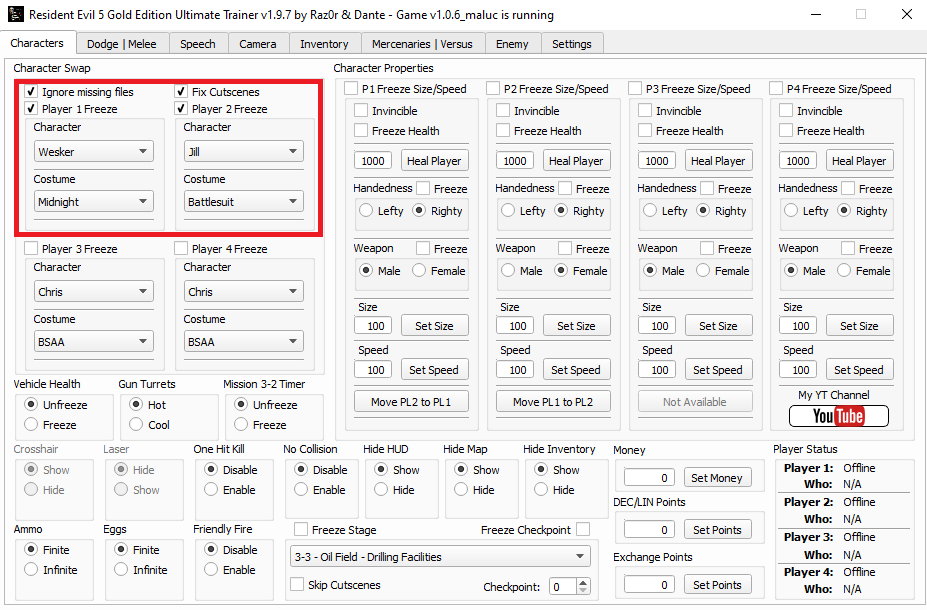
- On the trainer's Characters tab click on the "Player 1 Freeze", "Ignore missing files", "Player 2 Freeze" and "Fix Cutscenes". Then, below the "Player 1 Freeze" box you'll change the player 1 character to Wesker and the costume to Midnight. For the player 2, select Jill and the Battlesuit costume.
- After that, you can start the match.
Super Speed
There are two types of super speed that you can use with Wesker during gameplay:
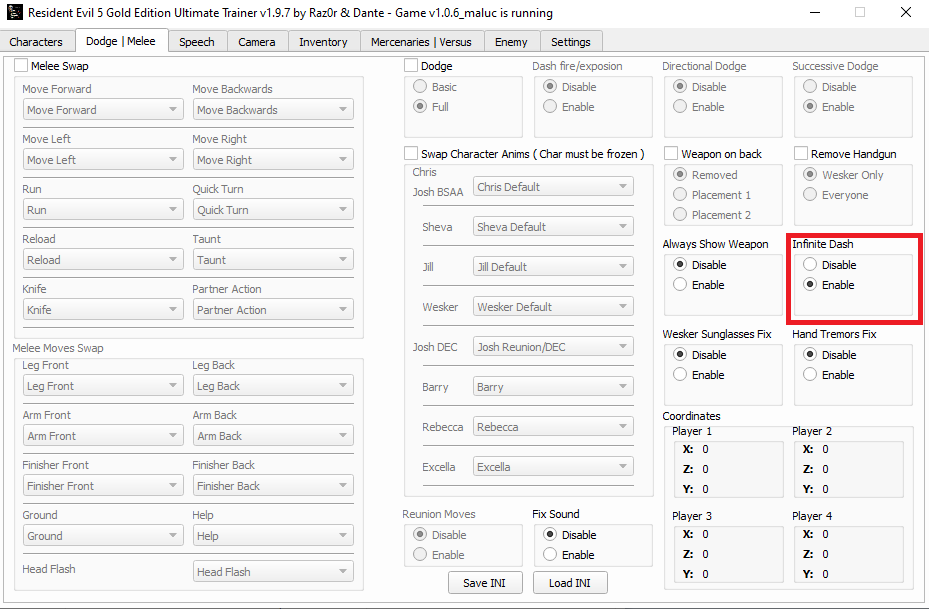
To use the dash attack, just press the Taunt button when you are about to start running (Default is X).
With this dash attack you can change direction only with W A S D. To stop, either run into a wall or press the Attack button and he'll finish the dash with a knee attack.
- Regular Super Speed
- Dash Attack
To use the dash attack, just press the Taunt button when you are about to start running (Default is X).
With this dash attack you can change direction only with W A S D. To stop, either run into a wall or press the Attack button and he'll finish the dash with a knee attack.
Dodge
If you want to use his dodge skills, enable the "Dodge" box option on the "Dodge | Melee" tab on the trainer, then select "Enable" on Successive Dodge and Full under the dodge box.
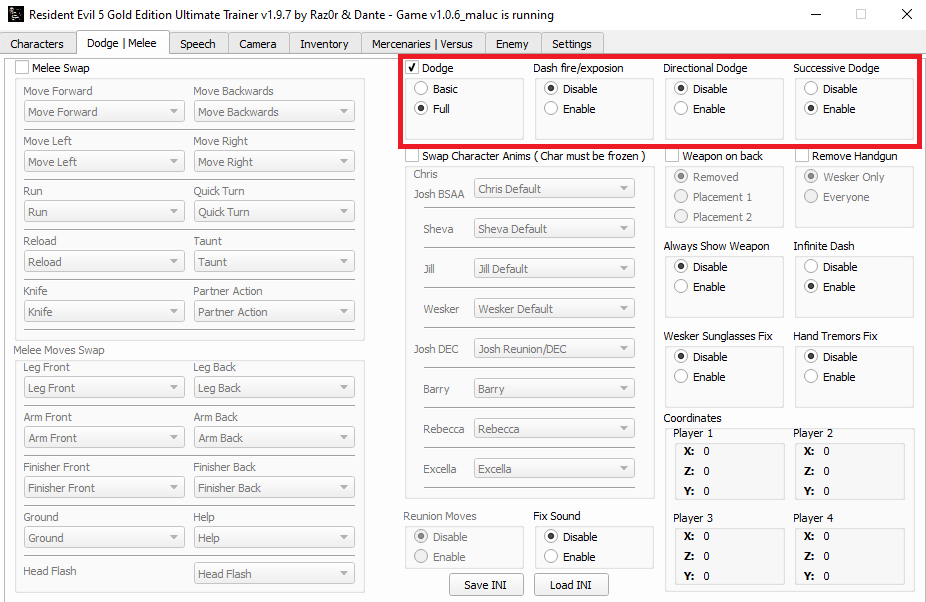 Keep in mind that this dodge is extremly OP, automaticly dodging almost everything on the game which will make the game too easy, so enabling this is optional.
Keep in mind that this dodge is extremly OP, automaticly dodging almost everything on the game which will make the game too easy, so enabling this is optional.
Melee Attacks
To use his melee attacks you'll need to edit some of the base moves.
Note
Below the "Melee Swap" there's a "Melee Moves Swap" section. You can edit those too if you want just like you did on the section above, but those will change only the follow-up attacks that you can do after shooting the enemy's head, legs, etc. So if you want to be able to use the melee attacks more freely, stick to the "Melee Swap" section as shown in the screenshot.
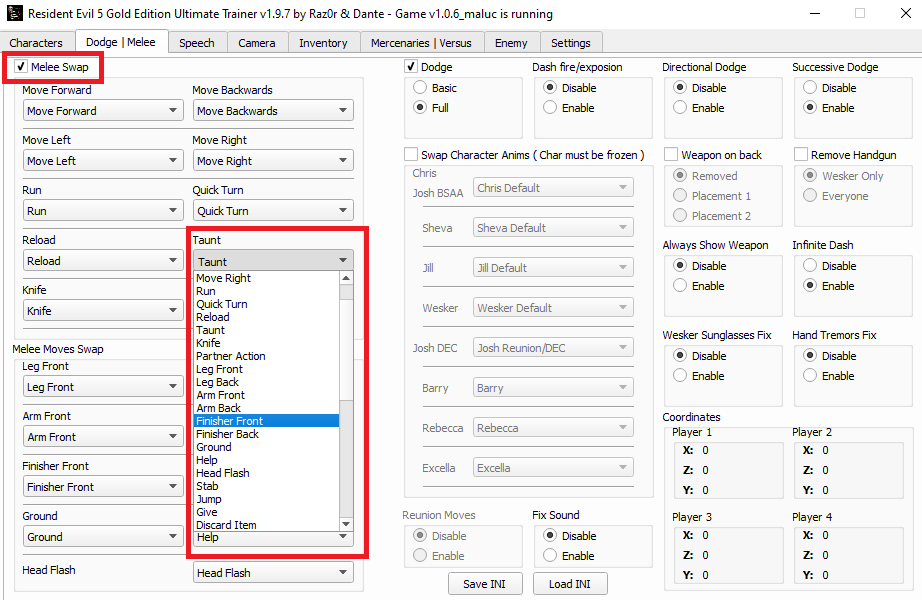
- On the "Dodge | Melee" tab on the trainer, click on the "Melee Swap" box.
- Select one of the default moves to replace with a attack. We'll be replacing the "Taunt" (You can replace other moves if you prefer).
- On the "Taunt" menu, you can select one move to replace the taunt. In this example we'll be using the "Finisher Front", so whenever you press the taunt button, he'll do the move we selected instead. There's quite a few moves to try and you can change them at any time during gameplay.
Note
Below the "Melee Swap" there's a "Melee Moves Swap" section. You can edit those too if you want just like you did on the section above, but those will change only the follow-up attacks that you can do after shooting the enemy's head, legs, etc. So if you want to be able to use the melee attacks more freely, stick to the "Melee Swap" section as shown in the screenshot.
Notes
- This mod is extremly unstable so bugs are expected.
- Giving Jill certain weapons like Shotguns will make her use the default walk/run/idle animations instead of her boss ones.
- Giving more than one weapon for Wesker can make some of the guns stay on his face during gameplay, you can fix this by enabling the "Weapon on back" box and selecting the "Remove" opton right below it at the "Dodge | Melee" tab of the trainer.
- You can play this online with friends as long as both players have the mod and trainer properly installed and have setup everything like each other.
- If you don't intend to play online with a friend, please set your match to "Local".
- The "Infinite Ammo" mode in game doesn't work with this mod, so if you want to have infinite ammo, use the trainer one under the "Characters" tab.
- During cutscenes Wesker's hair will be bugged, both Wesker and Jill won't have facial animation, etc.
- Sometimes when climbing stairs or jumping over small gaps, Wesker will use his Super Jump
and there's a chance he'll fall through the floor and you'll get stuck under the map.
Well, that's it.
Have fun!
More Resident Evil 5 guides
- Resident Evil 5 - Fixes★ 5 (2k)119k views2.4k ♥9 minUpdated Aug 2, 2025
- Resident Evil 5 Quality of Life Fixes★ 5 (1.5k)78k views2.1k ♥4 minUpdated Mar 9
- Resident Evil 5: Gold Edition 100% Achievement Guide★ 5 (1.3k)42k views2.6k ♥24 min
- getting multiplayer achievements with bots★ 5 (879)33k views1.7k ♥11 minBulgarianUpdated Aug 27, 2023
- Farming Gold (15K), ammo and eggs★ 5 (459)33k views423 ♥1 minBulgarianUpdated Sep 24, 2018
- Полный русификатор (текст+звук) {1C} Gold Edition★ 5 (674)30k views778 ♥1 minRussianUpdated Feb 3, 2024



🔥 Popular guides
- Upgrading to PremiumTeam Fortress 2★ 5 (20k)1441k views11k ♥6 minUpdated May 11, 2022
- No More Room in Hell Official ManualNo More Room in Hell★ 5 (2.8k)569k views2.1k ♥29 minUpdated Apr 22, 2019
- NMRiH Community Hosting GuidesNo More Room in Hell★ 5 (526)351k views653 ♥1 minUpdated Aug 10, 2022
- ULTIMATE GUIDE FOR GAME DEV TYCOONGame Dev Tycoon★ 5 (5.8k)326k views10k ♥4 minUpdated 23 Jan, 2014
- How to 'Git Gud' Soon™MORDHAU★ 5 (2k)318k views3k ♥68 minUpdated Nov 16, 2024
- Лучшие кооперативные игры SteamPAYDAY 2★ 5 (1.5k)315k views2.1k ♥56 minRussianUpdated Apr 27, 2025






This guide was created by its original author on the Steam Community. Are you the author and want it removed? Request removal.