Squad Refund Guide | Гайд по освобождению от Squad
Этап/Stage 1: Ты понял, что это страдание/You realized that this is suffering 😩
Ты запустил Squad, а игра лагает, вылетает или просто не твоё.
You launched Squad, and the game lags, crashes, or is just not for you.
Внутренний голос: «Всё, хватит. Я не должен так страдать. Хочу назад деньги».
Inner voice: "That's it, enough. I shouldn't suffer like this. I want my money back."
You launched Squad, and the game lags, crashes, or is just not for you.
Внутренний голос: «Всё, хватит. Я не должен так страдать. Хочу назад деньги».
Inner voice: "That's it, enough. I shouldn't suffer like this. I want my money back."
Этап/Stage 2: очистки кармы/karma cleansing
ru-Действие: Правой кнопкой по игре в библиотеке Steam → Управление → Удалить из аккаунта...
en-Action: Right-click on the game in the Steam library → Manage → Remove from account...
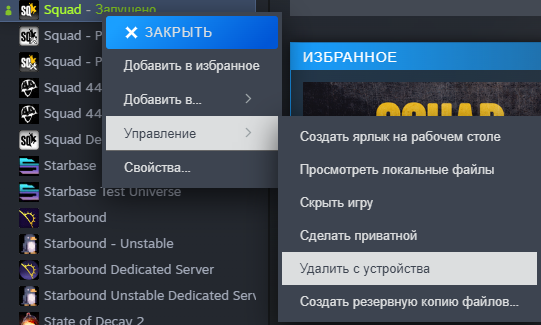
en-Action: Right-click on the game in the Steam library → Manage → Remove from account...
Этап/Stage 3: Куда идти? Святая святых!/Where to go? The Holy of Holies! 🙏
Go straight here/Иди прямо сюда: Steam Support (Помощь Steam)
Этап/Stage4:Волшебная кнопка«ХОЧУ ДЕНЬГИ НАЗАД»/The magic button "I WANT MY MONEY BACK" 💰
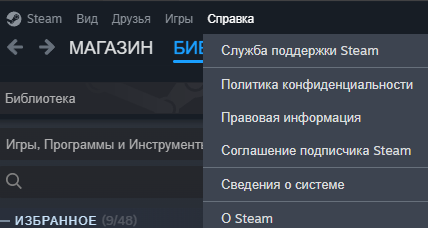
1. Справка (top left) → Help/Служба поддержки
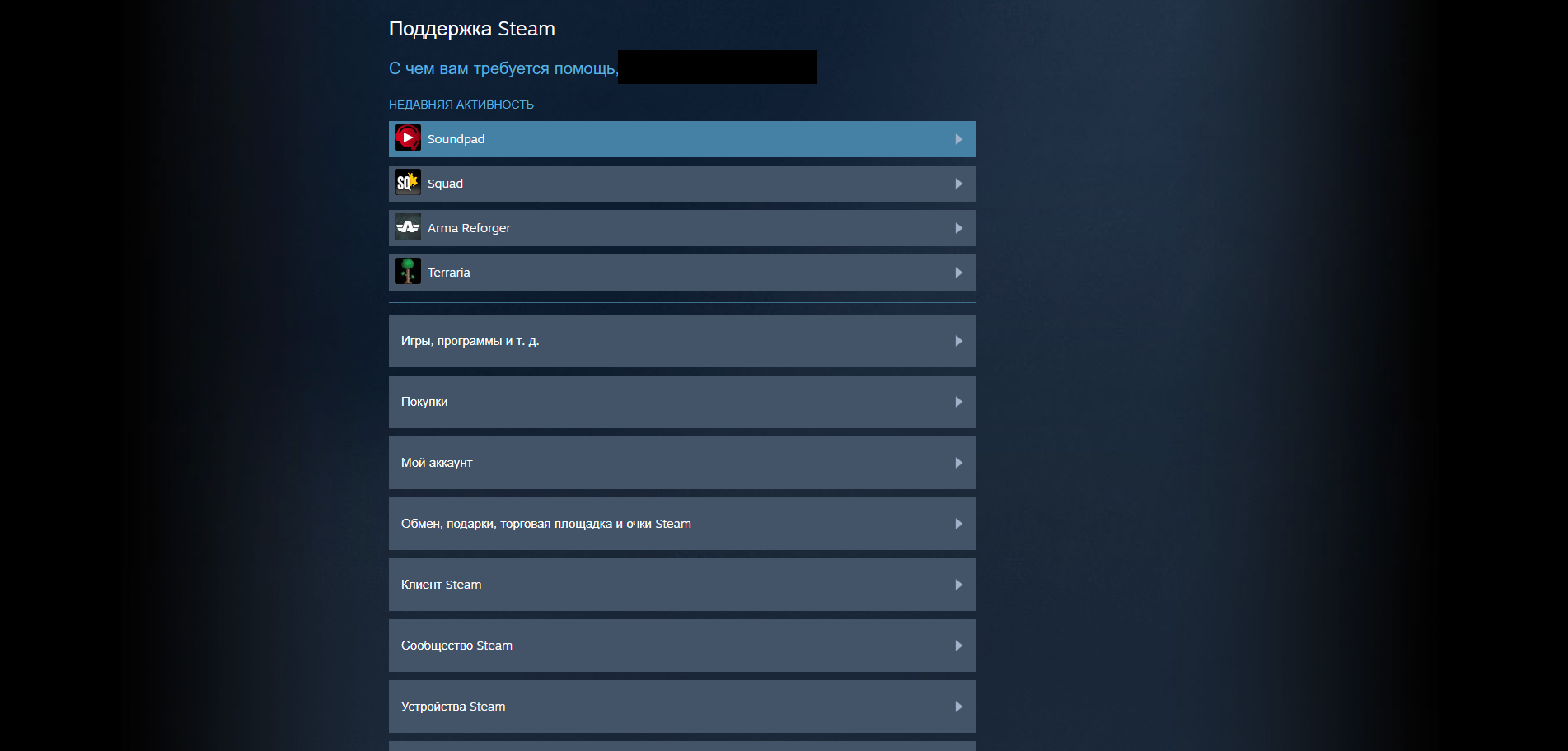
- → выбираем Squad → select Squad
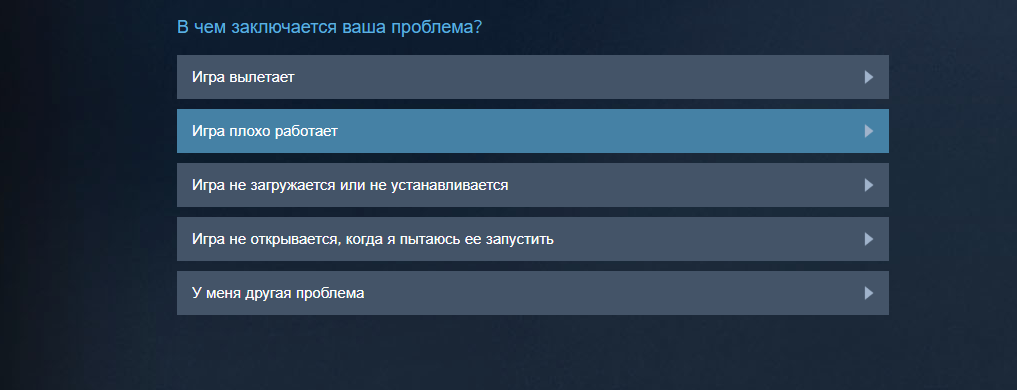
- → проблемы в игре или технические неполадки → Gameplay or technical issue
- → Игра плохо работает → Game runs poorly or won't run
- → оформить возврат средств → I'd like to request a refund[/h1]
Пример/Example comment: Я хотел бы вернуть деньги за игру, поскольку после перехода на Unreal Engine 5 разработчики изменили системные требования.
I would like to get a refund for the game because after the transition to Unreal Engine 5, the developers changed the system requirements[/b]
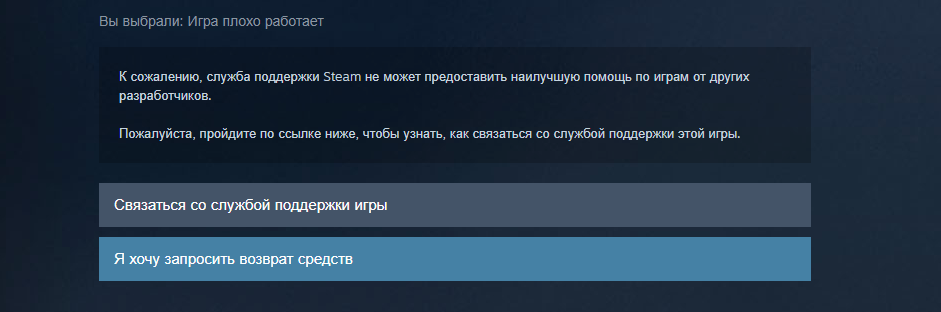
ВТОРОЙ ВАРИАНТ / SECOND OPTION
1. Справка → Help
- → выбираем Squad → select Squad
- → Я хочу навсегда удалить эту игру со своего аккаунта → I want to permanently remove this game from my account

Надеюсь это краткое руководство было для вас хоть чем то полезным
More Squad guides
- Подробный гайд для новичков★ 5 (764)61k views1.1k ♥20 minRussianUpdated 28 Sep, 2023
- Squad Leader 101★ 5 (884)29k views1.5k ♥60 minUpdated 22 Jul
- Как убрать мыло на экране | 100% Способ★ 4 (113)26k views355 ♥3 minRussianUpdated 1 May, 2023
- SQUAD - raising FPS together! / SQUAD - поднимаем FPS вместе!★ 3 (31)19k views75 ♥4 minUpdated 8 Jan, 2024
- Руководство по пилотированию вертолётов★ 5 (199)18k views446 ♥32 minRussianUpdated 20 Feb, 2022
- [Squad v10.5] [EN/РУ] / Where to shoot to penetrate? / Куда стрелять чтобы пробить?★ 5 (220)15k views606 ♥1 minUpdated 17 Jun




🔥 Popular guides
- Upgrading to PremiumTeam Fortress 2★ 5 (20k)1441k views11k ♥6 minUpdated May 11, 2022
- No More Room in Hell Official ManualNo More Room in Hell★ 5 (2.8k)569k views2.1k ♥29 minUpdated Apr 22, 2019
- NMRiH Community Hosting GuidesNo More Room in Hell★ 5 (526)351k views653 ♥1 minUpdated Aug 10, 2022
- ULTIMATE GUIDE FOR GAME DEV TYCOONGame Dev Tycoon★ 5 (5.8k)326k views10k ♥4 minUpdated 23 Jan, 2014
- How to 'Git Gud' Soon™MORDHAU★ 5 (2k)318k views3k ♥68 minUpdated Nov 16, 2024
- Лучшие кооперативные игры SteamPAYDAY 2★ 5 (1.5k)315k views2.1k ♥56 minRussianUpdated Apr 27, 2025






This guide was created by its original author on the Steam Community. Are you the author and want it removed? Request removal.