The Ultimate Gothic 3 Guide
Introduction
Union+ Modpack
In July 2024 a modpack called Union+ was created. It's an even easier way to install mods that puts them all into one big package with a user-friendly installer. The game needs to be patched, either using the patches listed below or by using the "Gothic 3 Patches" package on the Nexus Mods page for Union+.
You can download it here.[www.nexusmods.com]
CP 1.75.14 REQUIRED, PARALLEL UNIVERSE PATCH REQUIRED, UPDATE PACK REQUIRED
tl;dr - Patching the game for the lazy
For anyone that doesn't like to read, I present to you, the optimal installation order for a smooth experience. Just follow the steps and everything will be fine. If you like to read, skip this part and read the rest of the guide.
- Install Gothic 3. Run the game once. If there's no text in the main menu, use ESC and the left button to quit the game.
- Install the Community Patch 1.75.14 and run the game once. Download at the bottom. 1.48 GB file.
Download[www.worldofgothic.de] - Install the Parallel Universe Patch 1.1.1 and run the game once. It also fixes mouse issues.
Download[www.worldofgothic.de]
optional 4. Install the Update Pack 1.04 and run the game once.
Download[www.worldofgothic.de]
optional 4.1. Update Pack not working with PUP? Install the UP public beta 1.05.10 on top of it.
Download[forum.worldofplayers.de]
- Install Questpaket 4.2
Download[www.worldofgothic.de]
and the update for the 1.75 version of the game for it.
Download[www.worldofgothic.de] - if you want to, in addition to Questpaket 4.2 choose ONE of the mods listed below
6.1. Install Content Mod 3.1. Includes Consequences 2.0,
Download[www.worldofgothic.de]
6.2. or install Ring des Wassers,
Download[forum.worldofplayers.de]
6.3. or install only Consequences 2.0 without Content Mod 3.1.
Download[www.worldofgothic.de]
The Big Ones
This section will be dedicated to the patching/modding of the game. In case you want to install everything from this list, it's already in the correct installation order. Mixing it up might cause problems within the game itself or in worst cases the game won't even run. Just follow the guide and everything should work just fine.
The PDF manual explaining the community patch team's changes is found here:
- If using the "beta" channel at Steam to upgrade to v1.75.14, it is
...\Steam\steamapps\common\Gothic3\Docs\CP_1_7x_Manual.pdf- If applying the separate community patch to v1.75.14, it is
...\Steam\steamapps\common\Gothic3\CP_1_7x_Manual.pdf
Download[www.worldofgothic.de]
(Download at the bottom of the page)
Slow download speed on the link above?
The download speeds seem to differ for everyone, so either you're stuck with a slow download or try the mirror links listed on this site under the section Mirrors.
Link[forum.worldofplayers.de]
Another download link provided by the user Alexis:
Link[www.gamepressure.com]
Download not working?
Check the last section of this guide or try a different browser.
Optional way of getting the patch (not recommended)
Steam offers the "latest" Community Patch 1.75.14 under the Betas tab of the game. The exact version differs from the original CP 1.75.14, that's why I don't recommend using it. It causes problems for a lot of people and you won't be able to install any mods (you can still install the Update Pack) when doing it this way. If you insist on using it though, you can download it by right-clicking on Gothic 3 in your library, clicking on Properties..., choosing the Betas tab and selecting cpt_1.75_testbranch from the drop-down menu. Reinstall the game.
Download[www.worldofgothic.de]
(Download at the bottom of the page)
Download[forum.worldofplayers.de]
Fix for Parallel Universe Patch not working with Update Pack
Install the Update Pack v1.04.11 and then, on top of it, the public beta v1.05.10. The download for that is on page 15, post #293
Download[forum.worldofplayers.de]
Download[www.worldofgothic.de]
(Download at the bottom of the page)
Download, version 3.1[www.worldofgothic.de]
Download, version 2.6[www.worldofgothic.de]
Download, version 2.5[www.worldofgothic.de]
or 2.4 if you want to play with Orkmod (Gothic 2 orc looks)
Download, version 2.4[www.worldofgothic.de]
+ Download Orkmod 2.1[www.worldofgothic.de]
(All downloads at the bottom of the page)
Fix for Content Mod 3.1 - NPCs (Gorn, Lester, etc.) not leaving Ardea
A confirmed fix for this is by talking to Jens, the huntsman in front of Cape Dun. After talking to him they should respawn in their proper spots. An unconfirmed fix is to simply wait, do other things far enough from Ardea.
Download[www.worldofgothic.de]
(Download at the bottom of the page)
Ring des Wassers auf World of Gothic[forum.worldofplayers.de]
Alternatively you can use Enter/Return to use and equip items in your inventory instead of this fix.
Download[www.worldofgothic.de]
(Download at the bottom of the page)
Other
Guide - Gothic 3 HUD off | Free Camera
- Delete G3_Logo_01.bik, Publisher.bik and CPT.bik.
- Open ge3.ini.
- Change Camera.FOV= to the value you want (default is 60°).
- Save your changes.
(Personally, i recommend values between 75-80° for 16:9 resolutions.)
- Open ge3.ini.
- Change Fullscreen=true to Fullscreen=false.
- Save your changes. Reverse this change to go back to fullscreen mode.
(System cursor will be visible.)
Download[www.worldofgothic.de]
World Map
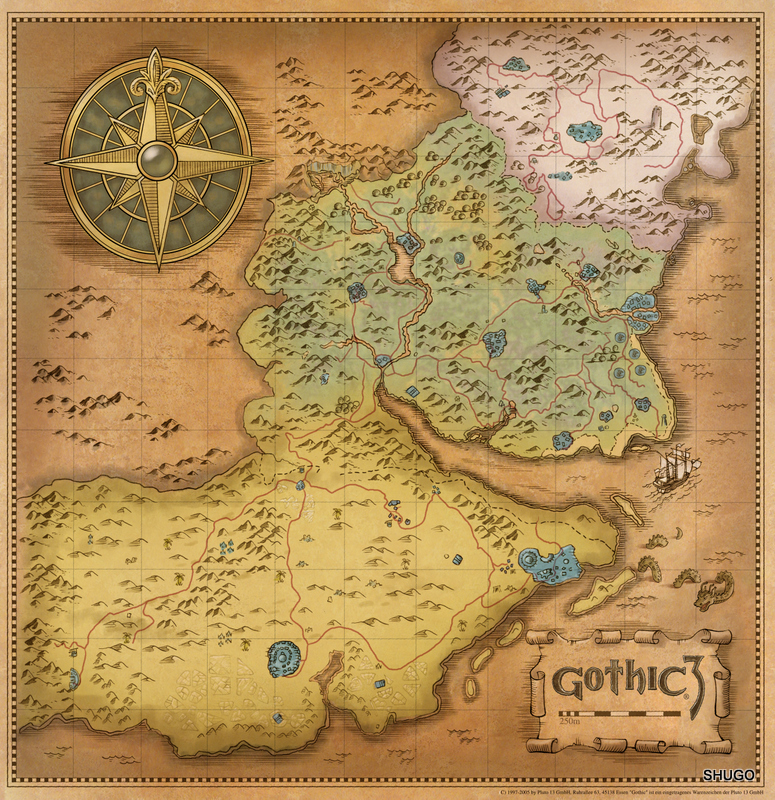
The map is huge. I love it. The world in Gothic 3 is so beautiful...
This tool lets you find anything you want in the game. Plants, people, weapon bundles...
Interactive map[www.worldofgothic.de]
(Contains only the location of vanilla NPCs, items, etc.)
Pretty nice to have these for people new to the game. If you can't find something that is in the near proximity of a certain town/camp, use them to help yourself out.
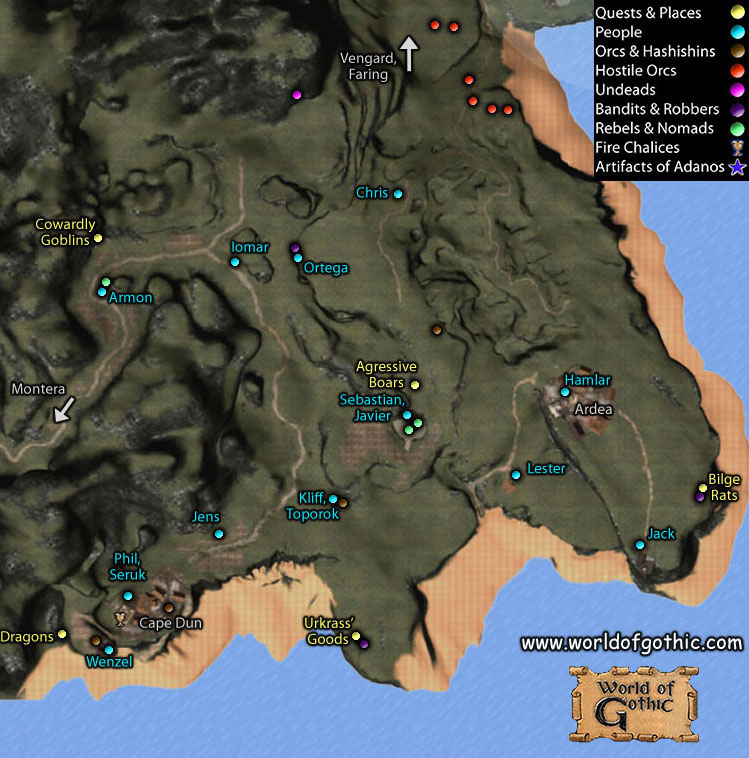
More maps[www.worldofgothic.com]
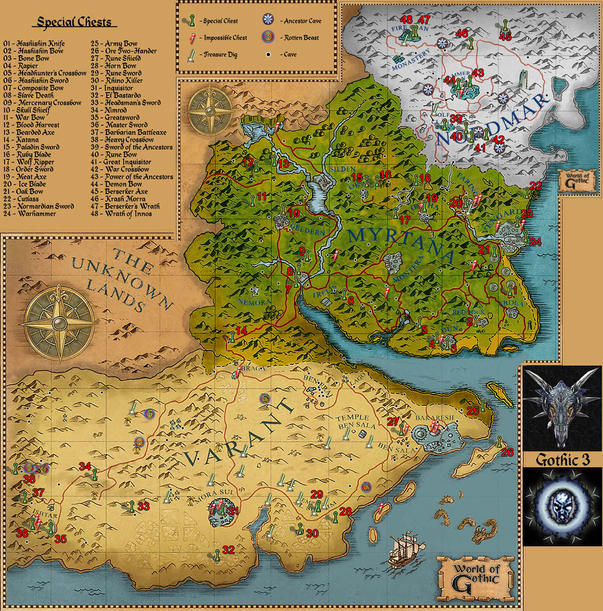
Heavy chests
Some equipment can only be obtained from Heavy Chests. The first few weapons might not be great, but be patient and open all HC you come across, it's worth it after a few have been opened.
It only matters how many chests you've opened so far, not which number you open. For example, if you open your first chest somewhere in Northmar, you'll always get the Hashishin Knife. It's the amount of chests you've opened so far that matters.
Let's say you've opened 18 so far and just found the 19th. You open it and you get the Meat Axe. It doesn't matter if it was number 19 on the map. It's the 19th chest you've opened.
- Hashishin Knife (It_1H_AssDagger_01)
- Hashishin Bow (It_Bow_Ass)
- Bone Bow (It_Bow_Bone)
- Rapier (It_1H_Epee_01)
- Headhunter's Crossbow (It_Crossbow_Bounty)
- Hashishin Sword (It_1H_AssSword_01)
- Composite Bow (It_Bow_Composite)
- Slave Death (Crossbow) (It_Crossbow_SlaveKiller)
- Mercenary Crossbow (It_Crossbow_Merc)
- Skull Shield (It_Shield_Skull_01)
- War Bow (It_Bow_War)
- Blood Harvest (Crossbow) (It_Crossbow_BloodHarvest)
- Bearded Axe (It_2H_Bardiche_01 or It_Axe_Bardiche_01)
 15. Paladin Sword (It_1H_PaladinSword_01)
- Ruby Blade (It_1H_Rubyblade_01)
- Wolf Ripper (Bow) (It_Bow_WolfRipper)
- Order Sword (It_2H_OrderSword_01)
- Meat Axe (It_2H_Waraxe_01 or It_Axe_Waraxe_01)
- Ice Blade (It_1H_Iceblade_01)
- Oak Bow (It_Bow_Oak)
- Cutlass (It_1H_Scimitar_01)
- Nordmarian Crossbow (It_Crossbow_Nrd)
- Warhammer (It_Axe_Warhammer_01)
- Army Bow (It_Bow_Army)
- Ore Two-Hander (It_2H_Sword_Ore_01)
- Rune Shield (It_Shield_Rune_01)
- Horn Bow (It_Bow_Horn)
- Rune Sword - Blueprint (It_1H_Runesword_01)
- Rhino Killer (Crossbow) (It_Crossbow_Rhino)
- Inquisitor (It_1H_Inquisitor_01)
- El B a s t a r d o (It_1H_ElBastardo_01)
- Headsman's Sword (It_2H_Executioner_01)
- Nimrod (Bow) (It_Bow_Nimroder)
- Greatsword (It_1H_GreatSword_01)
- Master Sword (It_1H_MasterSword_01)
- Barbarian Battleaxe (It_2H_BarbarianAxe_01 or It_Axe_BarbarianAxe_01)
- Heavy Crossbow (It_Crossbow_Heavy)
- Sword of the Ancestors - Blueprint (It_1H_AncestorSword_01)
- Rune Bow (It_Bow_Rune)
- Great Inquisitor (It_2H_GreatInquisitor_01)
- War Crossbow (It_Crossbow_War)
- Power of the Ancestors - Blueprint (It_2H_AncestorMight_01)
- Demon Bow (It_Bow_Demon)
- Berserker Axe (It_2H_BerserkerAxe_01 or It_Axe_BerserkerAxe_01)
- Krash Morra (Crossbow) (It_Crossbow_KrashMorra)
- Berserker's Wrath (Axe) (It_Axe_BerserkerRageAxe_01)
- Wrath of Innos (It_2H_InnosWrath_01)
Teleporter Stones
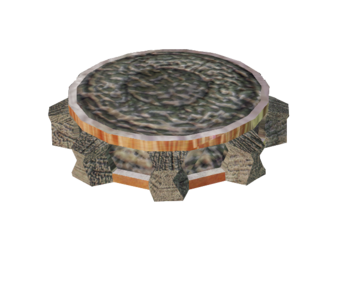 Ardea - On the bench at the starting point.
Reddock - Southern caves of Reddock.
Cape Dun - Inside the Urkrass' warehouse.
Montera - In the abandoned house next to Marik's house.
Gotha - Chest in the orc boss hut. Second inside Gotha, at the smithy.
Faring - Inside the first cavern where you met Rocko, at the end of the right tunnel.
Vengard Temple - Caves inside Gotha.
Vengard Throne Room - Above the throne room, where Karrypto is standing.
Okara - On a stone just left from the entrance, facing towards Okara.
Silden - North of town, on a stone near a stone circle. Second is on Grompel.
Geldern - On a stone outside the southern exit, next to a chest. Second on Mirzo.
Trelis - Inside a chest behind the Beliar Shrine outside the SW entrance.
Nemora - Right side of the entrance, halfway up the hill, inside a chest. Also on Treslott in the bottom cave.
Ben Erai - On a barrel, just below the slope to the mines. Another one is in the top-most mine tunnel.
Lago - In the weed dump, nearby Rasul.
Ben Sala - Around the smithy.
Bakaresh City - Near Silvio at the west entrance.
Bakaresh Temple - Inside the temple, in the center of "living quarters", the stairs lead down to the vault. The stone is in the second room.
Mora Sul - On a bench next to Bandaro.
Ishtar - One by the main entrance on a table. One in the very back of Zuben's palace by his bed. It teleports to his palace. It is guarded by a single hashishin and there is no way to get it without setting him off.
Hammer Clan - Inside Ingvar's smithy.
Fire Monastery - Bottom level in the library in a locked chest, right side of the stairs.
Fire Clan - In the first secluded house. Second in the Chieftains house.
Xardas - On the first floor of his tower.
Teachers
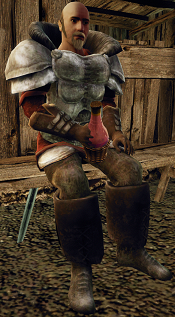 You can be whoever you want. Warrior, archer, mage... but to find the right teacher, you either search for a long time, or write every single one you met down on a piece of paper. Here's a shortcut. Just use the link below. Our fellow friend from World Of Gothic made this little list, where he specified each and every teacher in the game, what skills they teach and where they are.
List of every teacher in the game[forum.worldofplayers.de]
WoG downloads not working
Should it be impossible for you to download through World of Gothic, there is a simple workaround for that, provided by boogedybopcannon, thanks a lot for pointing that out!
- When on the download site provided in the sections above, we want to focus on the file we need. Not the mirror, but the file itself.
- We then right-click on the link and select "Save link as...". Select the path where you want to save it and allow your browser to download it, as it will most likely block the download, at least Chrome does.
- Руссификатор, а также всё необходимое для удобной игры в Gothic 3★ 5 (2.3k)59k views3.2k ♥10 minRussianUpdated Jan 3, 2016
- Gothic 3; русификатор★ 5 (487)39k views787 ♥1 minRussianUpdated Sep 21, 2021
- Готика 3 Лицензия без лагов и багов c русской озвучкой★ 5 (738)24k views1.4k ♥1 minRussianUpdated May 23
- Лучший сборник модов на Готику 3(на русском языке) 2021★ 5 (250)21k views499 ♥9 minRussianUpdated Oct 18, 2022
- The best optimization for Gothic 3 [MORE FPS]★ 4 (148)17k views243 ♥4 minUpdated Oct 15, 2024
- Прохождение городов/поселений для игры Gothic 3.★ 5 (869)16k views1.4k ♥136 minRussianUpdated Nov 21, 2021


- Upgrading to PremiumTeam Fortress 2★ 5 (20k)1441k views11k ♥6 minUpdated May 11, 2022
- No More Room in Hell Official ManualNo More Room in Hell★ 5 (2.8k)569k views2.1k ♥29 minUpdated Apr 22, 2019
- NMRiH Community Hosting GuidesNo More Room in Hell★ 5 (526)351k views653 ♥1 minUpdated Aug 10, 2022
- ULTIMATE GUIDE FOR GAME DEV TYCOONGame Dev Tycoon★ 5 (5.8k)326k views10k ♥4 minUpdated 23 Jan, 2014
- How to 'Git Gud' Soon™MORDHAU★ 5 (2k)318k views3k ♥68 minUpdated Nov 16, 2024
- Лучшие кооперативные игры SteamPAYDAY 2★ 5 (1.5k)315k views2.1k ♥56 minRussianUpdated Apr 27, 2025






This guide was created by its original author on the Steam Community. Are you the author and want it removed? Request removal.