[B42] How to Gunplay
Introduction
Arguably, build 42 is a great major update that offers a wide range of new features and mechanics that only enhance the player experience in Project Zomboid, but there is glaring issue in the community of new players and old players a-like struggling with the new gun mechanics of the game.
In this short guide, I will try to explain the new mechanics of Gunplay in build 42 to the best of my ability, this will be based on how I understand it and from other resources of information available.
So maybe that time you decide to pick up a gun to shoot at Zomboids, you will find yourself hitting most of your shots dead-center.
Understanding the Settings and Crosshair
Build 42 introduces new crosshair settings in the options which might confuse people at first glance. With some quick testing however I have figured out a simple understanding of how it works.
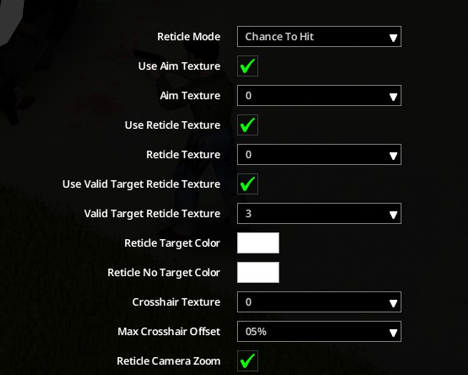
You might have noticed a few options in the settings and that they do look like a bunch of mumbo-jumbo with no tip descriptions of what each setting does, for some reason, Indie Stone did not provide any tip descriptions of what each setting does.
Luckily, I did some testing and I feel confident in explaining what each setting does.
Notice, how I did not touch on Reticle Colour and Reticle No (Valid) Target Colour. I recommend leaving those as white. Now lets review the recommended settings I have given you:
• Aim Texture = 4
• Reticle Texture = 4
• Valid Reticle Texture = 3
And thats it!
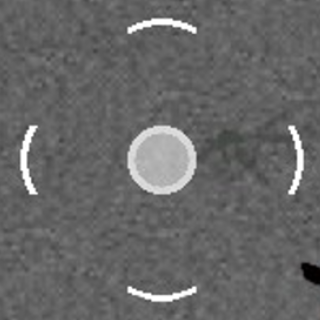
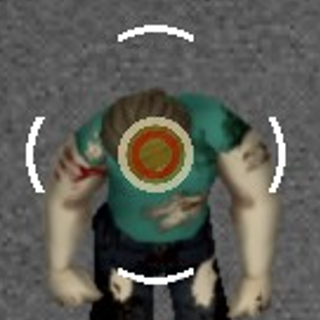
Notice every aspect of the crosshair is active in this photo. When there is a target in sight, your aim texture will immediately change colour corresponding to your chances of hitting or aim penalty.
The red reticle inside is the valid target reticle and confirms that you are aiming at something.
Recommended Crosshair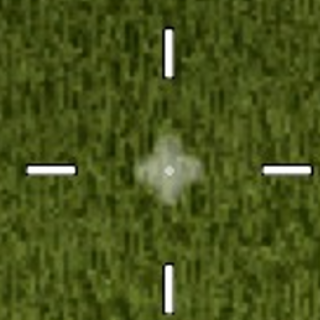
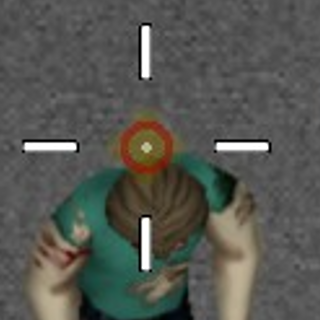
I have found that this recommended crosshair setting is somewhat more aesthetically pleasing, but of course you can disregard my recommendation and go for what you find absolutely the best crosshair setting for yourself.
How To Aim
Accuracy levels are no longer represented in aiming outlines on the Zomboids. The developers have changed the mechanics to be dependent on the aim texture colour on the crosshair, although it can be said accuracy remains the same except now it is represented on the crosshair.
A rough estimate what each colour represent are as follows:
• Red - High aim penalties, unlikely to hit.
• Orange/Yellow - Some penalties, not impossible to hit, might not kill the Zomboid in one shot.
• Green - Guaranteed hit, no aim penalties. You would have to be very unlucky or aiming wrong.
One thing you should immediately know it is also now viable to shoot from Aiming Skill 0-1, you obviously will not be as accurate as higher aiming skills but it is possible to start using firearms from absolutely no skill at all.
Remember when you are aiming you need to make sure the valid target reticle appears in the middle, that is how the crosshair confirms you are aiming at something.
Always aim directly for the head or slightly above the head. This should ensure your character is perfectly aligned to the target you are shooting at.
I have tried other angles with the crosshair being slightly forward, slightly to the left or right will produce the same results too, so as long as your character is aligned with your target and the crosshair is on the head.
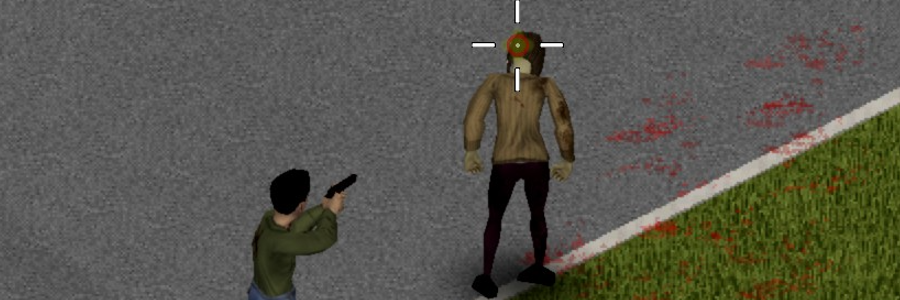
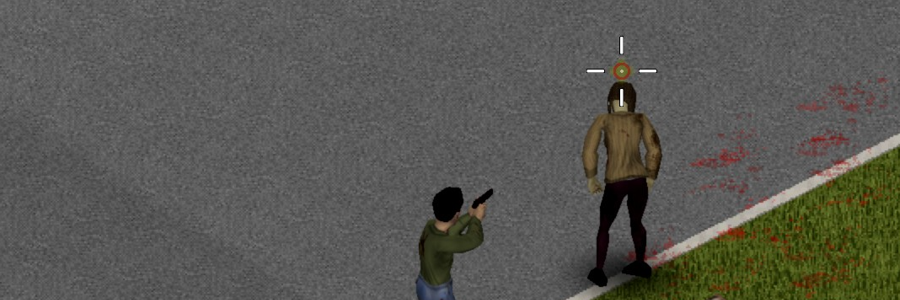
Notice how my character is exactly in line with the intended target. This is what good aiming looks like.
Under no circumstances, should you be aiming center mass or even at their legs as this may cause misaligned aiming, in this case when you fire you will find that your shot will go in a completely other direction than intended.
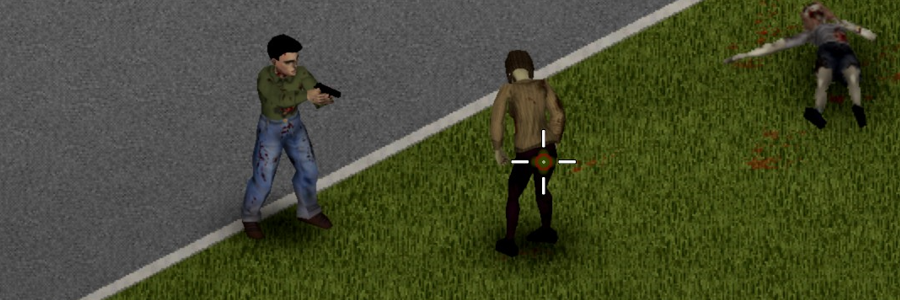
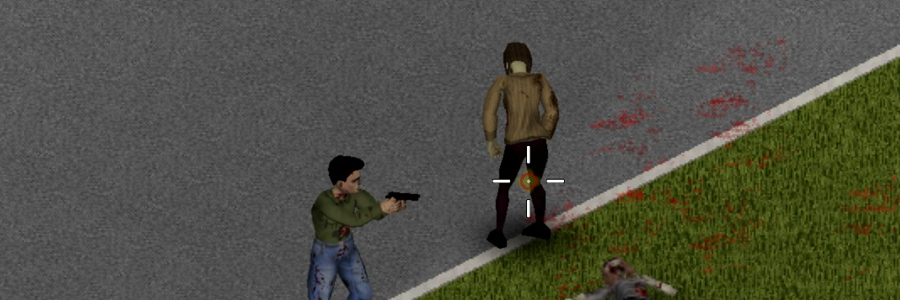
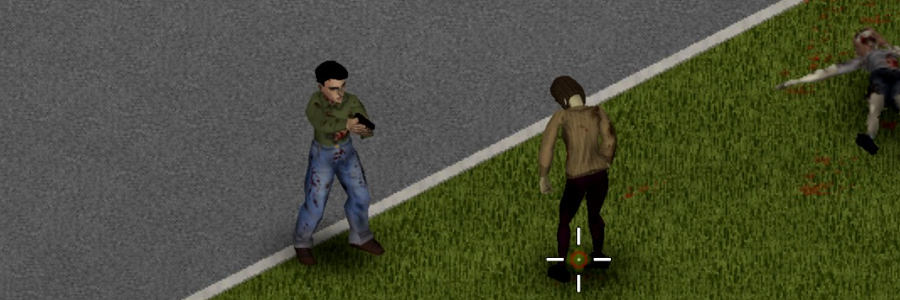
Notice how my character is misaligned with the target, if I were to shoot my gun the bullet will go past her. This is what bad aiming looks like.
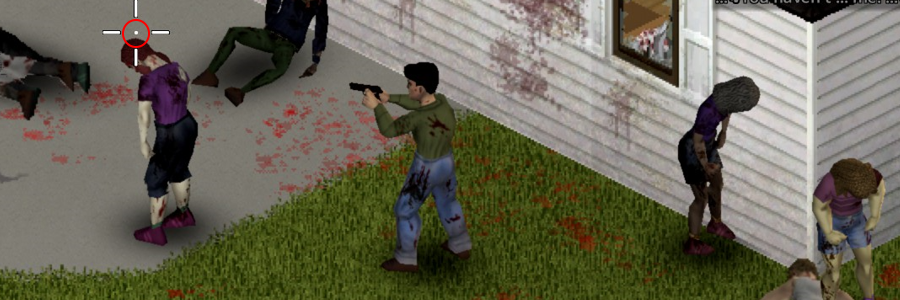 I have turned off aim texture and valid reticle texture for these example photos.
Notice how the lines are more closer to the reticle, this is roughly an estimate the radius your bullet will be able to travel. As you see it is more closed in so you are likely to hit only your target.
If you change the value to higher percentages, you will notice your crosshair will be slightly wider also increasing the radius of what can get hit.
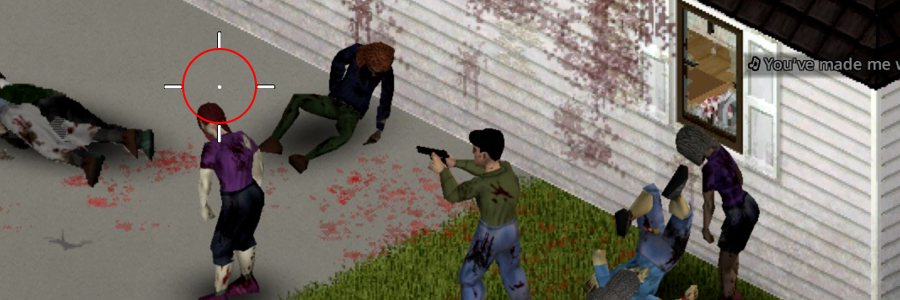 This is what the crosshair line radius will look like, as you can see it looks a lot wider than the previous 05% and it will ensure anything within this radius can get hit.
To conclude this chapter: The higher the offset, the higher chances your bullet will not only go to your intended target.
Things To Avoid or Look Out For
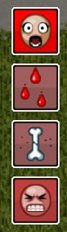 As mentioned before firearm accuracy is not only dependent on Aiming Skills, it is now dictated also by penalties from panic and pain moodles, and if it is anything like Advanced Trajectory Overhaul, I theorize stress, fatigue or exhaustion will give aim penalties too although I am not entirely sure.
Definitely try to avoid taking on large groups of Zomboids when you are using a firearm as this will gradually increase panic or stress and affect your aiming.
If you are wondering what moodles I am using in this playthrough:
Moodles Re-Animated by Muhrakk
Square Borders for Moodles by Molecule31
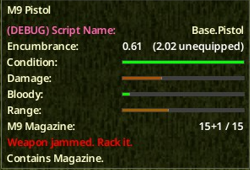
Weapons can also now jam, so if you find your gun clicking but not feeding out bullets, quickly press X or your preferred custom keybind to fix the issue.
General hits can also temporarily make a Zomboid fall or stop in their movement track towards you.
I would only recommend this when you find yourself in a situation able to finish off a downed Zomboid.
What I did not mention in the previous chapter, the Crosshair Offset setting in higher values can also cause general hits on Zomboids on their limbs or bodies, despite aiming on heads, this is exclusively true to higher offset values than 05%.
Conclusions
In conclusion, it may seem a little daunting at first but the new system isn't really that complicated.
With a little tweaking and proper aiming, you will become an unstoppable gunfighter and a true American.
I hope this guide has helped you understand the new systems and the settings, consider giving it a like and perhaps share it around, I'd greatly appreciate it!
Anyway, happy zomboiding!
Consider checking out my work for Project Zomboid!
https://steamcommunity.com/sharedfiles/filedetails/?id=3386956442
https://steamcommunity.com/sharedfiles/filedetails/?id=3389003300
This guide was at the time written only with Build 42.0.0 in mind, some information may or may not be outdated in any other version of build 42.x.x.
- Modding Policy★ 5 (397)133k views208 ♥9 minUpdated Nov 8, 2022
- 80 tips and tricks for Project Zomboid (If you have over 100 hours in this game some of these will probably be new to you too)★ 5 (1.6k)82k views3.1k ♥28 minUpdated Aug 29, 2021
- Топ 100 лучших модов на "project zomboid"★ 5 (415)68k views1.1k ♥10 minRussianUpdated Jul 28, 2024
- [B41] Лучшие места для базы★ 5 (477)61k views1.3k ♥6 minRussianUpdated Nov 30, 2025
- Первая помощь ❤★ 5 (628)49k views1.4k ♥5 minRussianUpdated Jan 20, 2025
- The Basics of Base Building★ 5 (704)48k views1.5k ♥17 minUpdated Dec 24, 2021





- Upgrading to PremiumTeam Fortress 2★ 5 (20k)1441k views11k ♥6 minUpdated May 11, 2022
- No More Room in Hell Official ManualNo More Room in Hell★ 5 (2.8k)569k views2.1k ♥29 minUpdated Apr 22, 2019
- NMRiH Community Hosting GuidesNo More Room in Hell★ 5 (526)351k views653 ♥1 minUpdated Aug 10, 2022
- ULTIMATE GUIDE FOR GAME DEV TYCOONGame Dev Tycoon★ 5 (5.8k)326k views10k ♥4 minUpdated 23 Jan, 2014
- How to 'Git Gud' Soon™MORDHAU★ 5 (2k)318k views3k ♥68 minUpdated Nov 16, 2024
- Лучшие кооперативные игры SteamPAYDAY 2★ 5 (1.5k)315k views2.1k ♥56 minRussianUpdated Apr 27, 2025






This guide was created by its original author on the Steam Community. Are you the author and want it removed? Request removal.