Chaos Crew Roleplay Guide - HL2:DM
First Time Joining the Server
Getting a Job

 There alot of jobs to choose from, but only some of them actually do something. These jobs are
RP Guide: Press E on a player and press Guide Player. If they accepted, you get paid for giving them a tour around the server.
Thief: Press E on a person and you can pickpocket them and steal weapons from them.
Medic: Press E on a wounded person and charge them money to heal them.
Sanitation: Pick up garbage/props around the map and bring it to this location and press E on the garbage/props to earn some cash.
Hooker: Have someone press E on you and make love with you for $250, $500, or $750. Good way to bond with someone.
Banker: Be a banker for someone so they can deposit their money to their bank.
Bounty Hunter: If you killed someone with a bounty, you gives X times the money that the bounty gives.
Hitman: Have someone press E on you to place a hit on someone. If you killed the target, you will earn money.
Lawyer: Have someone press E on you to reduce their crime and paying you $75 each 500 crime is removed.
Kidnapper: Take someone to this location and press E on them and kidnap them for money.
Penny Picker: Every pennies you picked up, you get $8 more.
Rebel: Kill cops to earn money.
The rest of the jobs are placeholders and will either be removed or turned into a usable job.
Your Inventory
Your Inventory is an important aspect of Roleplay and contains all the items you find and buy.
Accessing Your Inventory: Hit the Y Key and type /items. Alternatively you may press the Reload key when your Gravity Gun is out (Can Be Disabled with /toggle command). Then hit the ESC Key.
Navigating Your Inventory: Once you opened your items menu, you will have several categories of items.
Click any Category:
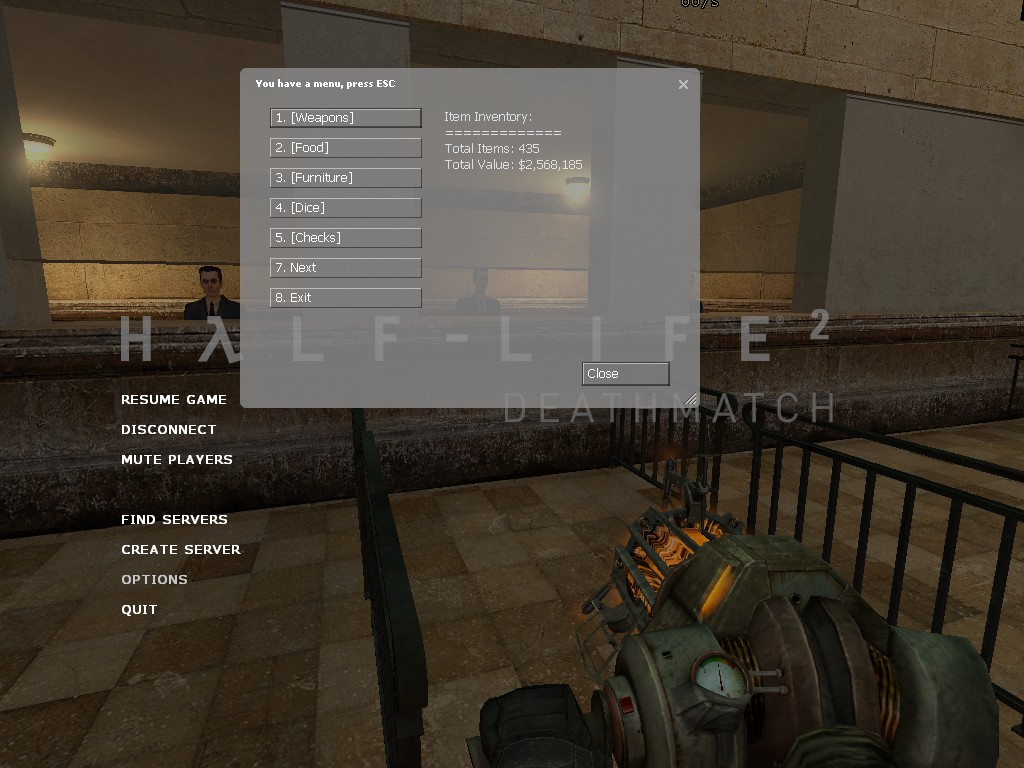
Click any item within that Category:
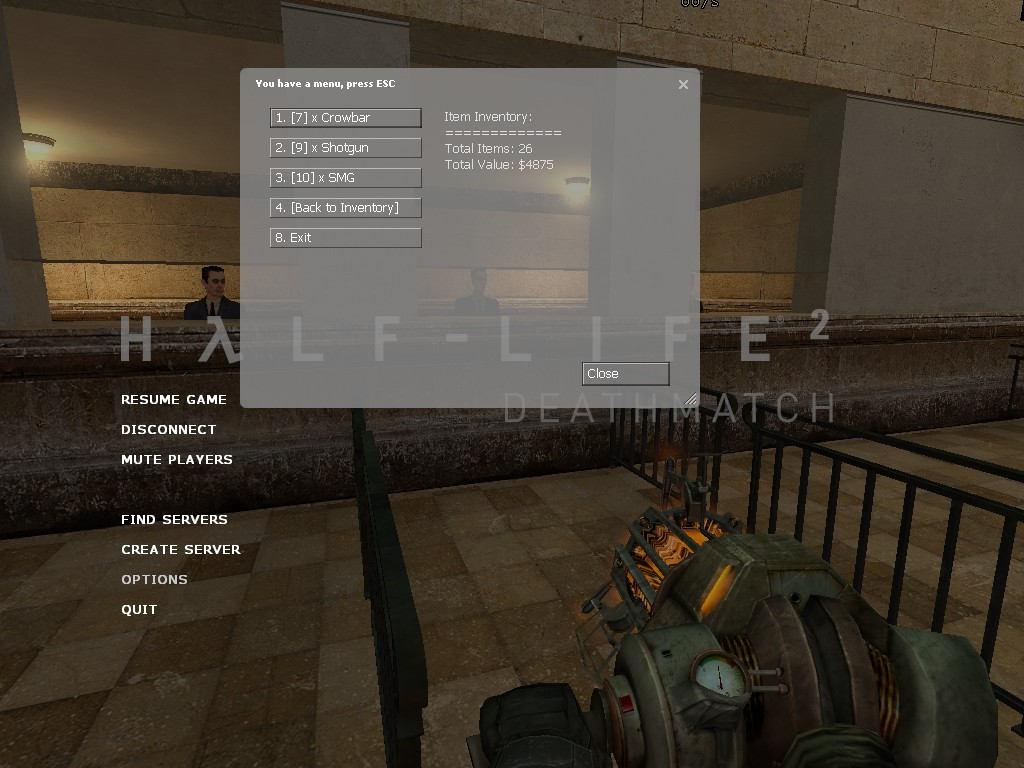
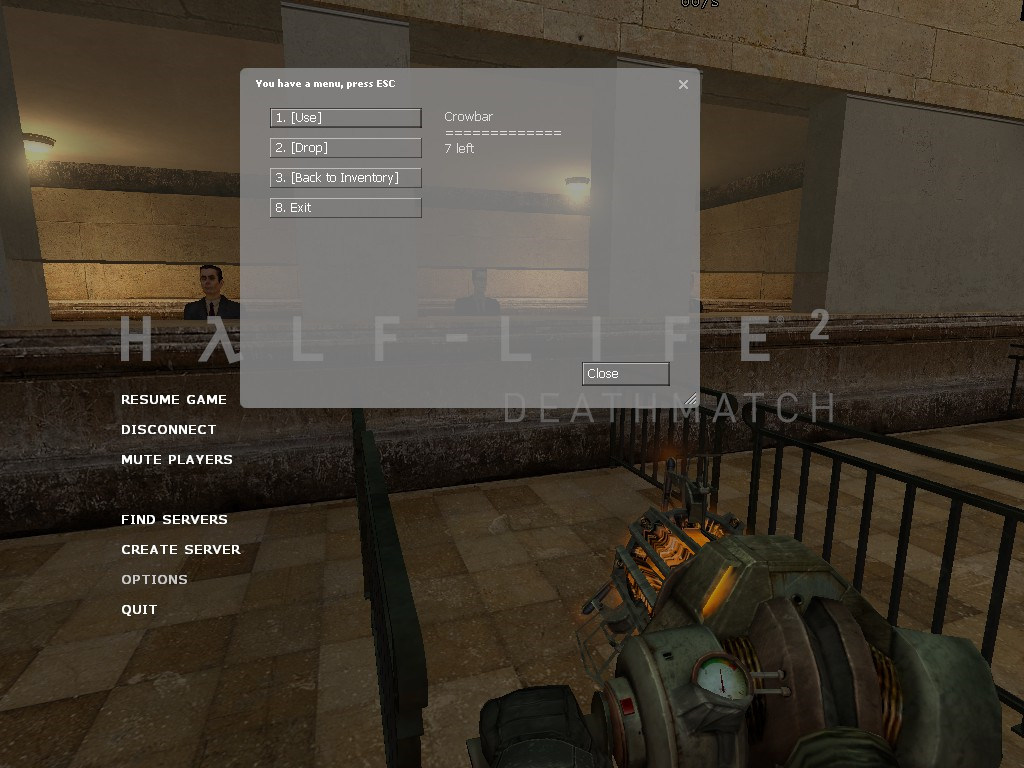
Now you have three options: Use, Drop, or Back to Inventory.
The HUD (Heads Up Display)
▬▬▬▬▬▬▬▬▬▬▬▬▬▬▬▬▬▬▬▬▬▬▬▬▬▬▬▬▬▬▬▬▬▬▬▬▬▬▬▬▬▬▬▬▬▬
The HUD can be a complicated concept to understand, so let's break it down a bit: Full HUD
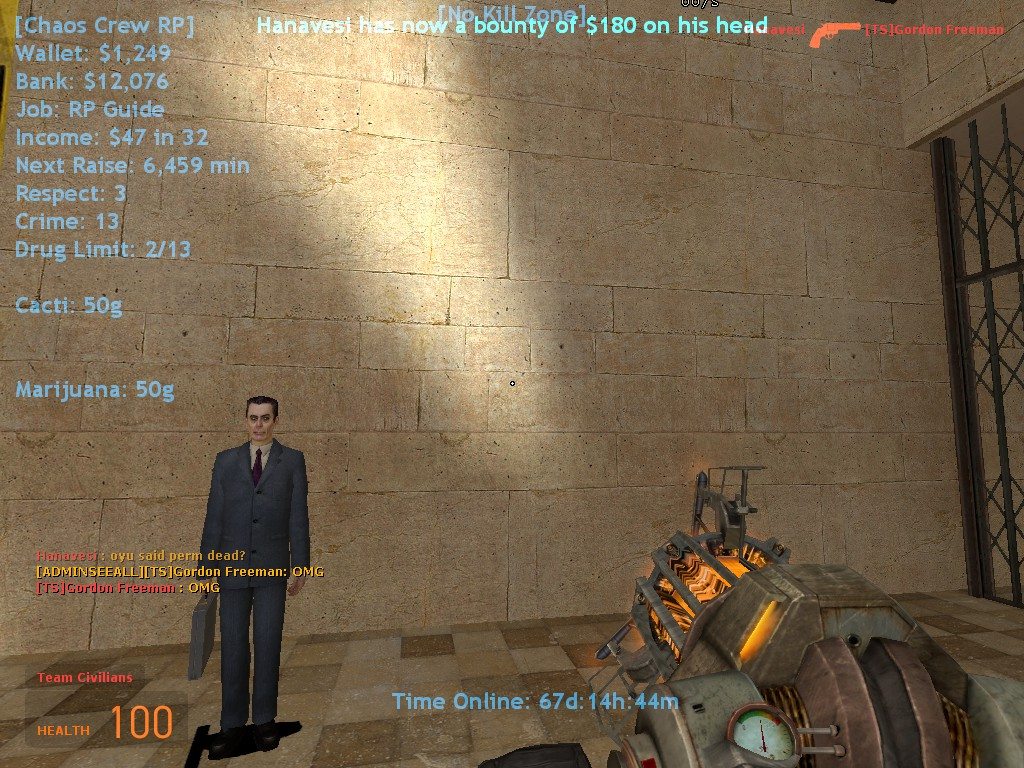
Main HUD: Your top right HUD that includes the following:
 The Chaos Crew Roleplay insignia, can be disabled with the chat command: /cchud
 The amount of money you have on yourself. Can be used to buy items, etc.
Note: If you are killed by another rebel, you will drop all of this money
 The amount of money you have in your bank
 The current job you are employed as
 Otherwise known as Wage, this is the amount of money you make per minute
 The time it takes until you get a raise on your income
 As a Gangster, you earn "Respect" by killing other players while 3 or more cops are online. The more respect you have, the more weapons you spawn with
 Each time you plant a drug, you gain Drug Points, once you exceed this limit, you may not plant any more drugs.
 No-Kill Zone: When in a No-Kill Zone, this will appear on the top center of your screen
 Time Online: The amount of time you have been playing the server shows on the bottom. This may be disabled by typing /timeplayed in the chat.
▬▬▬▬▬▬▬▬▬▬▬▬▬▬▬▬▬▬▬▬▬▬▬▬▬▬▬▬▬▬▬▬▬▬▬▬▬▬▬▬▬▬▬▬▬▬
Time Online: The amount of time you have been playing the server shows on the bottom. This may be disabled by typing /timeplayed in the chat.
▬▬▬▬▬▬▬▬▬▬▬▬▬▬▬▬▬▬▬▬▬▬▬▬▬▬▬▬▬▬▬▬▬▬▬▬▬▬▬▬▬▬▬▬▬▬Players can easily customize the color of their HUD Text by buying cheap "HUD Color" items. The HUD Color will save when the person leaves the server and comes back. HUD Colors are treated just like regular items and can be applied in your inventory menu under their own categories. Currently, the only HUDs that offer this ability are:
- Main HUD (Top Left)
- Center HUD (Middle of Screen)
Most HUD Commands are to disable parts of the HUD to make it more stable, available chat commands are:
- /mainhud - Toggles Top left HUD (Wallet, Bank, Income, etc.)
- /centerhud - Toggles Center HUD (Door Messages, etc.)
- /crimehud - Toggles Top right crime HUD
- /nokillhud - Toggles the Top middle [No Kill Zone] when in a No Kill Zone
- /stockhud - Toggles the Middle left Stock Market HUD
- /jetpackhud - Toggles the Bottom right Jetpack HUD
- /cchud - Toggles the [Chaos Crew RP] insignia on the Main HUD
Houses
What makes Half-Life 2: Deathmatch's Roleplay worth it is the fact that you can actually keep your home that you buy when you leave the server and come back a day later.
- Approach the designated door in which you wish to buy.
- Aim at the main door of the home
- Press the Y Key
- Type: /buydoor
- Type: /mydoormess Whatever you want your Door Name to be
- Aim at your door
- Hit the Y key
- Type: /givekeys 1 theirname
- Approach your door
- Aim at your door
- Press the Y Key
- Type: /selldoor
- You will get 90% of the price you bought the home back.
Bankers
Bankers are NPCs who allow you to make several transactions through your Bank Account and your Wallet. They usually appear as Gman, but can custom ones can be added to use any model.
Where they're located: In Banks across the map, usually near spawn.
To with withdraw money, simply approach the Banker and follow the steps below:
- Aim at the Banker and hit E (or your +use buttom)
- Hit the ESC key
- Withdraw
- Deposit
- Write a Check
- Cash in Check(s)
- Write Check Book $10
Withdraw - Withdraw a certain amount of money from your bank account
Deposit - Deposit a certain amount of money into your bank account
Write a Check - After you bought a check book, you can write a check that turns money into a check item
Cash in Check(s) - Cash in a check item you saved/received
Write Check Book $10 - Buy a Check Book that holds 10 checks you able to write, costs $10
Vendors
One of the most Basic aspects of Roleplay, Vendors are NPCs who sell you items to buy in the world of HL2DM Roleplay.
To Buy from any Vendor, simply follow the steps below
- Find a Vendor
- Aim at the Vendor and hit E (or your +use buttom)
- Hit the ESC Key
4. Select the item you wish to buy
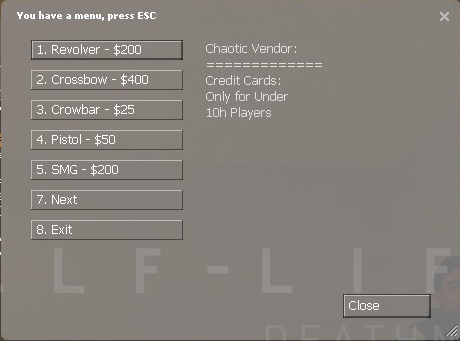
5. Select an option: either [Cash], [Credit], or [Buy Bulk].
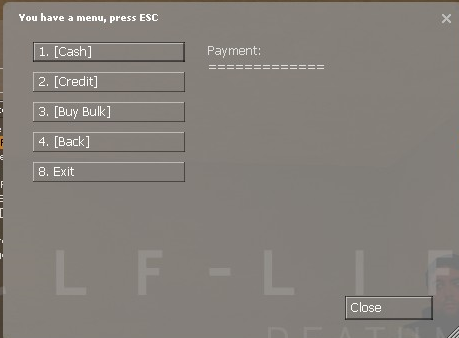
- You will hear a sound when you bought your item, simply repeat the process to buy another item.
Note: If you have under 10 hours, you may use a friendly "Credit" feature to buy items without having to withdraw money from your Bank Account.
Important Note: Vendors will not sell items to you when you have drugs on you.
Types of Vendors:- Weapons
- Food
- Drugs and Plant Water
- Alcohol
- Drug Effects
- Furniture
- Medical Supplies
- Locks and Lockbreakers
- Rebel Supplies
- Skins
- HUD Colors
- Dice
- VIP Vendor
Crime
- Killing other players
- Robbing Vendors/Bankers
- Planting, Selling, and Handling Illegal Drugs
- Using Lockpicks/Doorhacks/Cuffsaws
Note: Some items may affect this such as Crime Accelerators, which speed up the loss of crime.
Example: Player Joe gets jailed with 4000 Crime, he will spend 5 minutes in jail
Drugs and Other Contraband
Server Updates
Updates include:
- New Features
- Bug Fixes
- New Content (Materials, Models, Sounds)
Special Thanks
Alm - Creating HL2DM Roleplay
Krim - Advancing HL2DM Roleplay
Bloodshot - Founding Chaos Crew (2006-2012)
Nurse Shepard - Taking over Chaos Crew after Bloodshot left
Yo Momma - Taking over Chaos Crew after Bloodshot left. Rest in peace.
Rakkdur & Gizmo - Managing Chaos Crew (2013)
King of the Pirates Punisher - Managing Chaos Crew (2013-Present)
Spacebass - Creating ROFLCopter Roleplay
[GR]Nick_6893{A} - Creating "Nick's Mod" and revolutionized Roleplay
Moze from Abusement Park - Creating the map used in the screenshots, rp_abuse_me_city_v3
Anyone and Everyone who has played HL2DM. - This wouldn't be possible without you guys, thanks a bunch! :)
Valve - Creating such a great, modifiable game which lives to this day.
- "Yo-yo" trick video-guide★ 5 (201)10k views172 ♥2 min
- How to block fake servers like Fastpath★ 5 (208)7k views251 ♥5 min
- HL2: DM - Movement Training by Ade★ 4 (122)5.5k views169 ♥19 minUpdated Nov 2, 2024
- Первый Русский РП сервер (открыт в 2010)★ 4 (106)5.1k views142 ♥8 minRussianUpdated Jan 25
- Encyclopedia Deathmatchica★ 4 (129)4.2k views213 ♥42 minUpdated Nov 15, 2024
- Учебный курс HL2DM 103 - Основные навыки★ 4 (85)4.1k views133 ♥15 minRussian




- Upgrading to PremiumTeam Fortress 2★ 5 (20k)1441k views11k ♥6 minUpdated May 11, 2022
- No More Room in Hell Official ManualNo More Room in Hell★ 5 (2.8k)569k views2.1k ♥29 minUpdated Apr 22, 2019
- NMRiH Community Hosting GuidesNo More Room in Hell★ 5 (526)351k views653 ♥1 minUpdated Aug 10, 2022
- ULTIMATE GUIDE FOR GAME DEV TYCOONGame Dev Tycoon★ 5 (5.8k)326k views10k ♥4 minUpdated 23 Jan, 2014
- How to 'Git Gud' Soon™MORDHAU★ 5 (2k)318k views3k ♥68 minUpdated Nov 16, 2024
- Лучшие кооперативные игры SteamPAYDAY 2★ 5 (1.5k)315k views2.1k ♥56 minRussianUpdated Apr 27, 2025






This guide was created by its original author on the Steam Community. Are you the author and want it removed? Request removal.