How bypass SUPERHOT Launcher
Launch Options
- In your Steam library list, right-click on -> SUPERHOT (or SHVR\SH Mind Control )
- From the pull down menu, select -> Properties
- In the properties window, click on -> Set Launch Options
- Here you need insert your custom path to the "SH.exe" as is, with the quotes and the %command%, it should be look like this ->
"C:\Program Files (x86)\Steam\steamapps\common\SUPERHOT\SH.exe" %command%
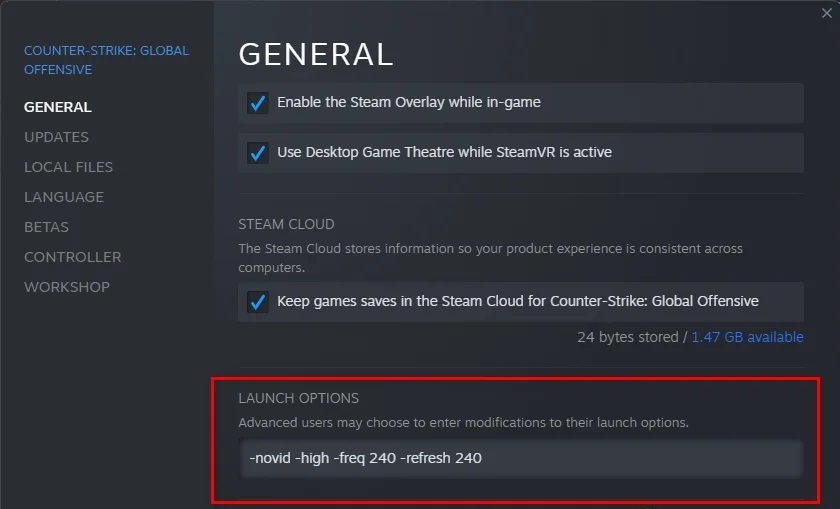
Now you can simply press "Launch" in Steam and instantly play SUPERHOT
Have fun)
and remember: SUPER HOT SUPER HOT SUPER HOT SUPER HOT
More SUPERHOT guides
- Levels Cracked!★ 5 (908)33k views1.3k ♥6 minUpdated Jul 16, 2018
- All SUPERHOT Secret Locations★ 5 (380)20k views477 ♥16 minUpdated Dec 31, 2016
- Достижения 100%★ 5 (363)13k views485 ♥4 minRussianUpdated Jan 1, 2021
- Stupid HOT tricks (and stupid HOT tips)★ 5 (204)12k views146 ♥5 minUpdated Mar 11, 2016
- SUPERHOT - Story Walkthrough★ 3 (96)11k views44 ♥1 minBulgarian
- ALL HIDDEN TERMINALS [1080p 60FPS VIDEO]★ 5 (237)9.9k views186 ♥1 minUpdated Jul 19, 2020





🔥 Popular guides
- Upgrading to PremiumTeam Fortress 2★ 5 (20k)1441k views11k ♥6 minUpdated May 11, 2022
- No More Room in Hell Official ManualNo More Room in Hell★ 5 (2.8k)569k views2.1k ♥29 minUpdated Apr 22, 2019
- NMRiH Community Hosting GuidesNo More Room in Hell★ 5 (526)351k views653 ♥1 minUpdated Aug 10, 2022
- ULTIMATE GUIDE FOR GAME DEV TYCOONGame Dev Tycoon★ 5 (5.8k)326k views10k ♥4 minUpdated 23 Jan, 2014
- How to 'Git Gud' Soon™MORDHAU★ 5 (2k)318k views3k ♥68 minUpdated Nov 16, 2024
- Лучшие кооперативные игры SteamPAYDAY 2★ 5 (1.5k)315k views2.1k ♥56 minRussianUpdated Apr 27, 2025






This guide was created by its original author on the Steam Community. Are you the author and want it removed? Request removal.