Insurgency Modding Wiki / Resources v2.84
How To Use This Guide
- Apps to download whole sites[www.maketecheasier.com]
- In non-steam browser: Print as .PDF or...
- Save as .html (Generates files and folders)
Major Updates / Notices
Give me a comment!
Author's Challenges
- Steam limits the characters/words on each section.
- I probably have to make my own website to bring them properly together.
- Must type in a document outside of Steam to be able to undo multiple times and as proper backup. Explanation in "{ Change Log Archive }"
- Not able to be on PC often. Mainly on mobile.
- Cannot move sections in the mobile app / browser mobile site even in desktop mode
- Sharing (copy & pasting) links & formatting is tedious on mobile
- The only one working on the guide. Hardly any aid.
- Will add more pictures
- Level Design / Mapping, Temporary Custom Server, Custom Dedicated Server ^Playlist
- Shiny guide icon?
- Sort from beginner to advanced skill levels. Move unrelated info to future blog + correct topics
- Clear recently broken links
Main Tools
All free!
Detailed info / wikis / source links are shown as "^Info"
Any other labels are self explanatory.
- SourceIO[github.com]
Blender addon for importing\exporting source engine textures/models/maps(not yet implemented) - SourceOps[github.com]
Blender Add-on for Source Engine - io_texture_VTF[github.com]
Blender addon Import-Export > Source Engine texture import
This addon allows for the import of Valve Material Type (VMT) and Valve Texture Format (VTF) files into Blender.
- GCFScape[nemesis.thewavelength.net]
^Info - VTF Editor[nemesis.thewavelength.net]
^Info - VTF Thumbnail & Property support[www.wunderboy.org]
- VTF Reader[gamebanana.com]
- VMT Editor[gira-x.github.io]
- Crowbar
^Guide ^BugTracker ^Insurgency ^Tutorials - Half Life Model Viewer[www.sourcemodding.com]
Included in "insurgency2\bin" folder
^Alternative[github.com] ^Info ^Guide[www.sourcemodding.com] - SDK Launcher
Included in "insurgency2\bin" folder
^LaunchInfo ^Alternative[gamebanana.com] ^Info[github.com]^Vid - Hammer
Included in "insurgency2\bin" folder
Go to "Source Modding Tools" section for more tools
- GIMP[www.gimp.org]
- GIMP 2.8.0[download.gimp.org]
- GIMP VTF Plugin for 2.8.0[code.google.com]
More info in "GIMP Tools" section
"Why don't you just use Photoshop???"
Answers: Pros and Cons here. You decide.[graphicdesign.stackexchange.com] ^Professional Example - Blender[www.blender.org] or BforArtists[www.bforartists.de]
- Blender Source Tool[steamreview.org] ^Beta for Blender 2.80
^Info ^Forum ^Search ^Insurgency
More info in "Blender Tools" section
- Notepad++[notepad-plus-plus.org] or Atom[atom.io]
Notepad++ VDF languages
^Info - 7-Zip[www.7-zip.org]
- All .OBJ files for weapons Compatible with Photoshop cs6 Extended and Photoshop CC
- Valve Source SDK Documentation
Fundamentals of Art and Game Design
Basics for art and software handling and anything else related to modding.
Understand how things work.
- Practice the fundamentals of Art[conceptartempire.com]
- "It's not some magical talent a few people are born with. It's a skill you can train." ~DrawABox[drawabox.com] ^Vids
- Concept Design: Thumb War[www.autodestruct.com]
- Concept Fundamentals[wiki.polycount.com]
- 3D Art Beginner Fundamentals
- History of Game Mods[www.nvidia.com]
- Tips for New Modders[gamebanana.com]
- Game Development Terms[www.pluralsight.com]
- Glossary For Designers[pulsiphergames.com]
- Glossary 3D Terms[www.timaxmedia.com]
- >>> Are Ngons Really That Evil in 3D Modeling?[www.creativeshrimp.com]
- Beginner's Texturing Tutorial[gamebanana.com]
- The power of 2 Explanation[www.katsbits.com] ^Info[en.wikipedia.org]
- What are the different texture maps for?[help.poliigon.com]
- >>> https://youtu.be/xMpDTk3DTW8
- 3D Rendering Wiki Index[en.wikipedia.org]
- Styles / Techniques of 3D Modeling[www.creativeshrimp.com]
- Game Rendering Terminology[wiki.polycount.com] ^Glossary[wiki.polycount.com]
- https://m.youtube.com/watch?v=8OADBBgk7oM
Insurgency Internals - Understanding Modding
Understanding the game's engine (and version) helps you understand how to make mods. ^Info[en.wikipedia.org] ^Info2
Insurgency (2014)[en.wikipedia.org]- Evolution of The Source Engine
- Is The Source Engine Outdated?
- >>> Steam Workshop: Basic Guidelines on How to Get Started in Making Content (Team Fortress 2)
P.S. They forgot to mention Blender and GIMP for software. File size = follow what other people are doing with their dimensions. Normally use 1024 or 2048 for Insurgency. - Documentation & Wikibook[en.wikibooks.org]
- File structures in Valve games (Windows 10)
- SDK (Source Software Development Kit) ^Info
It is a public accessible video game creation and editing program designed by Valve Corporation. It is the chief program used to develop all games made by Valve and many other mods. - Official Valve Source Glossary
- .tga (Truevision Graphics Adapter)
Commonly referred to as "targa" (Truevision Advanced Raster Graphics Adapter)
Non-proprietary image format from Truevision that is favoured by Valve.
Usage: It is the base format for Valve Texture Files (.vtf), and used to store images used by the Steam client.
Features: Lossless, alpha channel - .tiff (Tagged Image File Format)[www.widen.com]
Stores raster graphics images, popular among graphic artists, the publishing industry, and photographers.
TIFF is widely supported by scanning, faxing, word processing, optical character recognition, image manipulation, desktop publishing, and page-layout applications.
Features: Universal, lossless, layers, transparency.
Usage: For textures with transparency. and alpha channel?
- .gcf (Game/Grid Cache File)
Archive files in which Steam games are stored and official content is downloaded.
GCF files can be shared between games (e.g. source engine.gcf), and are stored in the Steam\SteamApps\ folder. - .vpk (Valve Pak)
Uncompressed archives used to package game content.
Valve's post-GCF games store materials, models, particles, choreography scenes and many other file types in VPK files.
VPKs are also used to distribute mods via the the addoninstaller tool that ships with some games, such as Left 4 Dead 2 - .vtf (Valve Texture File)
Proprietary texture format used by the Source engine.
VTF files are generally referenced in a Material instead of being accessed directly, which allows re-use in different ways. - .vmt (Valve Material Type)
A text file that defines a two-dimensional surface.
It contains all of the information needed for Source to simulate the surface visually, aurally, and physically. - .qc
A script file which controls the process of compiling SMDs into a binary model that can be loaded into a game.
Configures the model's location and name, which SMD files are used to provide geometry, collision meshes and animations, how the model reacts when shot, and so on. - .smd (Studiomdl Data)
Stores 3D models in ASCII for analysis and compilation by studiomdl.
SMD files are usually generated by an SMD export plug-in for a given model editor package like MilkShape. - .dmx (Data Model eXchange)
Stores a Datamodel object, encoded in either binary or ASCII. - .mdl
Valve Source's proprietary model format.
It defines the structure of the model along with animation, bounding box, hit box, materials, mesh and LOD information.
It does not, however, contain all the information needed for the model. - .vmf (Valve Map Format)
Proprietary format that stores raw (pre-compile) map data, used by the Valve Hammer Editor to save production-stage maps and prefabs.
It contains information on all map brushes and entities in a keyvalue format - .vtx
Proprietary mesh strip format.
It stores hardware optimized material, skinning and triangle strip/fan information for each LOD of each mesh in the MDL. - .vvd (Valve Studio Model Vertex Data File)
Proprietary model vertex data format.
It stores position independent flat data for the bone weights, normals, vertices, tangents and texture coordinates used by the MDL.
Note: Will sort alphabetically
Your Workspace

Keep your workspace prepared and clean to manage your workflow better.
- Don't forget to download the required installations such as the ones seen in Nem'sTools VTFEdit
- Be sure you're using the correct version if you're using addons that are compatible for a specific version of your software
- Update your drivers (graphics, tablet/wacom, etc)
- Download manuals or references as well for offline use and anything else vital to keep your mission rolling
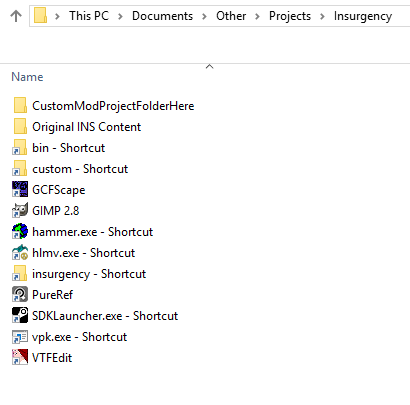
Make a project folder for all projects then add & sort folders by specific categories for things or tasks. You'll thank yourself later
- Example #1
- Project folder
- AKM_CustomModNameHere
- Models + References + Materials + Textures + Animations + Audio + Scripts + Shortcuts
- Project folder
- Example #2
It's in "Textures & Sounds" section but those steps are necessary for the game to be able to 'read' your files - Other examples: ^Link[developers.nravo.com] ^Link2[forum.unity.com] ^Link3[blog.theknightsofunity.com] ^Link4[www.howtogeek.com]
- Copy/drag the shortcuts/programs/folders you want to use
- Paste/place as shortcut to the project folder
- You can utilize the file paths for folders for exports/imports/plugins/addons/"custom" folder etc
Where to save your work online in the cloud
General-use options (Not as privacy respecting)
- Google Drive
- One Drive
- Dropbox
- Mediafire
Encrypt before uploading if you're dead serious about privacy for necessary things
- Mega nz
- Tresorit
- Sync
- Woelkli
- Nexcloud Providers
Textures & Sounds
Tutorials for modding weapon skins, character skins, sounds, user interface, and more related
>>> Reorder
- https://steamcommunity.com/sharedfiles/filedetails/?id=1221777683
- https://steamcommunity.com/sharedfiles/filedetails/?id=269352649
- https://steamcommunity.com/sharedfiles/filedetails/?id=338229566
- https://steamcommunity.com/sharedfiles/filedetails/?id=720079368
- https://steamcommunity.com/sharedfiles/filedetails/?id=349559876
- https://www.youtube.com/watch?v=9uKDurX8A2w
- https://www.youtube.com/watch?v=dlJ4MWsO6D8
- With GIMP VTF Plugin ^MultipleMaps https://youtu.be/d17FCBT8Rjc
- https://youtu.be/z8hZRYdus-0
Making a Mod - Valve Source Engine Fundamentals
Basically for this case:
Extract, convert for design, design, convert back (conserving same structure), repack
- Prepping "custom" folder:
Go to file path below by copying and pasting the path into your File Explorer's address bar & press EnterC:\Program Files (x86)\Steam\SteamApps\common\insurgency2\insurgency\customIf the "custom" folder does not exist, create one in "insurgency" - Prepping your custom mod folder for AKM (as example):
In "custom" or anywhere else: Setup your new folders in the order as shown below and rename what's in CAPSYOUR_CUSTOM_MOD_NAME\materials\models\weapons\akm (or other weapons)Underlined = For navigating in the .vpk later
"akm" = All your modded files (such as .vtf, WIP) go here
- With GCF Scape...
- File > Open > Go to...C:\Program Files (x86)\Steam\SteamApps\common\insurgency2\insurgency
- Open "insurgency_materials_dir.vpk"
^Info ^Info2 ^Info3 - Go to underlined path shown above
- Drag the 2 files ending with "_dm.vtf" to "akm" folder (In your renamed custom mod folder) or anywhere else you'd like. Be sure it's in a convenient place like in a project folder.
If plugin doesn't work, go to "GIMP" > "Workaround1" for conversion to edit, etc
(Optional) Use Normalmap Plugin for generating nornalmaps after making heightmaps ("Filter" > "Map" > "Normalmap")
- Drag your custom mod folder to vpk.exe in...C:\Program Files (x86)\Steam\SteamApps\common\insurgency2\binWith File Explorer in your custom mod folder's location...
- Move .vpk back to "custom" folder (Path at very top, step 1 of prepping)
- In Insurgency...
Main menu > Click "Workshop"
Note: DL workshop content and view internals for reference
Custom Models
Decompiling, importing, fixing animation / deltas, compiling models.
You can use Blender & GIMP together for making models and/or texturing
>>> Reorder
- https://steamcommunity.com/sharedfiles/filedetails/?id=844825568
- https://steamcommunity.com/sharedfiles/filedetails/?id=405641895
- https://steamcommunity.com/sharedfiles/filedetails/?id=757804088
- Compiling weapon models for Insurgency using Blender ^Infohttps://www.youtube.com/watch?v=TkwiS8t8odc
- https://steamcommunity.com/sharedfiles/filedetails/?id=650663814
- https://steamcommunity.com/sharedfiles/filedetails/?id=1170853573
- Model Creation Overview
>>> Sort the rest
- Complete Blender Game Ready Art Tutorial[www.gamefromscratch.com]
- Creating Game Ready 3D Models - Blender Beginner Modelling Tutorial Series
- https://steamcommunity.com/sharedfiles/filedetails/?id=285489946
- Compiling Viewmodel Attachments[gamebanana.com]
- Porting custom models for source engine[www.tophattwaffle.com]
- https://developer.valvesoftware.com/wiki/Compiling_a_model
- Insurgency Model Hack[mrbrightsideanimator.net]
- Search: Blender Hard Surface Modeling[hooktube.com] (guns, weapons, solid surfaces, sharp edges)
- Two armature, two rest pose, fixing animations[blender.stackexchange.com]
- Valve Source Materials for Models Guide
- Source Engine: Porting Models
- https://developer.valvesoftware.com/wiki/Compiling_a_model
- https://youtu.be/VkTwyhjfYqs
- https://www.youtube.com/watch?v=m9HQ231R3MM
- Blender 1st Person Animation
- Editing a Valve Model for SFM Using Modern Tools
- Creating a Weapon for Source
- Source Engine Viewmodel Rig and Animating[hooktube.com]
- https://m.youtube.com/watch?v=KMBkFp7pe3Y
- Low and Highpoly Workflow https://m.youtube.com/watch?v=OX2DIAnOacU
- Adding Detail Without High Poly Mesh https://youtu.be/bOTBcFfLD3o
- What are Normals and Fixes https://www.youtube.com/watch?v=lmMD9fV98Co
- Hard and Soft Edges https://m.youtube.com/watch?v=sTJ-pryZFQk
Search
Modding Effects
Materials / Texture effects such as bump mapping, engraving, glow, animated textures, shine, shader effects, and more
>>> Reorder and move Source Engine
- https://steamcommunity.com/sharedfiles/filedetails/?id=1492468820
- https://steamcommunity.com/sharedfiles/filedetails/?id=594255575
- https://steamcommunity.com/sharedfiles/filedetails/?id=1703547148
- https://steamcommunity.com/sharedfiles/filedetails/?id=469609809
- https://steamcommunity.com/sharedfiles/filedetails/?id=1722379559
- Material Nodes ShaderForge[www.acegikmo.com]
- Adding Effects to Source Textures[twhl.info]
- Getting Around in the Material System[valvedev.info]
- VMT Tutorial Post[gamebanana.com]
- Normal mapping. The correct Way[gamebanana.com]
- How NOT to make normal maps[www.katsbits.com]
- Making Normal map from image[www.katsbits.com] or make your own material via procedural material creation then bake for HD textures? > Go to Blender
- Painting Normalmaps in Photoshop
Can be done the same way in other programs that can paint. Just use Color picker
- Spec maps in Normal maps[gamebanana.com]
- $selfillum How to[gamebanana.com]
- https://twhl.info/index.php/wiki/page/Tutorial%3A_Adding_effects_to_Source_textures#h5b30be322b96b
- VMT Commands Cheatsheet[docs.google.com]
- Surface GGX [wiki.newworldinteractive.com]
- VMT Parameter Reference[gamebanana.com]
- Shader Parameters
- Animated Particles
- Shader Parameters List
https://youtu.be/_lxWuqrGsUE
Workaround in "GIMP Tools" https://youtu.be/97S9NfC985w
https://www.youtube.com/watch?v=r6G2B6cnx9E
https://www.youtube.com/watch?v=dLXkJbf_oGE
https://www.youtube.com/watch?v=nQ9gtLo4xwQ
^Info
Animation WIP
>>> Reorder move Source En
Raw game model to animation
https://cloud.blender.org/p/humane-rigging/
https://developer.valvesoftware.com/wiki/Animation_in_Blender
http://forums.cgsociety.org/t/how-to-rigg-fps-arms-and-guns-inside-blender-2-8/2050934
https://www.youtube.com/watch?v=GM1Fc-NTDsg
https://www.youtube.com/watch?v=mhQY2_gVoVg
https://youtu.be/gIDSh9Dr-9E
https://m.youtube.com/watch?v=X0Ssmvu1Nu8
https://youtu.be/jdGUedrxm-0
https://youtu.be/v6_m3xFSlIU
https://youtu.be/Yokj3SnISUw
https://m.youtube.com/watch?v=WjAJHrLGvBE
https://youtu.be/G3lYabSIUD8
Search: FPS Animation Tutorial Blender
Search: Video reference animating
Map Making / Level Design
>>> Reorder
- Artiflex Terra 3D Terrain Editor[www.artifexterra.com]
- Nem's 3D Map Editor[nemesis.thewavelength.net]
- Mipui[www.mipui.net] Simple Map Maker, Collaborative
- Tile Map Editor[www.mapeditor.org]
- Simple RPG Map maker[rpginferno.com]
- Pymapper[pymapper.com]
- Blender Addon: Level Buddy[matt-lucas.itch.io]
- Compile Pal[github.com]
- Valve Source SDK Basics
- https://steamcommunity.com/sharedfiles/filedetails/?id=250800601
- https://steamcommunity.com/sharedfiles/filedetails/?id=158909187
- https://steamcommunity.com/sharedfiles/filedetails/?id=158899767
- Level Design CS:GO[www.worldofleveldesign.com]
- How to Design Your Maps[devforum.roblox.com]Blender: City Making Resources
- https://gamebanana.com/articles/59
- https://gamebanana.com/articles/64
- https://gamebanana.com/articles/68
- https://www.mapcore.org/
- Seizure warning at the end of the vid at 1:44 https://www.youtube.com/watch?v=wf5O9MTIoB8
- https://www.worldofleveldesign.com/categories/cat-level-design.php
- https://www.worldofleveldesign.com/categories/cat-csgo.php
- https://www.worldofleveldesign.com/categories/cat-game-art.php
- https://steamcommunity.com/sharedfiles/filedetails/?id=1110438811
GIMP
GIMP Fundamentals / Basics
For new / returning users
GIMP Videos
Includes videos about the basics
GIMP for Valve Source Engine Workshop Development / Modding
For Insurgency (2014) since it's based on Valve Source Engine
GIMP Tools
Such as addons, plugins, and more
GIMP Communitiies
Forums, websites dedicated to GIMP
>>>Blender 2.80 Latest
https://www.youtube.com/watch?v=V-C-BJe1lRc
This is a beta developer release with major features and updates not available in Blender 2.79 / older.
Blender 2.80 can be used as a Substance painter / designer alternative (texture painting / shader editing (node editor).
It would help if someone makes an addon to make it easier to handle the node, texture layers workflow
Top Changes Coming to 2.8[cgcookie.com]
Blender Dev Manual[docs.blender.org]
Webpage[www.blender.org]
https://youtu.be/f92r93t2HKE
https://youtu.be/jBqYTgaFDxU
https://www.youtube.com/watch?v=85Xu93bsN34
https://www.youtube.com/watch?v=gz4qV5_zuMo
https://youtu.be/aTDF94CU5wc
https://www.youtube.com/watch?v=ReVGrqx_c5M
https://youtu.be/dG_BQ5uXxJc
https://www.youtube.com/watch?v=svzKoq3vew0
https://youtu.be/nM-Oirmb-Pw
https://youtu.be/p5GgkPXGoH0
Hard surface modeling. This year. https://m.youtube.com/results?search_query=hard+surface+blender+2.8&sp=EgQIBRAB
Texture painting. This Year. https://m.youtube.com/results?search_query=blender+2.8+texture+painting&sp=EgIIBA%253D%253D
https://hooktube.com/results?search_query=best+blender+2.8+gun
https://hooktube.com/results?search_query=best+blender+2.8+fundamental
https://hooktube.com/results?search_query=blender+2.8+tutorials
https://hooktube.com/results?search_query=blender+2.8+addon
>>>Blender Video Tutorials
- https://www.youtube.com/watch?v=n9YYrVQdCMY
- https://www.youtube.com/watch?v=6gRUUeFteQg
- https://m.youtube.com/watch?v=cS6B5PAzlWI
- https://youtu.be/_rDfJlyqDC8?t=41
- https://www.youtube.com/watch?v=scPSP_U858k&list=PLjEaoINr3zgHJVJF3T3CFUAZ6z11jKg6a&index=5
- https://youtu.be/pfhtbaLSCx0
- https://youtu.be/o-OgkrWX94I?t=46
- https://www.youtube.com/watch?v=KcCXM5zCuc0
- https://youtu.be/LcCQKuWPhXk?t=4
- https://www.youtube.com/watch?v=Db_cYZh6lt4
- Nondestructive Shading https://www.youtube.com/watch?v=C__h2q81Ej8
- Secrets to realistic texturing in Blender
- Making Realistic PBR Materials[www.blenderguru.com]
- Scripting: How to Automate Your Tasks in Blender with Python Programming ^Vid2 ^Vid3
- 2.80 addon dev https://www.youtube.com/watch?v=uahfuypQQ04
- Nondestructive modeling https://www.youtube.com/watch?v=0SbyO33YtL4
Production Lessons[cloud.blender.org]
>>>Blender Tools
Addons, programs, scripts, and more for blender
^Info[docs.blender.org]
> Blender Addons that Work with 2.80[blenderartists.org]
> 55 Addons for Blender 2.80 (Some can work on older versions)
- Interactive Tools for Blender (Smart Scripts)[docs.google.com]
Collection of intuitive, context sensitive tools to improve workflow - MACHIN3tools 0.3 for Blender 2.80
Continuously evolving collection of blender tools and pie menus in a single customizable package - BY-GEN for 2.80
Simplifies the process of creating non-destructive, generative modeling styles - "base" Blender Addon for Source Engine[github.com]
- Armor Paint (Build It)[www.blendernation.com]
Physically-based texture painting that aims to become an open source alternative for Substance Painter - {LINK REMOVED}KIT OPS Free Version for 2.79
Instantly cuts and adds to existing objects or create standalone objects with the goal of rapidly creating and exploring new designs. - Image Refresh[blenderartists.org]
Improves image/texturing workflow by automatically refreshing image in blender for new changes - Cycles Texture Paint Layers[blenderartists.org]
Quickly create and manipulate layers in Blender’s texture paint mode - TexTools[renderhjs.net] ^Info[80.lv]
UV and Texturing tools - Magic UV[github.com]
Consists of many UV manipulation features which Blender lacks of. - Fast Carve
Hardsurface utility for quick and easy boolean and bevel operations - Building Tools[blenderartists.org]
Simplifies creation of building exteriors - ArchiPack[github.com]
Faster workflow for architecture / construction - Principled Baker[github.com]
Bake PBR textures with a few clicks - Simple Asset Manager[blenderartists.org]
Works with objects, materials and particle systems. Made for simplicity of usage. - Proper Keymap for Blender 2.80[blenderartists.org]
Improves usage of Blender - Sprytile[chemikhazi.itch.io]
Brings tile mapping tools to Blender to give you a powerful and intuitive way to create in 3D
Other
- BlenderKit[www.blenderkit.com]
Database containing online models, brushes, and materials to be used directly in Blender. - fSpy[fspy.io]
Open source still image camera matching for Blender
- ArmorPaint[armorpaint.org]
More affordable 3D PBR texture painting software compared to Substance Painter ^FreeVersion?[armory.itch.io]
Addons
- Speedflow
- NodeCustomBuilder[blendermarket.com]
Saves your node setup, including the settings each node - Level Builder[blendermarket.com]
Speeds up level design process - (BATS) Blender Artistic Texturing and Shading[blendermarket.com]
PBR Material Creation With Layers - Definitely EEVEE Materials System[blendermarket.com]
Material library - Extreme PBR 2.0 for Blender 2.79-2.80[blendermarket.com]
Material library and manager - Materialiq for 2.79 and 2.80[blendermarket.com]
Materials library, Cycles+Eevee pbr, architectural materials, uv+generated mapping - {LINK REMOVED}MESHMachine
- AutoMaps[http//AutoMaps+Texture+Group+Manager]
Allows easy management of groups of texture maps - {LINK REMOVED}UV Packmaster
UV packing solution. - BPainter[blendermarket.com]
Powerful texture painting - RetopoFlow[blendermarket.com]
Helps you create clean topology in minutes versus hours - Search BlenderMarket: Best Rated, Low to High Price[blendermarket.com]
Other
- Best Blender Addons & Plugins For 3D Artists In 2019 [conceptartempire.com] ^Vids
- Top Blender Addons&Scripts[blendermarket.com] ^Search2[blendermarket.com]
- Search Github: Scripts[github.com]
- ^Addons[github.com] ^All Blender[github.com]
Other Related Tutorials
>>> Move to Source related Steam, sort
- SDK Tutorials
- Where to find 3d models for model importing[gamebanana.com]
- https://steamcommunity.com/sharedfiles/filedetails/?id=1316254513
- https://steamcommunity.com/sharedfiles/filedetails/?id=1372652108
- https://steamcommunity.com/sharedfiles/filedetails/?id=1288408087
- https://steamcommunity.com/sharedfiles/filedetails/?id=763495213
- https://steamcommunity.com/sharedfiles/filedetails/?id=918708716
- Creating a Material (Fundamental page for Source Engine material modding)
- Generic compiling/decompiling for Source Engine[gamebanana.com]
- Making High Quality Textures[blenderartists.org]
- How to Create Textures From Scratch
- How to make 3D textures with Blender's Internal Render Engine and Gimp
- TopHatWaffle Tutorials (level design, 3Ds max, counter strike)
- How to Model a Tech 9
- Model And Rig Any Gun With 6 Steps In Blender
- Creating a Combat Knife[blenderartists.org]
- Weapon tutorials
- How to Texture Weapons
- Weapon Creation Tutorial
- Handpainted Style Workflow For Game Assets
- Texturing Light Machine Gun - Blender + GIMP Workflow Example
- FPS Weapon Creation: How To Match AAA Standards[room8studio.com]
- CS:GO Workshop Site
- https://steamcommunity.com/sharedfiles/filedetails/?id=290669146
- CSGO Weapon Finish Guide Info > faq > mats
- ^Vids ^Vids2 ^Vids3
- ^Guide ^Guide2 ^Guide3 ^Template
https://www.worldofleveldesign.com/tutorials.php
Physically Based Rendering (PBR)[docs.google.com]
Marmoset PBR Content Creation[marmoset.co]
PBR Guide Substance Painter[www.substance3d.com]
PBR Tutorial Resources[3dcoat.com]
https://www.youtube.com/watch?v=6BBq-bQJCHs
https://www.youtube.com/watch?v=jnI35hr2BHE
https://www.youtube.com/watch?v=m7PnstNigFg
https://www.youtube.com/watch?v=oOZaP4XZ0PE
- Older Docs[docs.gimp.org]
- https://developer.valvesoftware.com/wiki/GIMP
Help / Troubleshooting / FAQ WIP
>>> Reorder and fix redundancies, move to official tracker. Make subReddit?
+++++++++What's needed for this section is a collection of commonly asked questions with answers, followed by common problems with answers.
Look in discussion forums, websites, Discord, reddit, etc then comment below
- https://steamcommunity.com/sharedfiles/filedetails/?id=724809825
- https://steamcommunity.com/sharedfiles/filedetails/?id=1420741343
- Troubleshooting Modeling
- Search: Troubleshooting
- FAQ Valve Source SDK
Taking quick notes as I go
Purple and black checkered texture problem
optic not on right place
Gun in wrong position
Delta animation
UV
Skin/textures effects
shine, glow
Mod not working
Sounds not working
vpk.exe not working
compilation not working
My mod not showing
Check your mods
Delete mods you don't need
Turn off then back on
File extension
Never use spaces for naming files
Be sure your files/connections are in the right place
Be sure to keep strict workflow b/c the game needs to be able to read
Mods Management
Here is about how to submit / upload / remove your workshop content / mods
>>> Add images, clean, reorder, copy to Source
- knowing that Steam does not remove all unsubscribed mods -
(Subscriptions = updates, not auto-removal when unsubscribing. They're like newsletters)
- Be sure that the game is not running
- Unsubscribe on Steam any mods you don't want anymore (Or everything)
Insurgency Workshop > Browse (or Your Files) > Subscribed Items - Workshop Content Location
Click the path below 3x to select all of it and copy it
Open your File Manager, paste the file path below into the address bar of your File Manager and press Enter for quick navigationC:\Program Files (x86)\Steam\steamapps\workshop\contentIf it's not there, you might want to check your AppData[support.pointlogic.com] folders - To choose the right folder, know the SteamAppId (The game's ID)
(Indicated in "gameinfo.txt" or "steam_appid.txt" or
at the top, in the address bar, of the game's store page)
You can enable the address bar of the steam browser somewhere in your settings[ccm.net]
Use Notepad++[notepad-plus-plus.org] or Atom[atom.io] to open the txt files if you want to see the txt easier File path to the .txt is belowC:\Program Files (x86)\Steam\steamapps\common\insurgency2\insurgencyIDs
> SteamAppId (The game's ID) should be 222880
> Individual Mod IDs (Mod names and their IDs)
are listed in "state_workshop.txt" (or at the top, in the address bar, of the mod's content page where you normally subscribe to)222880 = InsurgencyOther Workshop/Mod pathsC:\Program Files (x86)\Steam\steamapps\common\insurgency2\insurgency\custom\workshop C:\Program Files (x86)\Steam\steamapps\common\insurgency2\insurgency\custom C:\Program Files (x86)\Steam\steamapps\common\insurgency2\insurgency\insurgency\customLook in "gameinfo.txt" for other paths
/////
Note: You go back and forth on checking Mod IDs in "state_workshop.txt" and deleting mods within the content workshop (mods) folders - Delete mods/content you don't want anymore (or everything) from the content folders referenced above
- In "state_workshop.txt"- Delete individual mods in the list or delete the whole .txt file itself
Be sure that the mods you want to delete are already deleted from the workshop content folders as referenced aboveC:\Program Files (x86)\Steam\steamapps\common\insurgency2///// - Verify Game Cache
Verifying should restore "state_workshop.txt" (if you deleted it) and any mods you're subscribed to
It may take a while and may take a lot of data depending on how much you deleted and how many mod subscriptions you have
If you notice some mods that were working before which aren't showing up, you might have to unsubscribe and then resubscribe - Enjoy The Game
You can (re)subscribe to mods
They all depend on whether the server owner enables them.
You can filter out for mod-supported servers by ticking the 'mod support' square in the coop server browser page at the bottom.
Be careful for heavily modded servers though because they can break some of your mods.
You can fix that by restarting Insurgency and then going to a more vanilla (close to default insurgency) server.
Get Workshop Mods Without Steam[www.gog.com]
Workshop Downloader tools are in "Source Modding Tools" section, in the "Webapps" child-section
Resources

Assets, references, wikis, and related resources for modding or game development and modding
>>> Move some to source, military stay, assets to site
- Camopedia[camopedia.org]
- Camouflage Patterns[en.wikipedia.org]
- Half Life Wiki[twhl.info]
- Internet Movie Firearms Database: Insurgency[www.imfdb.org]
- Fandom: Insurgency[insurgency.fandom.com]
- Minimal List of all Insurgency Weapons
- Wikipedia: All Weapons[en.wikipedia.org]
- Polycount[wiki.polycount.com]
- https://steamcommunity.com/sharedfiles/filedetails/?id=729217515
- Forgotten Weapons[www.forgottenweapons.com]
- Wood Database[www.wood-database.com]
- Polycount Reference Links[wiki.polycount.com]
- Valve's CSGO Workshop Style Guide
- ZeqMacaw's Tidbits[sites.google.com]
Tutorials, resources, and more
- https://www.textures.com/freeTextures
- https://beta.gametextures.com/freebies?order=popular&tags=Free
- GameBanana Community Made... ^Models[gamebanana.com] ^Textures[gamebanana.com]
- Gaming Models[www.gaming-models.de]
- GameDevMarket Free Stuff[www.gamedevmarket.net]
- Free GameArts[freegamearts.tuxfamily.org]
- Open Game Arts Collections[opengameart.org]
- Itch.io Game Assets[itch.io]
- Free3D[free3d.com]
- TurboSquid[www.turbosquid.com]
- UnrealEngine[www.unrealengine.com]
- Unity[assetstore.unity.com]
- BlendSwap[www.blendswap.com] ^Register to download stuff
https://steamcommunity.com/sharedfiles/filedetails/?id=841469178 - Blueprints[www.the-blueprints.com]
- Gamer Lab[gamer-lab.com]
Ganes List
Steam Source Engine List
https://steamcommunity.com/sharedfiles/filedetails/?id=94164282
Day of Infamy
Garry's Mod
https://game-icons.net/
Sites
- GameBanana[gamebanana.com]^Insurgency[gamebanana.com] ^Tutorials[gamebanana.com]
- ModDB ^Insurgency ^SourceEngine
- Interlopers Source Engine Forum Section[www.interlopers.net]
- NexusMods[www.nexusmods.com]
- Valve Dev[valvedev.info]
- Game Design & Content Making Tutorials For Blender[www.katsbits.com]
- r/gamedev
^Wiki ^Tip ^YT Channels ^Resources - Gamasutra[www.gamasutra.com]
- FacePunch[forum.facepunch.com]
- UnrealEngine Forums[forums.unrealengine.com] ^Freebies[forums.unrealengine.com]
- Next Level Design[nextleveldesign.proboards.com]
- Game Dev Resources[github.com]
- CGSociety Forum[forums.cgsociety.org] ^Blender[forums.cgsociety.org]
Blender
- https://blender.community/c/
- Blender Reddit Wiki
- Blender Resources[blender.stackexchange.com]
CS:GO
- r/csworkshop
- CSGO Game Banana[gamebanana.com]
- CS:GO Weapons https://developer.valvesoftware.com/wiki/Category:Counter-Strike:_Global_Offensive_Weapons
Source Modding Tools
- Source Shader Editor (SSE) ^Vid ^Vid2
- Mass VMT Generator[gflclan.com]
- VMT Editor[gira-x.github.io]
- VTF image loader[sourceforge.net]
- Source MDL Texture Information Tool[gamebanana.com]
- https://github.com/GorangeNinja/PyVMF
- Wonderboy's Source SDK Tools[www.wunderboy.org]
- Official Valve Source Tools ^Tag ^3rd Party
- Engine Tools ^Direct Launch
- Source Modding Tools[www.sourcemodding.com]
- Other Source Tools List[www.sourcemodding.com]
- TopHatWaffle Downloads for Tools[www.tophattwaffle.com]
Online Webapps - Online 3D Converter[www.greentoken.de]
- {LINK REMOVED}Workshop Downloader ^V2[steamworkshopdownloader.com] {LINK REMOVED}^V3
Alternative Tools

Alternatives to GIMP and Blender
>>> Move to site and add pictures
- PaintNet (PDN)[www.getpaint.net]
Beginner friendly alternative to GIMP, but lacks many features ^VTF Plugin[nemesis.thewavelength.net] ^V2 TopHatWaffle[www.tophattwaffle.com] - LazPaint[sourceforge.net]
Image editor, like PaintBrush[sourceforge.net] or Paint.Net - PixBuilder Studio[www.wnsoft.com]
Photo editing software - PixaFlux[www.pixaflux.com]
Node based, visual scripting system - Photopea[www.photopea.com]
Online webapp which is a "clone" / alternative to Photoshop ^Info[www.diyphotography.net] - Alternative to Photoshop + 3D Combo = Gimp (with Photoshop Plugins extension) + Krita + G'mic plugin + Blender
- Krita[krita.org]
Professional FREE and open source painting program. It is made by artists that want to see affordable art tools for everyone. - Fire Alpaca[firealpaca.com]
More simple paint program. Beginner friendly alternative to Krita - MyPaint[mypaint.org]
Nimble, distraction-free, and easy tool for digital painters. It supports graphics tablets made by Wacom, and many similar devices. - Verve Painter[www.wnsoft.com]
Uses dynamic fluids and brushes. Very GPU intensive. - Mari Non-Commercial 3D Paint Tool[www.foundry.com]
- Sculpris[pixologic.com]
A gateway to 3D - MakeHuman[www.makehumancommunity.org]
- SculptGL
- Silo[nevercenter.com]
Dedicated 3D Modeling and UV Mapping - Hack n Plan[hacknplan.com] ^More[www.gamasutra.com]
Project management suite for developers - Photoshop[www.adobe.com]
- Substance Painter
- AutoDesk Trial Page[www.autodesk.com] 3D Design Software
- Rizom UV Virtual Spaces[www.rizom-lab.com] Full-featured UV Mapping application, with features surpassing most offerings currently on the market
- Corel Draw[www.corel.com]
Other Tools
Tools / Software that can be used alongside other programs in your workflow.
>>> Move to site, add pictures review and solutions
- Ultra_Outliner[ultraoutliner.com]
Connect cards in chains, intersect the chains and view each plot isolated. It is based on Microsoft Visio concept. - Cosmic Everyday (FREE + Portable)[comigo.itch.io] ^Comigo[comigo.itch.io]
Project management suite - PureRef[www.pureref.com]
Helps you organize and view your ref images - ShareX[getsharex.com]
Screen capture, file sharing and productivity tool + Color picking - DropIt File Organizer[www.dropitproject.com]
- nJob[charles.hollemeersch.net]
You can use this to convert normal maps to heightmaps ^Info[www.katsbits.com] - Insane Bump[sites.google.com]
GPU accelerated map generator. - Awesomebump[github.com]
Generates normal, height, specular or ambient occlusion textures from a single image - XNormal[www.xnormal.net] ^Guide[katfetisov.wordpress.com]
Bakes texture maps - Laigter[azagaya.itch.io]
Generates normal maps for 2D textures
- Shader Forge from Unity[github.com] ^Vid ^Info[docs.unity3d.com] ^Info2[forum.unity.com]
- TexGraph[galloscript.itch.io]
Procedural texture creation tool - PixaFlux[www.pixaflux.com]
Image Operations defined by nodes that can be connected to create powerful workflows - Texatool[kronbits.itch.io]
Generates textures - Texture Grid Generator[wahooney.itch.io]
- Texture Exporter[unorthodox.itch.io]
- FilterJs[comigo.itch.io]
Generates textures - Materialize[boundingboxsoftware.com]
A standalone tool for creating materials for use in games from images. You can create an entire material from a single image or import the textures you have and generate the textures you need. - Texture map generator[cpetry.github.io]
(Or use graphics editing software such as GIMP)
- SculptGL
- Figuro[figuro.itch.io]
3D Modeling Tool for Game Development - PaintCube[paintcube.co]
Web-based 3D Painting Software - SumoPaint[sumo.app]
- Font Identification / Reverse Search[www.myfonts.com]
- Resize Image[resizeimage.net]
- Pimp My Gun[pimpmygun.doctornoob.com] / Gunstruction[gunstruction.net]
Custom weapon making
- LibThree[libthree.itch.io]
Standalone application that allows you to import various 3d file formats and visualize them - Quixel Legacy dDo for Photoshop? Free[gamebanana.com] ^Link[support.quixel.se] ^Info[quixel.se]
Creates textured models and tileable materials. It’s a tool that was designed to work extensively with Photoshop (Might be able to use with GIMP via Photoshop Plugin for GIMP)
- Mod io[mod.io] ^Steam Comparison[apps.mod.io] ^Info[apps.mod.io]
"Make it easy for you to support mods on all platforms and stores your game is released" - Fider[getfider.com]
Collects and prioritizes feedback so that you can focus on building the right product - GameSaveManager
Inspirations / Ideas
>>>
- Cerakote[www.cerakote.com]
Weapon paint finish designs - Templ[www.templ.net]
Ancient weaponry - Weapon Camouflage from Call of Duty[callofduty.fandom.com]
- Games with Weapon Customization[www.giantbomb.com]
- Innovative Weapon Designs Study Suggestions [www.gamasutra.com] ^Search[www.gamasutra.com]
- Gun Customization Games
- Location / Design Ideas List[worldofleveldesign.com]
- Tactical[www.deviantart.com]
- Dyson's Maps Archive[dysonlogos.blog]
- Level Design Inspiration[leveldesigninspirationmachine.tumblr.com]
- ArtStation[www.artstation.com] ^Insurgency[www.artstation.com]
Concept art, and more - Dribbble[dribbble.com]
Modern graphics design - Pinterest[www.pinterest.com]
Multi-subject. ^Gun Design[www.pinterest.com] ^Gun Paint Job[www.pinterest.com] - Indulgy[indulgy.com]
Similar to Pinterest - Tumblr ^Weapon Design[www.tumblr.com] ^CS:GO[www.tumblr.com]
- Active Self Protection
Evidence based scenarios to analyze and learn for self defense
(Dead serious: Can save you & your loved one's life. Don't take it for granted. I'm inspired to make a skin dedicated to his channel) - Garand Thumb
Gun reviews with quick clips of shooting with some humor - T.Rex Arms
Training and reviews. Very objective and critical - Warrior Poet Society
Pursues and discusses the philosophy of self defense - Hickok45
"Grandfather" of gun testing/reviewing - Sootch00
Quality footages of "Makes you want to buy" gun reviews - IraqVeteran8888
More loose, variable, and scientifically experimental gun related reviews with shooting - Forgotten Weapons
Reviews on rare and unusual weapons.
Other gun video sites: ^Site1[www.full30.com] ^Site2[guntube.org] ^Site3[gunstreamer.com]
https://www.youtube.com/watch?v=WhWc3b3KhnY
Yanal Sosak: "Blender is What I do for a Living"[blendermarket.com]
GIMP Creation on Reddit:Fed up with the stigma that you must pay for expensive subscription-based software to get professional results. I made this image using an old version of GIMP, 7 years ago!Verdict: It doesn't matter what tool you use as long as it works for you / the task. Whether you decide to optimize workflow or stay with the original program, it doesn't matter. Another extreme example via MSPaint
My Portfolios
{ Change Log Archive }
- 6/11 - 6/17
> Facepunch Forums closed
> Minor additions and edits - 6/1 - 6/10 > New links + Fixed imgs > Awesome list self host in Workspace section > Useful Blender links > Minor changes > Added imgs
- 5/30/19 > Automation in Blender> GIMP & Blender addons
- 5/29/19 > Changed name to something more memorable > GIMP Portable link
- 5/28/19 > Clarified section titles > Cleaned up Fundamentals
- 5/25/19 > Added map tools
- 5/22/19 > Added source engine fundamentals > Added important terms > Added a warning in "Resources"
- 5/21/19 > Minor changes and additions > Added more useful links > Repaired more of Resources page
- 5/20/19 > Major changes sorting > Added links > Deleted Videos. Moved videos to related sections > Sorted major sections in correct order
- 5/19/19 > Dumped new links > Restored last remembered child sections of Resources > Destroyed Resources section ^^^^^ Update: Support: There is no way to undo changes.
Steam cannot edit or change content from guide. ^^^ Completely lost info. Must redo resource page. There was no way for me to undo on the page as a result of accidentally removing the content and tapping the save button on mobile ^^^ If anyone finds out how to undo this huge mistake I made, please let me know about any solutions. Will contact steam support to see if they can help + Project Management Tools and tips - 5/17/19 > Soft sections > Changed title "Tutorials & Resources Compilation - Insurgency Reference / Encyclopedia" to "Insurgency Compendium / References" > Added new gems (gems = links)
- 5/16/19 > Added gun related YT channels > Re-sorted > Referenced https://web.archive.org/ > GIMP version info for plugins under Tools updated > Added a warning in Resources > Fixing typos as I go > Added Alpha channel section for specific material effects in GIMP > Added new useful links / gems > Minor edits
- 5/15/19 > Sorted links > Added Beginner & Mod Specifics child sections for most sections > Fixed typos and format > Moved some stuff to "Data Dump" to sort later > Added new links > Fixed some formatting > Moved art advice to "Other Tutorials" to make room for top description
- 5/14/19 > Added "Data Dump" section > Added offline method at top > Added "Archive" child section in "Resources" > Fixed more redundancies from links > Moved "Other Tools" > Added Inspiration to "Resources"
- 5/13/19 > Added Inspirations > Added empty lines in lists for subject / topic changes > Moved links to correct sections > Added description for tools > Added new section: Other tools and moved corresponding info > Added new links > Added archives > Fixed some formatting > Changed some lists to numbered for easy reference > Fixed categories orders within sections > Deleted unnecessary / redundant text > Added new tools > Cleaned up some links > Deleted broken links
- 5/12/19 > Changed title this guide > Added this section > Added GIMP and Blender sections > Added new links and some notes
- 5/11/19 > Changed branding image. Made by me (Divine Lotus) via GIMP > Added new useful things > Cleaned up lists > Added GIMP info/notes > Added Change Log
- The vital importance of BULLETS★ 5 (1k)30k views598 ♥5 minBulgarianUpdated Apr 12, 2020
- How to create a private server to play with your friends!? | (Listen Server)★ 5 (396)27k views646 ♥5 minUpdated Mar 12, 2024
- General 'real life' tactics that work in Insurgency and any other tactical shooter.★ 5 (727)25k views1k ♥14 minUpdated Apr 1, 2014
- В помощь новичкам★ 5 (663)23k views360 ♥8 minUpdated Oct 23, 2022
- Полезная бурда по экипировке в Insurgency★ 5 (612)23k views503 ♥24 minRussianUpdated Feb 26, 2017
- Секретное достижение ODA 420: что это такое? Как его получить?★ 5 (424)23k views395 ♥1 minRussian



- Upgrading to PremiumTeam Fortress 2★ 5 (20k)1441k views11k ♥6 minUpdated May 11, 2022
- No More Room in Hell Official ManualNo More Room in Hell★ 5 (2.8k)569k views2.1k ♥29 minUpdated Apr 22, 2019
- NMRiH Community Hosting GuidesNo More Room in Hell★ 5 (526)351k views653 ♥1 minUpdated Aug 10, 2022
- ULTIMATE GUIDE FOR GAME DEV TYCOONGame Dev Tycoon★ 5 (5.8k)326k views10k ♥4 minUpdated 23 Jan, 2014
- How to 'Git Gud' Soon™MORDHAU★ 5 (2k)318k views3k ♥68 minUpdated Nov 16, 2024
- Лучшие кооперативные игры SteamPAYDAY 2★ 5 (1.5k)315k views2.1k ♥56 minRussianUpdated Apr 27, 2025






This guide was created by its original author on the Steam Community. Are you the author and want it removed? Request removal.