NVMP - Troubleshooting Various Issues
File Does Not Exist Path Errors
If you're like me, you may have chosen to spite the instructions and placed the "NVMP Mod Organizer" in a secondary drive. This may have caused some errors regarding missing files.
Here's a few things to try:
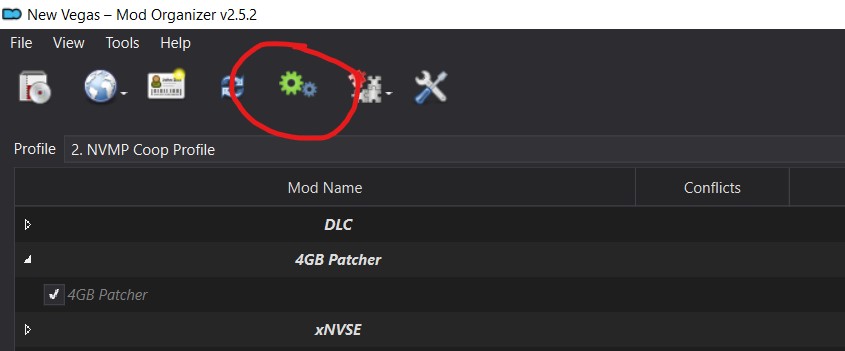 Ensure the letter at the start of the path matches the drive "NVMP Mod Organizer" is located in.
 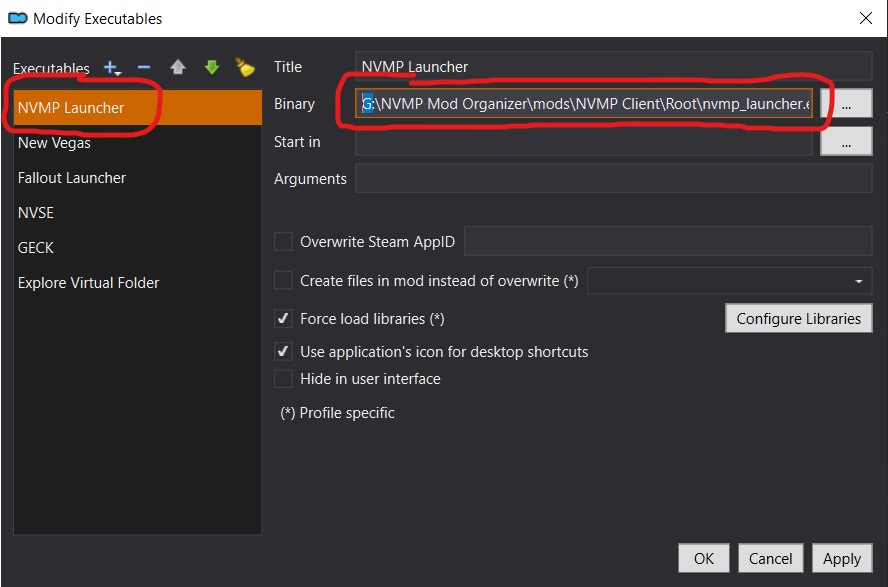 This will change your launch target for some reason. Make sure to re-select "NVMP Launcher" next to "Run."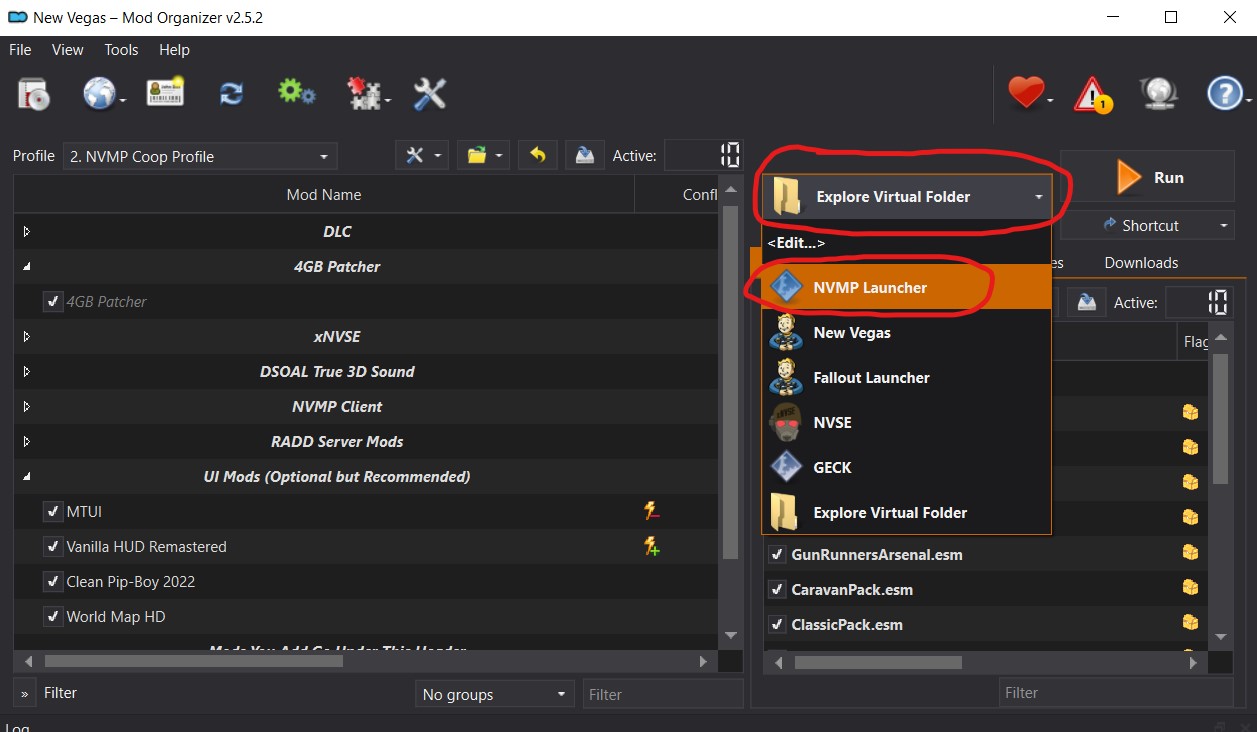
Epic Online Services Platform Failed to initialize due to a configuration or installation error
- nvmp_launcher.exe didn't get removed from your Fallout New Vegas folder. This may happen if you click "Unlock" in Mod Organizer. Delete nvmp_launcher.exe from your Fallout New Vegas folder and try launching again.
- Verify your game files on Steam and try again.
Font spritesheet file gamebitmap_0.png was not found
Allegedly, this happens if you're not using a 16:9 resolution.
NOTE: Changing your FONV game settings or ini files will not change NVMP.
To change NVMP's ini files, go into Mod Organizer, click the folder icon to the right of the "Profile" dropdown, and select "Open INIs Folder."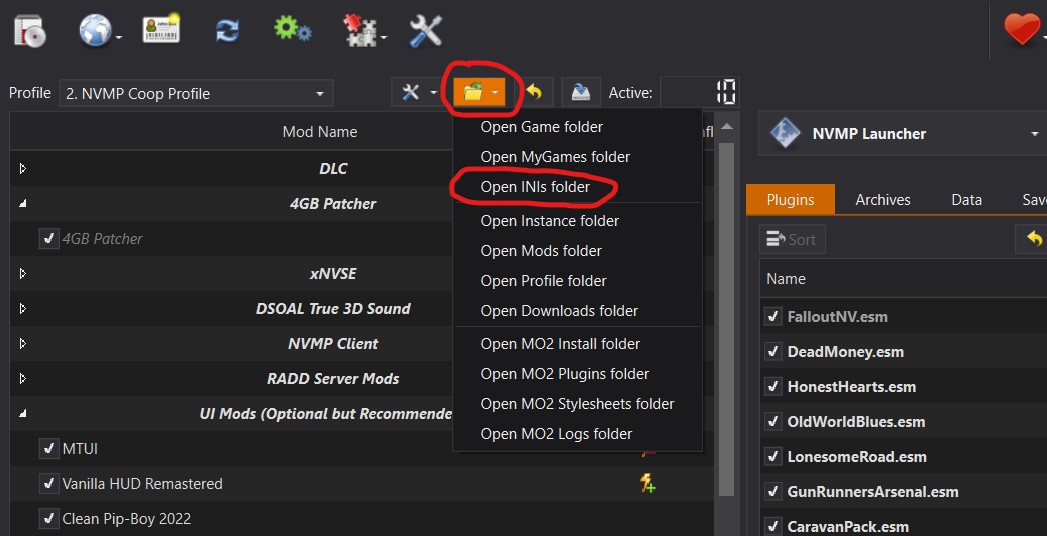 Find and open "falloutprefs.ini" and set
 Invisible Mouse Cursor
I'm not exactly sure what causes this one, but it seemed to be something wrong with the ini files. I gave my friend my fallout.ini and falloutprefs.ini files and it seemed to fix it.
fallout.ini: https://pastebin.com/k7xE5DXd
falloutprefs.ini: https://pastebin.com/x8U0y7Lv
Replace the fallout.ini and falloutprefs.ini with the files linked above.
- Simple Guide to Setting up New Vegas in 2026★ 5 (2.9k)122k views8k ♥9 minUpdated May 6
- New Vegas 2024 Essential Modding Guide★ 5 (1.4k)112k views3.9k ♥37 minUpdated Jan 19
- Fallout:NV Console Command List / Weapons / Armor / NPC's and World Objects★ 5 (948)67k views2.4k ♥33 minUpdated Aug 6, 2025
- 100% Achievement Guide: Fallout - New Vegas★ 5 (1.5k)37k views4.6k ♥98 minUpdated May 9
- Interactive Map★ 5 (614)27k views957 ♥1 minBulgarianUpdated 30 Jan
- Complete Achievement Guide (Includes DLC)★ 5 (808)23k views2.1k ♥26 minUpdated Aug 5, 2025




- Upgrading to PremiumTeam Fortress 2★ 5 (20k)1441k views11k ♥6 minUpdated May 11, 2022
- No More Room in Hell Official ManualNo More Room in Hell★ 5 (2.8k)569k views2.1k ♥29 minUpdated Apr 22, 2019
- NMRiH Community Hosting GuidesNo More Room in Hell★ 5 (526)351k views653 ♥1 minUpdated Aug 10, 2022
- ULTIMATE GUIDE FOR GAME DEV TYCOONGame Dev Tycoon★ 5 (5.8k)326k views10k ♥4 minUpdated 23 Jan, 2014
- How to 'Git Gud' Soon™MORDHAU★ 5 (2k)318k views3k ♥68 minUpdated Nov 16, 2024
- Лучшие кооперативные игры SteamPAYDAY 2★ 5 (1.5k)315k views2.1k ♥56 minRussianUpdated Apr 27, 2025






This guide was created by its original author on the Steam Community. Are you the author and want it removed? Request removal.