Official Guide to What's Changed with UMMs in v1.0
Overview
- Maps are no longer "cooked". The "cook" option for now just compresses the map, making it quicker to upload/download. We may add more functionality to it in the future.
- We've added full UMM download support to the in-game server browser.
- Under-the-hood, we've switched to using Steam's "UGC" (User Generated Content) API for managing Workshop Content
Here's what all of this means for you...
What's Changed: For Clients
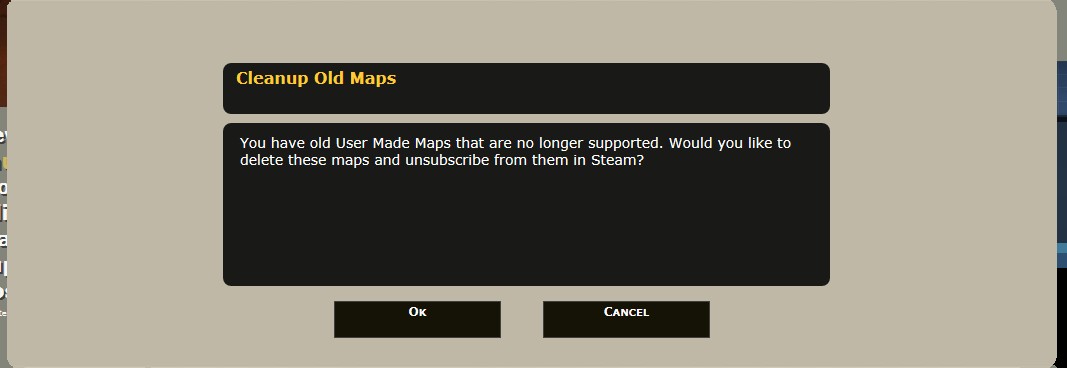
If you have old UMMs, when you launch the game you'll get a popup asking if you'd like to delete them and unsubscribe from them in Steam.
Servers in the list will appear red if they're actively running a map that you don't have.
When you try to join a server that has UMMs, a popup will appear listing all Workshop Items that are on the server that you haven't subscribed to. Clicking "OK" will subscribe to and start downloading the Items in Steam. When the download finishes, you'll join the server.
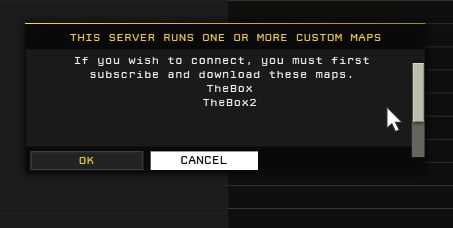
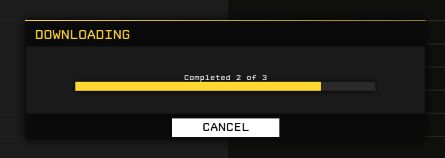

Steam manages Workshop files, and will automatically keep subscribed Items up-to-date, or delete them when you unsubscribe.
What's Changed: For Servers
Each Workshop Item gets its own subfolder with the name of the Item's Id.
On the server, all UMM files should continue to be uploaded to:
What's Changed: For Map Creators
Important: Your maps now need to be saved in their own individual subfolders.
By default, your UMMs are saved under:
Additionally, in rare circumstances you may need to create a .metadata file for your map (see "Metadata Files" below).
- Maps should no longer have to be republished every time we release a small update to the game.
- Maps sizes no longer have to be under 100MB. The new Steam UGC API has no filesize limit.
 We've introduced a new process called "searing" that stores compiled shaders used by the map right inside of the published map file.
This option is enabled by default in the "Publish" window. The process is highly recommended, as clients and servers will not have to compile shaders the first time they load seared maps
PublishFileId=<Your Item Id>
(You can find your Item Id by looking at the URL of your Item in the Steam Workshop: .../sharedfiles/filedetails/?id= <This is your Item Id>)
- America's Army: Proving Grounds Quick Start Guide★ 5 (203)11k views121 ♥14 minUpdated Jul 2, 2014
- Official Weapon Challenge Guide★ 5 (215)9k views250 ♥13 minUpdated Mar 4, 2016
- The Art of Takedown★ 4 (91)7.4k views59 ♥11 minUpdated Dec 30, 2023
- FPS improvement (AASystemSettings.ini tweaking)★ 4 (93)7.4k views157 ♥8 minUpdated Nov 22, 2015
- Using the nVidia Override for Anti-Aliasing★ 3 (33)5.7k views22 ♥4 minUpdated Jul 2, 2014
- Official XP and Leveling Guide★ 4 (80)3.8k views94 ♥2 minUpdated Dec 9, 2015





- Upgrading to PremiumTeam Fortress 2★ 5 (20k)1441k views11k ♥6 minUpdated May 11, 2022
- No More Room in Hell Official ManualNo More Room in Hell★ 5 (2.8k)569k views2.1k ♥29 minUpdated Apr 22, 2019
- NMRiH Community Hosting GuidesNo More Room in Hell★ 5 (526)351k views653 ♥1 minUpdated Aug 10, 2022
- ULTIMATE GUIDE FOR GAME DEV TYCOONGame Dev Tycoon★ 5 (5.8k)326k views10k ♥4 minUpdated 23 Jan, 2014
- How to 'Git Gud' Soon™MORDHAU★ 5 (2k)318k views3k ♥68 minUpdated Nov 16, 2024
- Лучшие кооперативные игры SteamPAYDAY 2★ 5 (1.5k)315k views2.1k ♥56 minRussianUpdated Apr 27, 2025






This guide was created by its original author on the Steam Community. Are you the author and want it removed? Request removal.