Knights of the Old Republic Part 1 on Linux with Steam Play / Proton (Quick 'n Dirty Guide)
KOTOR 1 on Linux - Quick 'n Dirty Fix
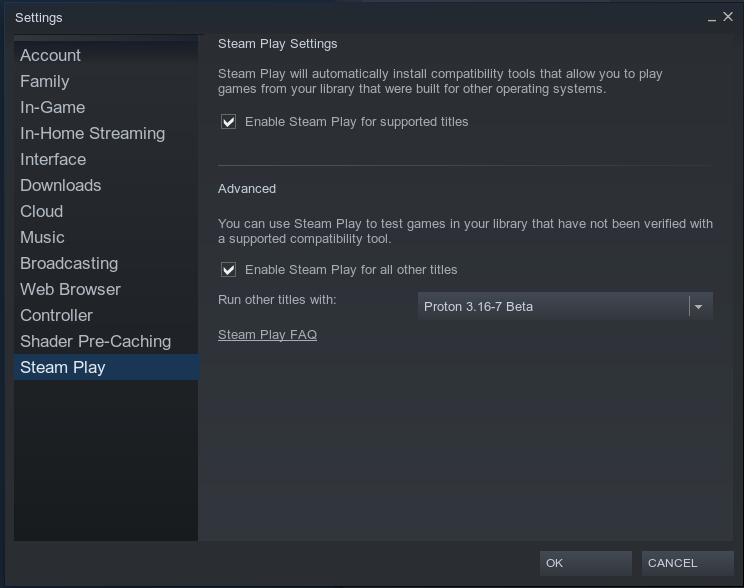
Step 1: Enable Steam Play for all titles in your game library.
Click on Steam in the upper left corner of the Steam window and click Settings. Click on Steam Play at the bottom of the list on the left side of the window that pops up and enable Steam Play by default like so:
--- ---
---
Step 2: Fix the default KOTOR configuration settings
Open up your favourite terminal and edit the KOTOR configuration file like so:
or like so:
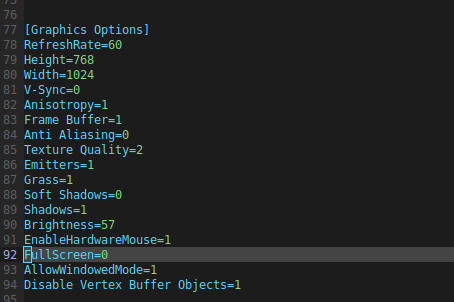
Then scroll down to the graphics section of the file and add or edit the lines there like so: ---
 ---
---
Pay extra attention to the lines:
and:
The first of which determine the window size and the latter of which allow the game to start properly.
---
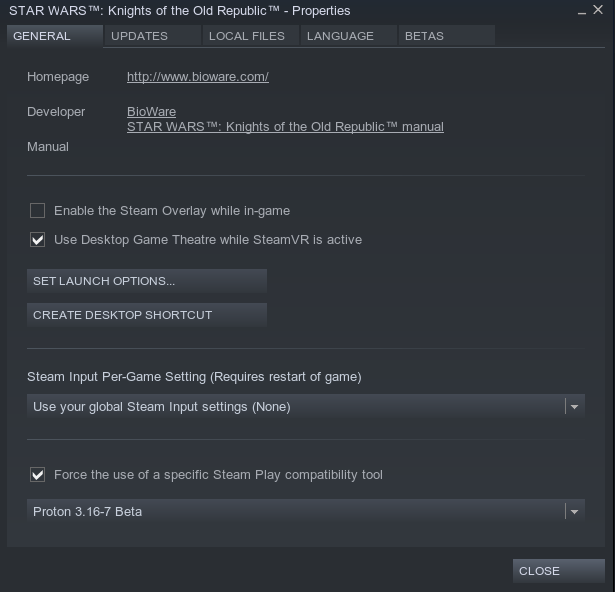
Step 3: Disable Steam Overlay
Although not strictly necessary - I have noticed that the game becomes considerably more stable after disabling the Steam Overlay in game.
To do this navigate to KOTOR in your library, right-click and select properties. Then uncheck "Enable the Steam Overlay while in-game" like so:
--- ---
---
That should do the trick, allowing you to play KOTOR 1 on Linux :)
Note 1: As the game hasn't been updated, it is a 4:3 ratio game - not 16:9 or 16:10
Note 2: It is possible to press Alt+Enter to enter full screen, although effects may vary depending on your setup. The game may run nicely full screen, but may also appear shifted up or down or have mouse control shifted in a weird way. I recommend playing it in Window mode. (This also comes in handy with when playing with a walk-through).
Enjoy :)
---
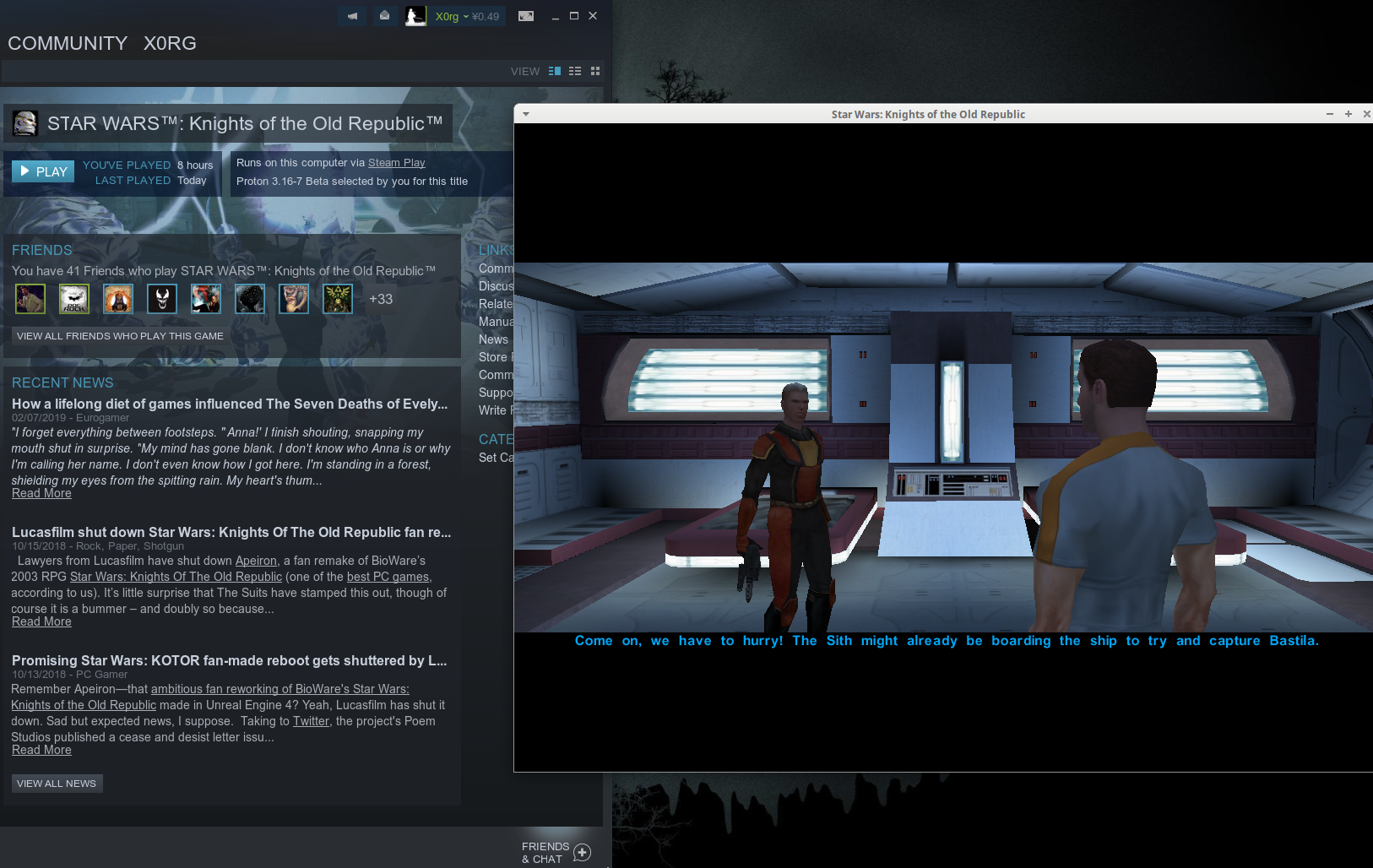
End Result (@ 1024x768 (higher is possible)
---
- The Definitive Improvement Guide★ 5 (1.6k)158k views4.1k ♥22 minUpdated Mar 25, 2021
- KotOR Cheat Codes★ 5 (1.6k)123k views4.2k ♥4 minUpdated Nov 23, 2014
- Make your KOTOR playthrough more enjoyable★ 5 (1.8k)97k views5k ♥13 minUpdated Jun 24
- [How-To] KotOR on modern systems (incl. Widescreen)★ 5 (778)95k views1.8k ♥4 minUpdated Nov 24, 2015
- KoToR Best Order of Planets★ 5 (689)73k views1.6k ♥1 min
- [Windows 10] My Steps To Running The Game On WIndows 10★ 5 (617)64k views1.7k ♥2 minUpdated Nov 2, 2018





- Upgrading to PremiumTeam Fortress 2★ 5 (20k)1441k views11k ♥6 minUpdated May 11, 2022
- No More Room in Hell Official ManualNo More Room in Hell★ 5 (2.8k)569k views2.1k ♥29 minUpdated Apr 22, 2019
- NMRiH Community Hosting GuidesNo More Room in Hell★ 5 (526)351k views653 ♥1 minUpdated Aug 10, 2022
- ULTIMATE GUIDE FOR GAME DEV TYCOONGame Dev Tycoon★ 5 (5.8k)326k views10k ♥4 minUpdated 23 Jan, 2014
- How to 'Git Gud' Soon™MORDHAU★ 5 (2k)318k views3k ♥68 minUpdated Nov 16, 2024
- Лучшие кооперативные игры SteamPAYDAY 2★ 5 (1.5k)315k views2.1k ♥56 minRussianUpdated Apr 27, 2025






This guide was created by its original author on the Steam Community. Are you the author and want it removed? Request removal.