How to fix a world corrupted by a ridiculous amount of logic gates
Your world is corrupted isn't it ?
Well your world turns into Crashcity, Crashtopia. How suprising !!!!

You are probably here because you broke your world by freeing the g̷̳̬̿͝ͅa̶͇̋̔̑͛t̷̖̓͒́ë̶̞̤̜̱́͐̄͠͝s̷̢̖̆͆. In that case, I hate you, and I'm here to help you.
If you're just here because of the funny thumbnail, then feel free to read whatever insanites will follow.
Did bugsplat save you ?
Now that's not much of a problem, because since you are a very smart person, you chose to close the program when Windows asked you.
If you had left it running though (which obviously didn't happen), your audio, Windows UI and probably 90% of your open apps would have crashed, which would have been quite inconvenient.
Now if you are still experiencing this : well first of all, congratulations for getting to this page. That would be impressive if you didn't bring this misery upon yourself 5 minutes ago.
You will want to press Win+R, type cmd, and then type 'shutdown -r' and press enter.
I barely understand what I'm doing so please save your world
Trying to bring back your broken world will involve editing it's file. Now this isn't too complicated, but since Scrap code is kinda spaghetti, and you were dumb enough to break the RAM in the first place, I'd appreciate if you backed up your world just in case.
I'm also not quite sure what I'm doing, and I don't know if what I'm doing is safe or will work for everyone, so don't expect miracles.
Your world should be located at
How to access :
-Press win+R
-Type 'appdata' in the funny box and press enter
-Click Roaming, then Axolot Games, then Scrap Mechanic, then User
-If there is only one folder click on it, else you need to find the good one (i can't help you there)
-Click on Save Your folder should look like this.
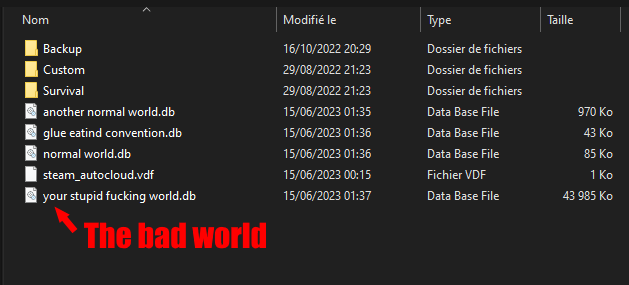
If your files are not here they are most probably somewhere else.
Take your world and copy-paste it somewhere before editing it.
Time to SQL
It's SQLing time.
You can download SQLite[sqlitebrowser.org] to edit your world file. You can also use whatever SQL browser as long as it works.
Once you open the app, press ctrl+O and open your world file (as seen like two lines above this).
Under, click on 'ChildShape'.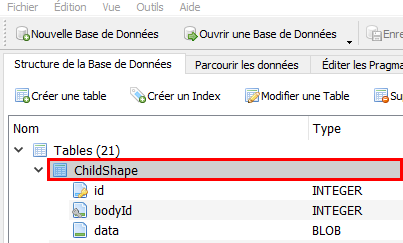 Then click on 'See Data' (or whatever my thing is in french).
Now, depending on when you placed the RAM, go to the corresponding section.
If it's the last thing you placed
If the last thing you placed is the RAM you broke, this should be easy (in theory).
Each logic gate seems to be taking one row. The number of logic gates is 4x the number of bits in the ram (it's also in the description). So you will want to delete the last 4*bits row. For example, if you have the 16*16 RAM, you will want to delete the last 1024 rows.
To do that, click on the last row, and then shift+click on the last row you want to delete.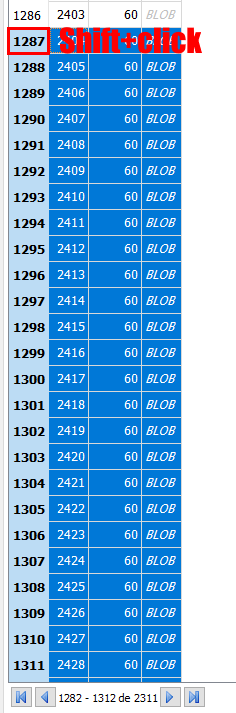
Here we click on 2311-1024=1287th row. Then click on the delete rows button.
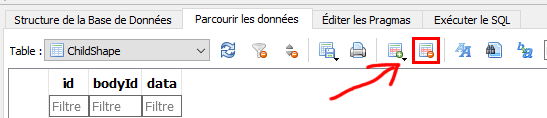
YOU FORGOT TO THINK BEFORE BREAKING THE RAM BUT DON'T FORGET TO SAVE.
This should have deleted most of the gates and the game should be able to load the rest.
If the game gives you an error when loading the world, try deleting one or 2 more rows (after closing the game), saving and relaunching. If it still doesnt work try next method using another copy of the original file.
If it isn't the last thing you placed (or first method didn't work)
This is a bit more complicated BUT should work 100% of the time most of the time.
We will search the gates with their bodyId. They should all have the same. It should be easy to find since it is 4x the number of bits of the ram (the number in the description, remember ? the description you read thinking it was funny ?).
So in my case, with the 16*16 RAM, I am looking for 1024 gates with the same bodyId.
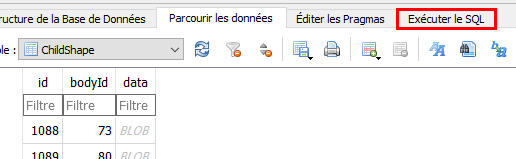 And then paste this :
 Your SQL thingy should output the number of blocks per bodyId. Look for the number of gates as explained previously (you may need to scroll back up). In my case, I am looking for a bodyId with 1024 blocks.
Found it !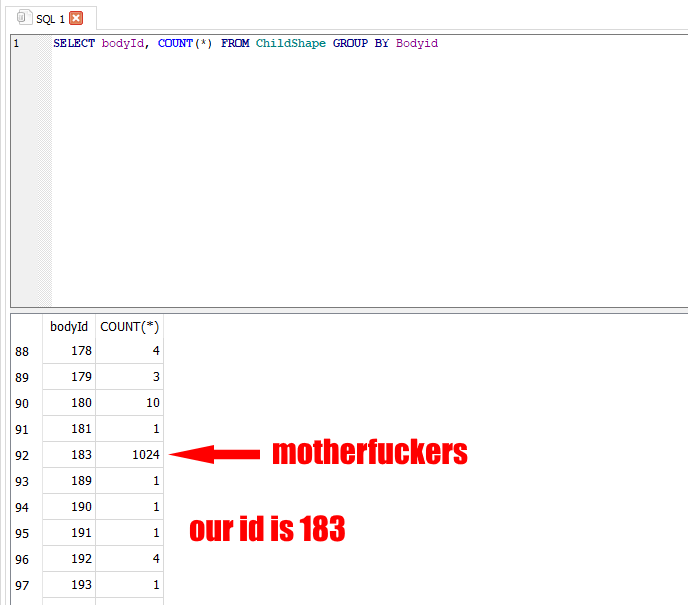 Now we want to delete those rows with this command :
The software should tell you something like this (not in french though)
DO NOT FORGET TO SAVE !!!
NOTE : If you have 2 bodyIds with the exact number of blocks, you can only guess which one is actually the freed RAM. I recommend you back up your file and try deleting them one by one. Don't forget to save.
Everything should be working if you followed this correctly. If your world is still toast, you can leave a comment and I will lose a bit more faith in humanity trying to help you.
- How raids actually work (Version 0.5.1)★ 5 (550)19k views867 ♥3 minUpdated 7 Apr, 2021
- Как пройти выживание?★ 5 (448)18k views700 ♥25 minRussianUpdated 12 Aug, 2020
- Все команды для скрап механик★ 5 (259)15k views475 ♥1 minRussianUpdated 1 Dec, 2023
- Robots and weapons concept proposal★ 5 (421)10k views182 ♥3 minUpdated 1 Apr, 2022
- How Does Fuel Consumption Work? Which Engine Is the Most Efficient?★ 5 (182)10k views152 ♥3 minUpdated 16 Oct, 2020
- Русификатор для Scrap Mechanic by Pro100DarkTV (v2.5)★ 5 (317)9.9k views516 ♥1 minRussianUpdated 19 Jun, 2021



- Upgrading to PremiumTeam Fortress 2★ 5 (20k)1441k views11k ♥6 minUpdated May 11, 2022
- No More Room in Hell Official ManualNo More Room in Hell★ 5 (2.8k)569k views2.1k ♥29 minUpdated Apr 22, 2019
- NMRiH Community Hosting GuidesNo More Room in Hell★ 5 (526)351k views653 ♥1 minUpdated Aug 10, 2022
- ULTIMATE GUIDE FOR GAME DEV TYCOONGame Dev Tycoon★ 5 (5.8k)326k views10k ♥4 minUpdated 23 Jan, 2014
- How to 'Git Gud' Soon™MORDHAU★ 5 (2k)318k views3k ♥68 minUpdated Nov 16, 2024
- Лучшие кооперативные игры SteamPAYDAY 2★ 5 (1.5k)315k views2.1k ♥56 minRussianUpdated Apr 27, 2025






This guide was created by its original author on the Steam Community. Are you the author and want it removed? Request removal.