How to disable edge scrolling
Directly changing files
As long as there is no mod for this, you can disable it by changing
Base game - \steamapps\common\Sid Meier's Civilization V\Assets\UI\InGame\InGame.xml
G&K - \steamapps\common\Sid Meier's Civilization V\Assets\DLC\Expansion\UI\InGame\InGame.xml
BNW - \steamapps\common\Sid Meier's Civilization V\Assets\DLC\Expansion2\UI\InGame\InGame.xml
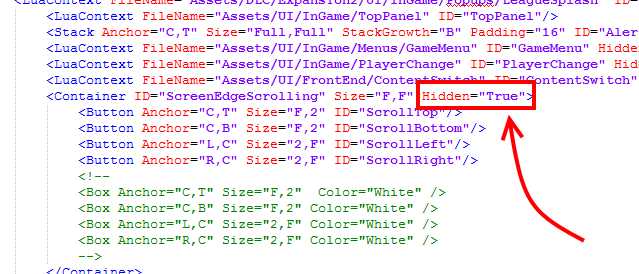
Search for the line
<Container ID="ScreenEdgeScrolling" Size="F,F">
and replace it with
<Container ID="ScreenEdgeScrolling" Size="F,F" Hidden="True">
You should use Notepad++[notepad-plus-plus.org] or a similar edit tool for this. Standard Notepad does not support the file's standard encoding (UTF-8 without a BOM (byte order mark)) and may corrupt your file.
I believe this is incompatible with mods that modify this file.
More Sid Meier's Civilization V guides
- Real Populations★ 5 (1.2k)79k views1.2k ♥2 minBulgarianUpdated Aug 31, 2017
- Civ-specific tricks, secrets and clarifications (BNW)★ 5 (1k)53k views2.2k ♥96 minUpdated Jun 30, 2019
- Zigzagzigal's Civ Summaries (BNW)★ 5 (1.5k)49k views3.9k ♥134 minUpdated Jun 30, 2019
- Who to Trust and Who to Avoid in Civ V★ 5 (570)41k views802 ♥12 minUpdated Jul 8, 2016
- How to win the Korea Scenario as Korea on Deity in 16 turns★ 5 (532)41k views828 ♥15 minUpdated Apr 1, 2016
- Drunk Civ★ 5 (1.1k)39k views1.2k ♥2 minUpdated 17 Jan, 2020




🔥 Popular guides
- Upgrading to PremiumTeam Fortress 2★ 5 (20k)1441k views11k ♥6 minUpdated May 11, 2022
- No More Room in Hell Official ManualNo More Room in Hell★ 5 (2.8k)569k views2.1k ♥29 minUpdated Apr 22, 2019
- NMRiH Community Hosting GuidesNo More Room in Hell★ 5 (526)351k views653 ♥1 minUpdated Aug 10, 2022
- ULTIMATE GUIDE FOR GAME DEV TYCOONGame Dev Tycoon★ 5 (5.8k)326k views10k ♥4 minUpdated 23 Jan, 2014
- How to 'Git Gud' Soon™MORDHAU★ 5 (2k)318k views3k ♥68 minUpdated Nov 16, 2024
- Лучшие кооперативные игры SteamPAYDAY 2★ 5 (1.5k)315k views2.1k ♥56 minRussianUpdated Apr 27, 2025






This guide was created by its original author on the Steam Community. Are you the author and want it removed? Request removal.