How to install the modding kit for Civilization V
SDK Installation Tutorial
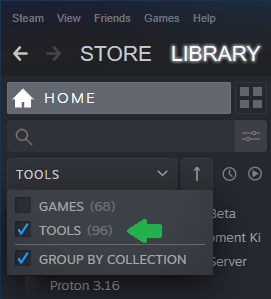
1. Go to your steam library, select "tools" on top of your games list (as seen on the picture at the bottom) and scroll down to the Sid Meiers Civilization V SDK.
2. Install and start it.
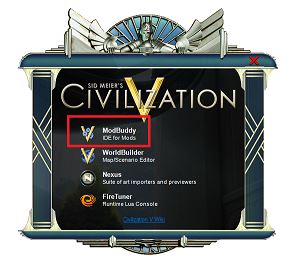
3. You can now see a small window that gives you 4 options.
4. If you just want to build a map, click the second option and were done now, but if you want to develope mods, you will have to do some other steps first.
5. If you choose ModBuddy, a window will likely be opended that says you have to download the Microsoft Visual Studio 2010 Isolated Shell at first. If thats not the case, everything is fine and you can now jump to step 8. The website you are directed to is outdated and will not give you the Isolated Shell.
6. I tried to download it from the older downloads section of VS, too, but i couldn't find it there.
There was an official download link here, but apparently Microsoft no longer offers this download, at least as EXE. Ask around in Modding Communities, I guess.
7. Run the Civ V SDK again and select the ModBuddy again.
8. Now another window should appear that asks for two different installation paths.
The first path has to lead to your normal game folder, for example C:\Program Files\Steam\steamapps\common\Sid Meier's Civilization V. If you dont know your game path, just select the game in your library, go to properties, choose the local files tab and click on open.
The second path has to lead to the user game files in your documents\mygames folder, so the path will likely be C:\Users\USER\Documents\My Games\Sid Meier's Civilization 5.
9. Accept and you are done!
I hope i could help you with this guide, if you like it or have a question I would be happy if you left a comment, feel free to rate the guide as well. Also sorry for eventual grammar or spelling mistakes I made, that's because I'm from Germany.
Thank you and have a nice day! :D
- Real Populations★ 5 (1.2k)79k views1.2k ♥2 minBulgarianUpdated Aug 31, 2017
- Civ-specific tricks, secrets and clarifications (BNW)★ 5 (1k)53k views2.2k ♥96 minUpdated Jun 30, 2019
- Zigzagzigal's Civ Summaries (BNW)★ 5 (1.5k)49k views3.9k ♥134 minUpdated Jun 30, 2019
- Who to Trust and Who to Avoid in Civ V★ 5 (570)41k views802 ♥12 minUpdated Jul 8, 2016
- How to win the Korea Scenario as Korea on Deity in 16 turns★ 5 (532)41k views828 ♥15 minUpdated Apr 1, 2016
- Drunk Civ★ 5 (1.1k)39k views1.2k ♥2 minUpdated 17 Jan, 2020




- Upgrading to PremiumTeam Fortress 2★ 5 (20k)1441k views11k ♥6 minUpdated May 11, 2022
- No More Room in Hell Official ManualNo More Room in Hell★ 5 (2.8k)569k views2.1k ♥29 minUpdated Apr 22, 2019
- NMRiH Community Hosting GuidesNo More Room in Hell★ 5 (526)351k views653 ♥1 minUpdated Aug 10, 2022
- ULTIMATE GUIDE FOR GAME DEV TYCOONGame Dev Tycoon★ 5 (5.8k)326k views10k ♥4 minUpdated 23 Jan, 2014
- How to 'Git Gud' Soon™MORDHAU★ 5 (2k)318k views3k ♥68 minUpdated Nov 16, 2024
- Лучшие кооперативные игры SteamPAYDAY 2★ 5 (1.5k)315k views2.1k ♥56 minRussianUpdated Apr 27, 2025






This guide was created by its original author on the Steam Community. Are you the author and want it removed? Request removal.